







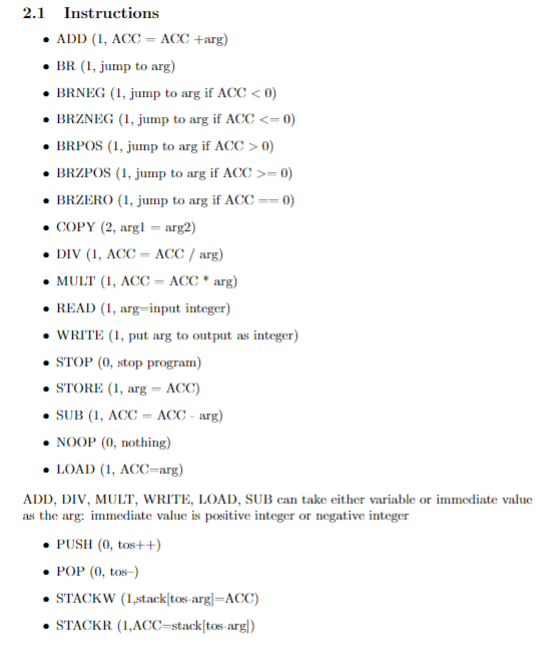
Question: 2 . 1 Instructions ADD ( 1 , ACC = ACC + arg ) BR ( 1 , jump to arg ) BRNEG ( 1
Instructions
ADDACCACCarg
BR jump to arg
BRNEG jump to arg if ACC
BRZNEG jump to arg if ACC
BRPOS jump to arg if ACC
BRZPOS jump to arg if ACC
BRZERO jump to arg if ACC
COPYargarg
DIVACC
ACCarg
READ arginput integer
WRITE put arg to output as integer
stop program
STOREargACC
SUBACCACCarg
nothing
LOAD ACCarg
ADD, DIV, MULT, WRITE, LOAD, SUB can take either variable or immediate value
as the arg: immediate value is positive integer or negative integer
PUSH tos Your program will find the sum of the numbers input and display all the input values. You will write an assembly language project using the virtual machine described in class and available on Canvas to perform four tasks. These tasks will build on each other, starting with the most straightforward program and progressing to the complete program. The comprehensive program will read in numbers from the keyboard until the value is entered, then display all the numbers described in tasks.
Task : This program should read in numbers until is entered, then display the sum of all singledigit numbers and entered. is a flag to end the program; do not use in the sum. Call this program taskasm Points
Task : This program should read in numbers until is entered. If the entered number lies between and check whether the entered number is a prime number. If yes, find the sum of all prime numbers and display the sum. Call this program taskasm. Points
Task : This final version should read in numbers until is entered. It should display all of the numbers entered, followed by printing out the total of these numbers following these rules: Call this program taskasm. Points
If the total number is a singledigit number, compute the cube of the number. Points
If the total number is greater than or equal to ten, then compute the square of a number. Points
Do not display as being entered, nor include it in the total. Points
SOLVE THIS USING THE RULES IN THE PICTURE
Step by Step Solution
There are 3 Steps involved in it
1 Expert Approved Answer
Step: 1 Unlock

Question Has Been Solved by an Expert!
Get step-by-step solutions from verified subject matter experts
Step: 2 Unlock
Step: 3 Unlock
 Study Help