







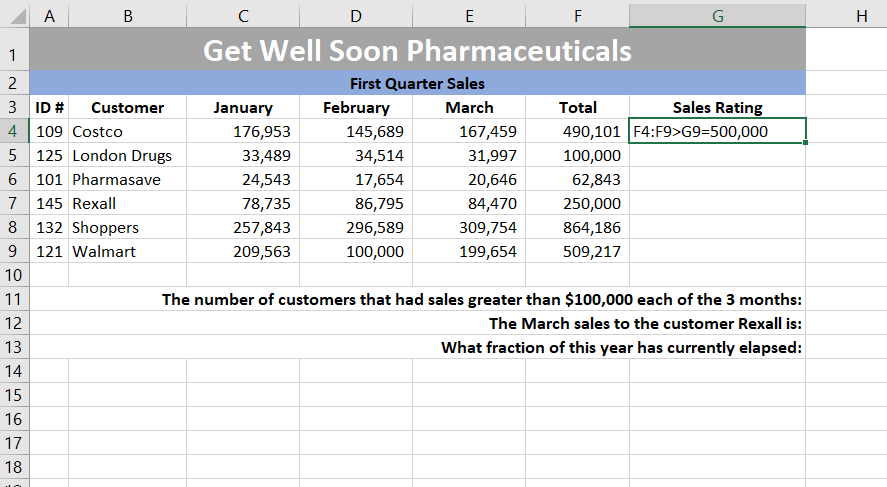
Question: 2 3 . Create a formula in cell G 4 that determines the sales rating for total sales as follows: - for total sales greater
Create a formula in cell G that determines the sales rating for total sales as follows:
for total sales greater than or equal to the sales rating is Awesome
for total sales greater than or equal to the sales rating is Great
for total sales greater than or equal to the sales rating is Good
for all other total sales amounts, the sales rating is Needs Work
Copy the formula in cell G to cells G through G
You are expected to use the IFS function in your formula to answer this question correctly. Use
TRUE for the final logical test.
In cell H create a formula that counts the number of customers that had sales greater than
in every one of the three months. You are expected to use the COUNTIFS function in your
formula to answer this question correctly.
In cell H create a formula that looks up the March sales to the customer Rexall. You are expected
to use nested INDEX and MATCH functions to complete this question correctly. You should assume
the array for the INDEX function is the cell range A:G
In cell H create a formula that calculates the fraction of the current year that has elapsed so far.
For example, if you open this workbook in the year then it must automatically calculate the
fraction of the year that has elapsed.
Your entire formula must be contained in cell H so you will need to use nested functions.
Hint: Use the DATE, YEAR, and NOW functions to get the date of the first day of the current year. You
can assume values of for both the month and day ie January st The YEARFRAC function can
then use this date as the start date, along with the current date as the end date, to determine the
fraction of the current year.
Step by Step Solution
There are 3 Steps involved in it
1 Expert Approved Answer
Step: 1 Unlock

Question Has Been Solved by an Expert!
Get step-by-step solutions from verified subject matter experts
Step: 2 Unlock
Step: 3 Unlock
 Study Help