







Question: 2. Create a directory in your work environment name test users. Write a PowerShell script to: a. Create the following output Enter User's Full Name
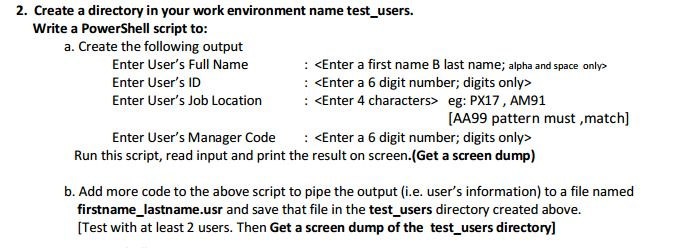
2. Create a directory in your work environment name test users. Write a PowerShell script to: a. Create the following output Enter User's Full Name Enter User's ID Enter User's Job Location :
Step by Step Solution
There are 3 Steps involved in it
1 Expert Approved Answer
Step: 1 Unlock

Question Has Been Solved by an Expert!
Get step-by-step solutions from verified subject matter experts
Step: 2 Unlock
Step: 3 Unlock
 Study Help