







Question: 2. Create a new Document, by a. Click on the down arrow next to the blue Document button b. In the search bar search UML'
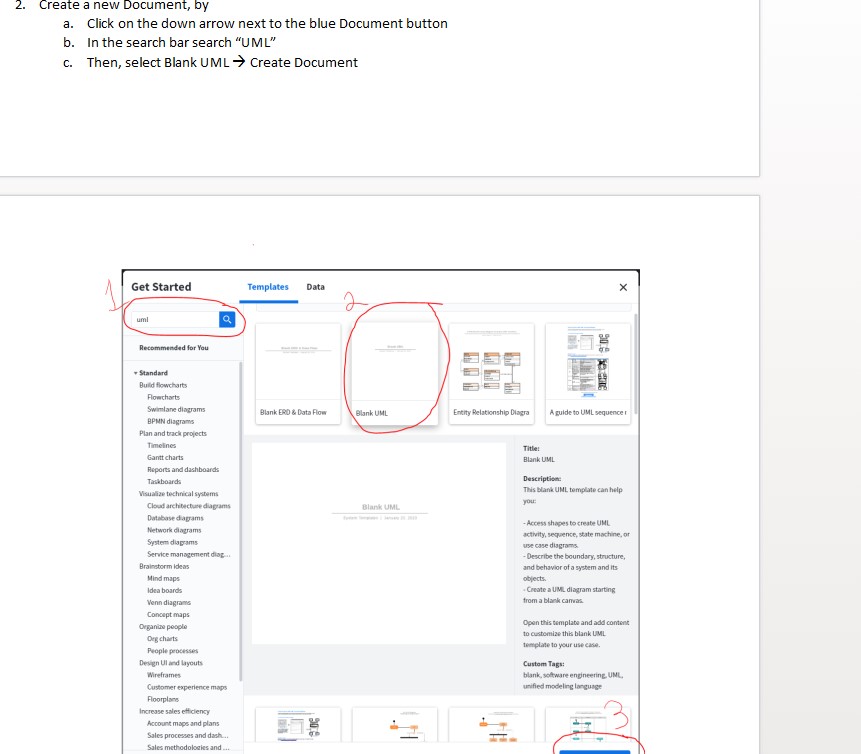
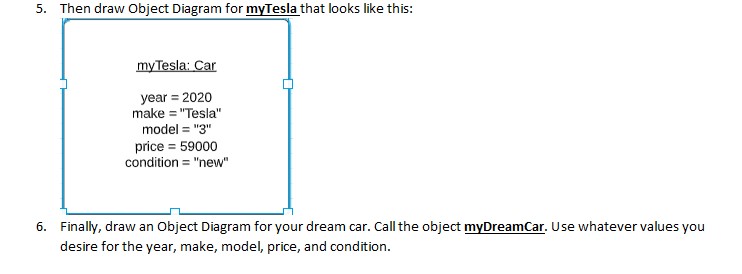
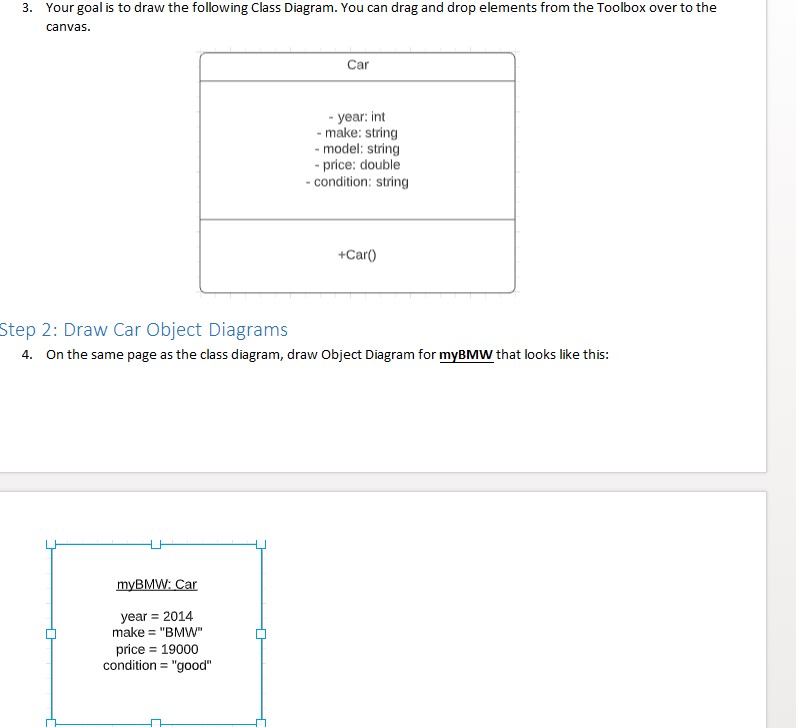
2. Create a new Document, by a. Click on the down arrow next to the blue Document button b. In the search bar search "UML' C. Then, select Blank UML > Create Document Get Started Templates Data X Q ecommended for You Standard Build flowchart: Flowcharts wimlane diagrams Blank ERD & Data Flow Blank UML Entity Relationship Diagra A guide to UML sequence [ BPMN diagrams Plan and brack projects Timelines Title! Gantt charts Blank UML Reports and dashboards Tankboards Description Visualize technical systems This blank UNL template can help YOU: Cloud architecture diagrams Blank UML Durtaboise diagrams - Access shapes to create UHL Network diagram activity, sequence, state machine, or System use case diagrams. Service management diaz .. - Describe the boundary, structure, Brainstorm Ideas and behavior of a system and its Mind maps objects Idea boards . Create a UML diagram starting Venn diagrams from a blank canvas Concept maps Organiza people Opan this template and add content to customize this blank UML Org charts template to your use case. People processors Design UI and Layouts Custom Tags: Wireframes blank, software engineering. UNL, Customer experience maps unified modeling language Floorplans crease sales efficiency punt maps and plans les processes and dash..5. Then draw Object Diagram for myTesla that looks like this: my Tesla: Car year = 2020 make = "Tesla" model = "g price = 59000 condition = "new" 6. Finally, draw an Object Diagram for your dream car. Call the object myDreamCar. Use whatever values you desire for the year, make, model, price, and condition.3. Your goal is to draw the following Class Diagram. You can drag and drop elements from the Toolbox over to the CEIWE s. - year: int make: string - model: String - price: double condition: string Step 2: Draw Car Object Diagrams 4. On the same page as the class diagram, draw Object Diagram for mIBMW that looks like this: mBMW: Car year = 2014 make = "BMW" price = 1943043 condition = "good"
Step by Step Solution
There are 3 Steps involved in it

Get step-by-step solutions from verified subject matter experts
 Study Help