







Question: 2. Create a program that reads a file of 2D coordinates and calculates the bounding box and center of the bounding box. The bounding box
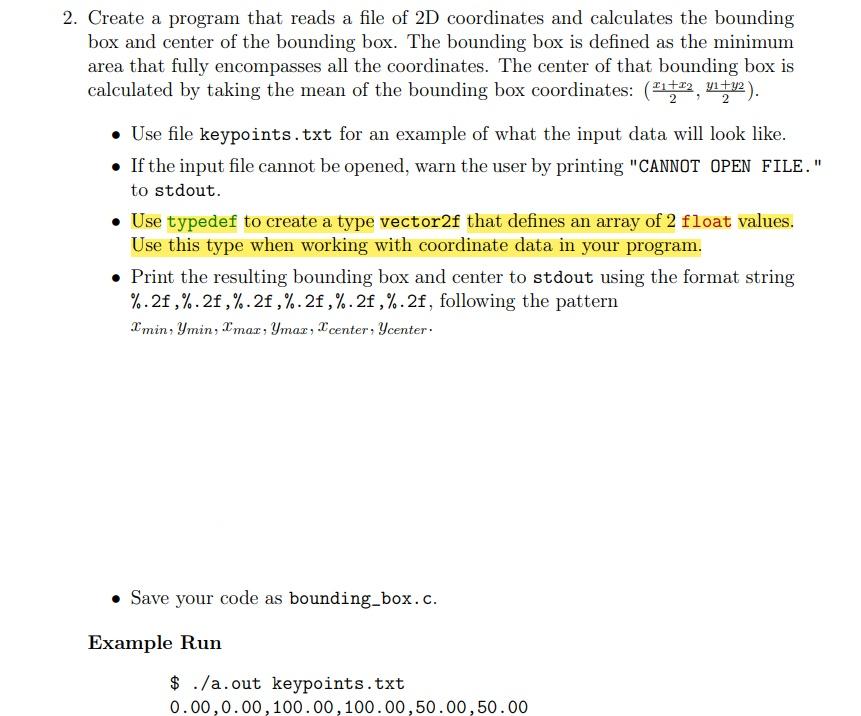
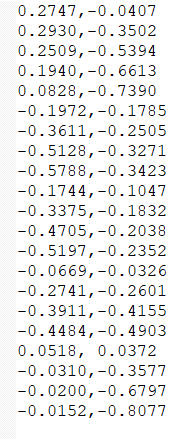
2. Create a program that reads a file of 2D coordinates and calculates the bounding box and center of the bounding box. The bounding box is defined as the minimum area that fully encompasses all the coordinates. The center of that bounding box is calculated by taking the mean of the bounding box coordinates: (22, 4142). Use file keypoints.txt for an example of what the input data will look like. If the input file cannot be opened, warn the user by printing "CANNOT OPEN FILE." to stdout. Use typedef to create a type vector2f that defines an array of 2 float values. Use this type when working with coordinate data in your program. Print the resulting bounding box and center to stdout using the format string %.2f,%.2f ,%.2f,%.2f ,%.2f ,%.2f, following the pattern I'min, Ymin, Imar, Ymar, l'center: Ycenter: Save your code as bounding_box.c. Example Run $ ./a.out keypoints.txt 0.00,0.00, 100.00,100.00,50.00,50.00 0.2747,-0.0407 0.2930,-0.3502 0.2509,-0.5394 0.1940,-0.6613 0.0828,-0.7390 -0.1972,-0.1785 -0.3611,-0.2505 -0.5128,-0.3271 -0.5788,-0.3423 -0.1744,-0.1047 -0.3375,-0.1832 -0.4705,-0.2038 -0.5197,-0.2352 -0.0669,-0.0326 -0.2741,-0.2601 -0.3911,-0.4155 -0.4484,-0.4903 0.0518, 0.0372 -0.0310,-0.3577 -0.0200,-0.6797 -0.0152,-0.8077
Step by Step Solution
There are 3 Steps involved in it

Get step-by-step solutions from verified subject matter experts
 Study Help