







Question: 2. Drone Customization Shop Management 2.1 The system will send a Parts Request for needed drone components on an order to Drone Inventory department. 2.2

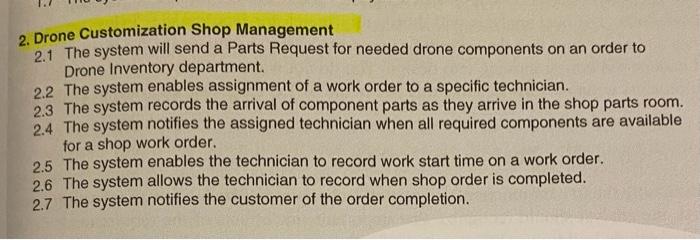
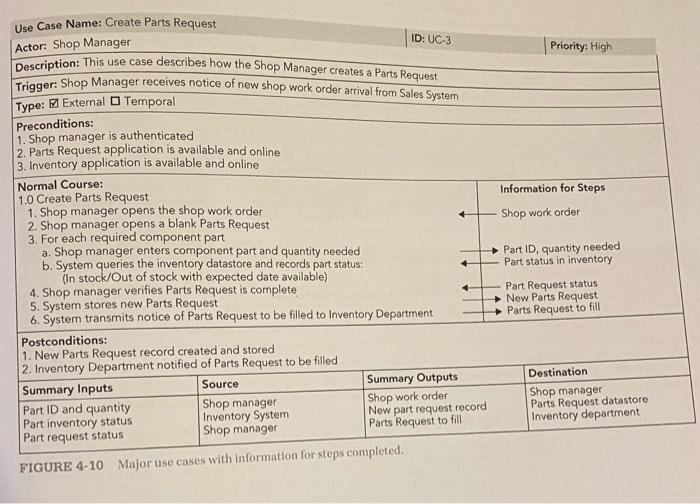
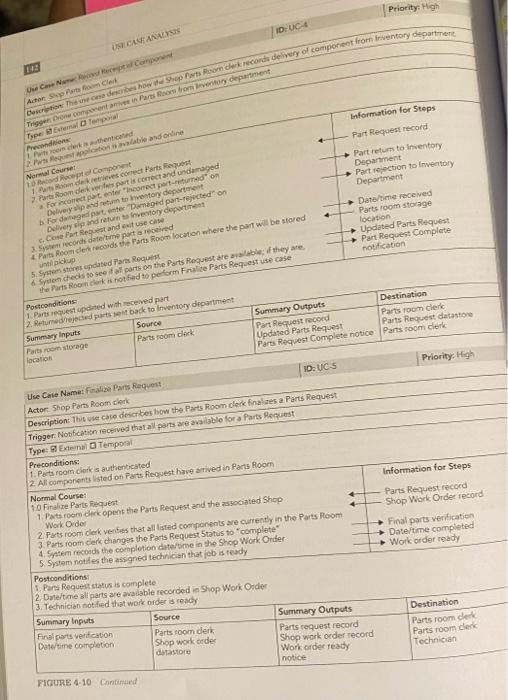
2. Drone Customization Shop Management 2.1 The system will send a Parts Request for needed drone components on an order to Drone Inventory department. 2.2 The system enables assignment of a work order to a specific technician. 2.3 The system records the arrival of component parts as they arrive in the shop parts room. 2.4 The system notifies the assigned technician when all required components are available for a shop work order. 2.5 The system enables the technician to record work start time on a work order. 2.6 The system allows the technician to record when shop order is completed. 2.7 The system notifies the customer of the order completion. \begin{tabular}{|l|l} \hline YOUR TURN 42 & Functional Requirements for DrnTeq Create a Parts Request \end{tabular} Review the initial DronTeq Customization Shop Management functional requirement 2-1 in Figure 3-3. Now, based on your study of UC-3 in Figure 4-10, revise the list of functional requirements to provide more clarity and detail for the task of preparing a Parts Request. Use Case Name: Create Parts Request Actor: Shop Manager ID: UC-3 Description: This use case describes how the Shop Manager creates a Parts Request Trigger: Shop Manager receives notice of new shop work order arrival from Sales System Type: External Temporal Preconditions: 1. Shop manager is authenticated 2. Parts Request application is available and online 3. Inventory application is available and online Normal Course: 1.0 Create Parts Request 1. Shop manager opens the shop work order 2. Shop manager opens a blank Parts Request 3. For each required component part a. Shop manager enters component part and quantity needed b. System queries the inventory datastore and records part status: (In stock/Out of stock with expected date available) 4. Shop manager verifies Parts Request is complete. 5. System stores new Parts Request Postconditions: 1. New Parts Request record created and stored 2. Inventory Department notified of Parts Request to be filled \begin{tabular}{|l|l|l|l|} \hline Summary Inputs & Source & Summary Outputs & Destination \\ \hline PartIDandquantityPartinventorystatusPartrequeststatus & ShopmanagerInventorySystemShopmanager & ShopworkorderNewpartrequestrecordPartsRequesttofill & ShopmanagerPartsRequestdatastoreInventorydepartment \\ \hline \end{tabular} FIGURE 4-10 Major use cases with information for steps completed. FICURE 4-10 Cantimand
Step by Step Solution
There are 3 Steps involved in it

Get step-by-step solutions from verified subject matter experts
 Study Help