







Question: (2) Python or Java: Processing CSV data Goal: Write a program in Python to read a file of purchase information in csv (comma separated value)
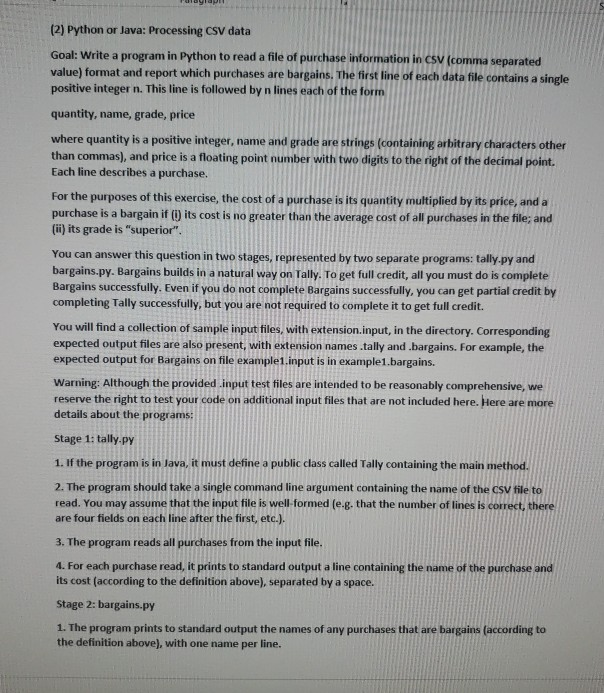
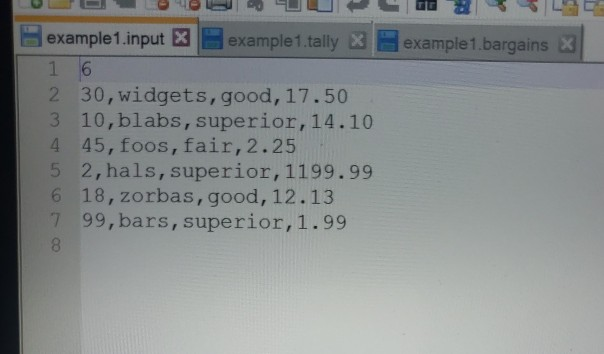
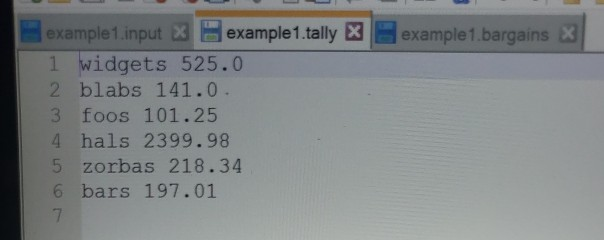
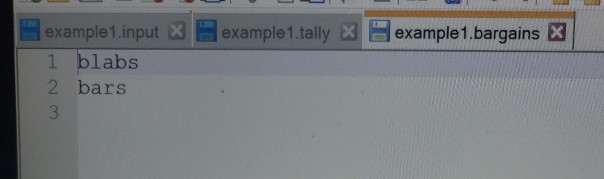
(2) Python or Java: Processing CSV data Goal: Write a program in Python to read a file of purchase information in csv (comma separated value) format and report which purchases are bargains. The first line of each data file contains a single positive integer n. This line is followed by n lines each of the form quantity, name, grade, price where quantity is a positive integer, name and grade are strings (containing arbitrary characters other than commas), and price is a floating point number with two digits to the right of the decimal point. Each line describes a purchase. For the purposes of this exercise, the cost of a purchase is its quantity multiplied by its price, and a purchase is a bargain if () its cost is no greater than the average cost of all purchases in the file and (i) its grade is "superior" You can answer this question in two stages, represented by two separate programs: tally.py and bargains.py. Bargains builds in a natural way on Tally. To get full credit, all you must do is complete Bargains successfully. Even if you do not complete Bargains successfully, you can get partial credit by completing Tally successfully, but you are not required to complete it to get full credit. You will find a collection of sample input files, with extension.input, in the directory. Corresponding expected output files are also present, with extension names tally and .bargains. For example, the expected output for Bargains on file example1.input is in example1.bargains. Warning: Although the provided input test files are intended to be reasonably comprehensive, we reserve the right to test your code on additional input files that are not included here. Here are more details about the programs: Stage 1: tally-py 1. If the program is in lava, it must define a public class called Tally containing the main method 2. The program should take a single command line argument containing the name of the CSV file to read. You may assume that the input file is well-formed (e-g. that the number of lines is correct, there are four fields on each line after the first, etc.). 3. The program reads all purchases from the input file. 4. For each purchase read, it prints to standard output a line containing the name of the purchase and its cost (according to the definition above), separated by a space. Stage 2: bargains.py 1. The program prints to standard output the names of any purchases that are bargains (according to the definition above), with one name per line. example1 inputexample1.tally example1.bargains 2 3 4 5 6 7 30,widgets, good, 17.50 10,blabs, superior,14.10 45, foos, fair,2.25 2, hals, superior, 1199.99 18,zorbas, good, 12.13 99,bars, superior,1.99 example1 input example1.bargains X example1.tally 1 widgets 525.0 2 blabs 141.0 3 foos 101.25 4 hals 2399.98 5 zorbas 218.34 6 bars 197.01 7 example1.input X example1.tally K 1 blabs 2 bars 3 example1.bargains
Step by Step Solution
There are 3 Steps involved in it

Get step-by-step solutions from verified subject matter experts
 Study Help