







Question: 2. Starting from line 32, initialize the kart Actor, then initialize all its properties (gasOn, breakOn, and coins). The kart's x position should be 40
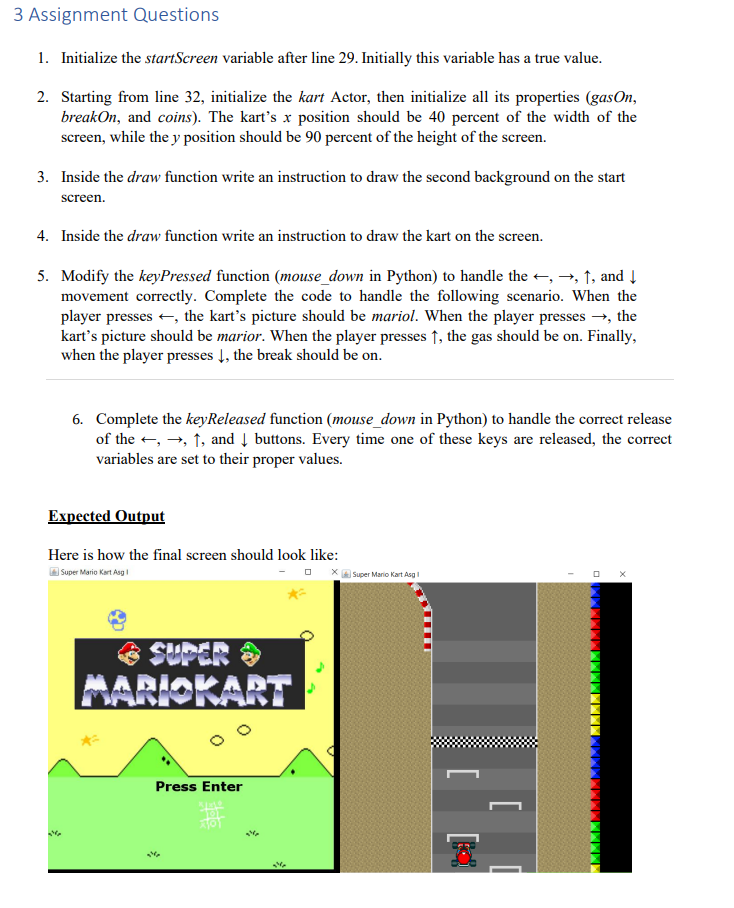
2. Starting from line 32, initialize the kart Actor, then initialize all its properties (gasOn, breakOn, and coins). The kart's x position should be 40 percent of the width of the screen, while the y position should be 90 percent of the height of the screen. 3. Inside the draw function write an instruction to draw the second background on the start screen. 4. Inside the draw function write an instruction to draw the kart on the screen. 5. Modify the keyPressed function (mouse_down in Python) to handle the ,,, and movement correctly. Complete the code to handle the following scenario. When the player presses , the kart's picture should be mariol. When the player presses , the kart's picture should be marior. When the player presses , the gas should be on. Finally, when the player presses , the break should be on. 6. Complete the keyReleased function (mouse_down in Python) to handle the correct release of the ,,, and buttons. Every time one of these keys are released, the correct variables are set to their proper values. Expected Output Here is how the final screen should look like: (4) Super Mario Kart Asg I 2. Starting from line 32, initialize the kart Actor, then initialize all its properties (gasOn, breakOn, and coins). The kart's x position should be 40 percent of the width of the screen, while the y position should be 90 percent of the height of the screen. 3. Inside the draw function write an instruction to draw the second background on the start screen. 4. Inside the draw function write an instruction to draw the kart on the screen. 5. Modify the keyPressed function (mouse_down in Python) to handle the ,,, and movement correctly. Complete the code to handle the following scenario. When the player presses , the kart's picture should be mariol. When the player presses , the kart's picture should be marior. When the player presses , the gas should be on. Finally, when the player presses , the break should be on. 6. Complete the keyReleased function (mouse_down in Python) to handle the correct release of the ,,, and buttons. Every time one of these keys are released, the correct variables are set to their proper values. Expected Output Here is how the final screen should look like: (4) Super Mario Kart Asg
Step by Step Solution
There are 3 Steps involved in it

Get step-by-step solutions from verified subject matter experts
 Study Help