







Question: 2 Supporting Advanced Constraints The requirement analysis also revealed certain behaviors and integrity the database must uphold when deployed. For this, you are required to
Supporting Advanced Constraints
The requirement analysis also revealed certain behaviors and integrity the database must uphold when deployed. For this, you are required to create appropriate views, functions and procedures, and triggers that allow the database to behave as expected.
Modifications to Student Table
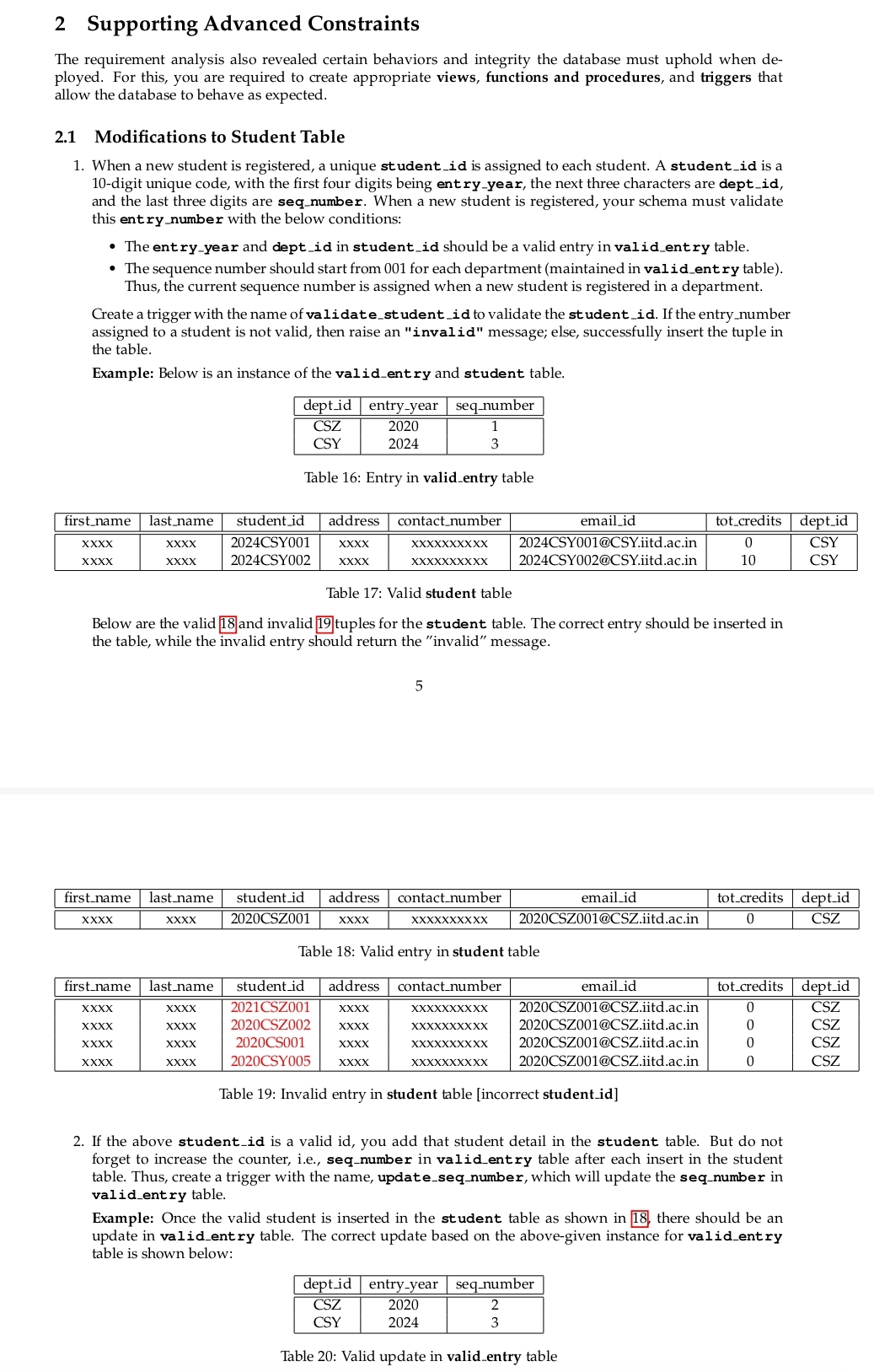
When a new student is registered, a unique studentid is assigned to each student. A studentid is a digit unique code, with the first four digits being entryyear, the next three characters are deptid and the last three digits are seqnumber. When a new student is registered, your schema must validate this entrynumber with the below conditions:
The entryyear and deptid in studentid should be a valid entry in validentry table.
The sequence number should start from for each department maintained in valident ry table Thus, the current sequence number is assigned when a new student is registered in a department.
Create a trigger with the name of validatestudentid to validate the studentid If the entrynumber assigned to a student is not valid, then raise an "invalid" message; else, successfully insert the tuple in the table.
Example: Below is an instance of the validentry and student table.
tabledeptidentryyear,seqnumberCSZCSY
Table : Entry in validentry table
tablefirstname,lastname,studentidaddress,contactnumber,emailidtotcredits,deptidCSYXXXXXXXXXXCSY@CSYiitd.acinCSYCSYCSY@CSYiitd.acinCSY
Table : Valid student table
Below are the valid and invalid tuples for the student table. The correct entry should be inserted in the table, while the invalid entry should return the "invalid" message.
tablefirstname,lastname,studentidaddress,contactnumber,emailidtotcredits,deptidXXxxXXxxCSZXXXXXXXXXXXXXCSZ@CSZiitd.acinCSZ
Table : Valid entry in student table
tablefirstname,lastname,studentidaddress,contactnumber,emailidtotcredits,deptidxxxxxxxxCSZxxxxxxxxxxxxxxCSZ@CSZiitd.acinCSZxxxxxxxxCSZxxxxxxxxxxxxxxCSZ@CSZiitd.acinCSZxxxxxxxxCSxxxxxxxxxxxxxxCSZ@CSZiit.acinCSZxxxxxxxxCSYxxxxxxxxxxxxxxCSZ@CSZiitd.acinCSZ
Table : Invalid entry in student table incorrect studentid
If the above studentid is a valid id you add that student detail in the student table. But do not forget to increase the counter, ie seqnumber in validentry table after each insert in the student table. Thus, create a trigger with the name, updateseqnumber, which will update the seqnumber in validentry table.
Example: Once the valid student is inserted in the student table as shown in there should be an update in validentry table. The correct update based on the abovegiven instance for validentry table is shown below:
tabledeptidentryyear,seqnumberCSZCSY
Table : Valid update in validentry table
Step by Step Solution
There are 3 Steps involved in it
1 Expert Approved Answer
Step: 1 Unlock

Question Has Been Solved by an Expert!
Get step-by-step solutions from verified subject matter experts
Step: 2 Unlock
Step: 3 Unlock
 Study Help