







Question: 2 Task 2: Measurements in Mininet For the this task of the project you will use the iPerf tool and the standard latency mea surement
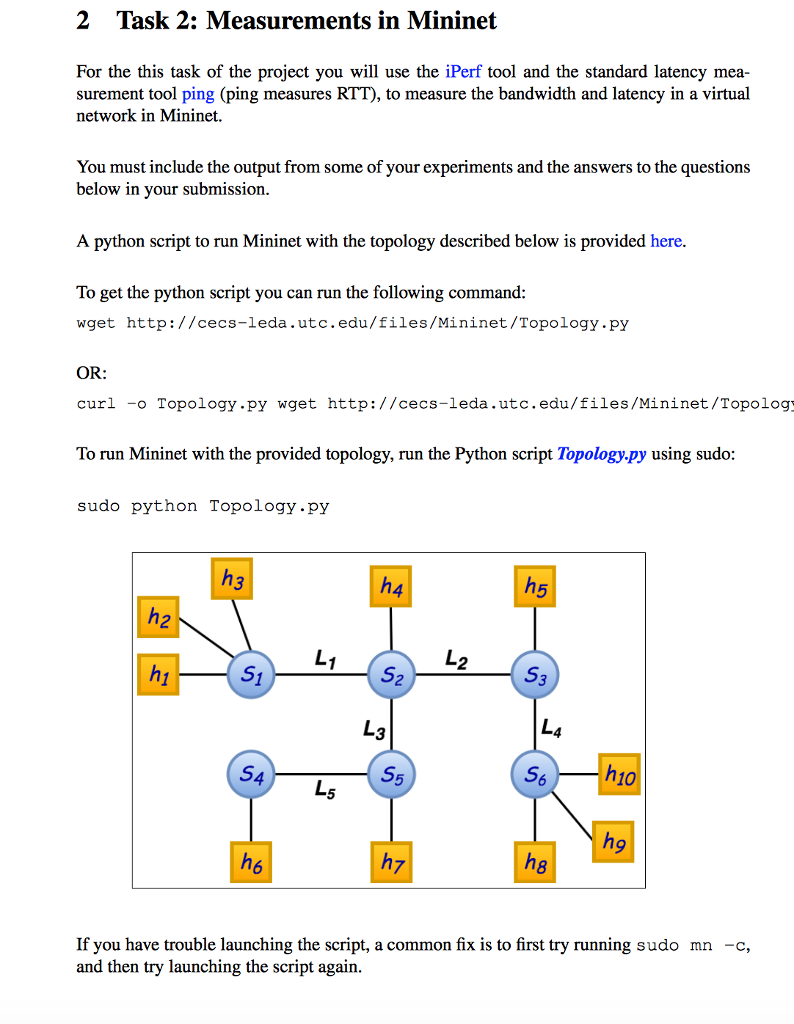

2 Task 2: Measurements in Mininet For the this task of the project you will use the iPerf tool and the standard latency mea surement tool ping (ping measures RTT), to measure the bandwidth and latency in a virtual network in Mininet. You must include the output from some of your experiments and the answers to the questions below in your submission A python script to run Mininet with the topology described below is provided here To get the python script you can run the following command wget http://cecs-leda .utc.edu/files/Mininet/Topology.py OR: curl -o Topology.py wget http://cecs-leda.utc.edu/files/Mininet/Topolog To run Mininet with the provided topology, run the Python script Topology.py using sudo sudo python Topology.py h10 5 9 If you have trouble launching the script, a common fix is to first try running sudo mn -c, and then try launching the script again 2 Task 2: Measurements in Mininet For the this task of the project you will use the iPerf tool and the standard latency mea surement tool ping (ping measures RTT), to measure the bandwidth and latency in a virtual network in Mininet. You must include the output from some of your experiments and the answers to the questions below in your submission A python script to run Mininet with the topology described below is provided here To get the python script you can run the following command wget http://cecs-leda .utc.edu/files/Mininet/Topology.py OR: curl -o Topology.py wget http://cecs-leda.utc.edu/files/Mininet/Topolog To run Mininet with the provided topology, run the Python script Topology.py using sudo sudo python Topology.py h10 5 9 If you have trouble launching the script, a common fix is to first try running sudo mn -c, and then try launching the script again
Step by Step Solution
There are 3 Steps involved in it

Get step-by-step solutions from verified subject matter experts
 Study Help