







Question: ( 2 ) Write a Matlab APP to open and display a color image; use the imfinfo ( ) function to retrieve and show the
Write a Matlab APP to open and display a color image; use the imfinfo function to
retrieve and show the following information of the image: Width, Height, ColorType,
and FileModDate. Check Matlab documentation on imfinfo function for more
information.
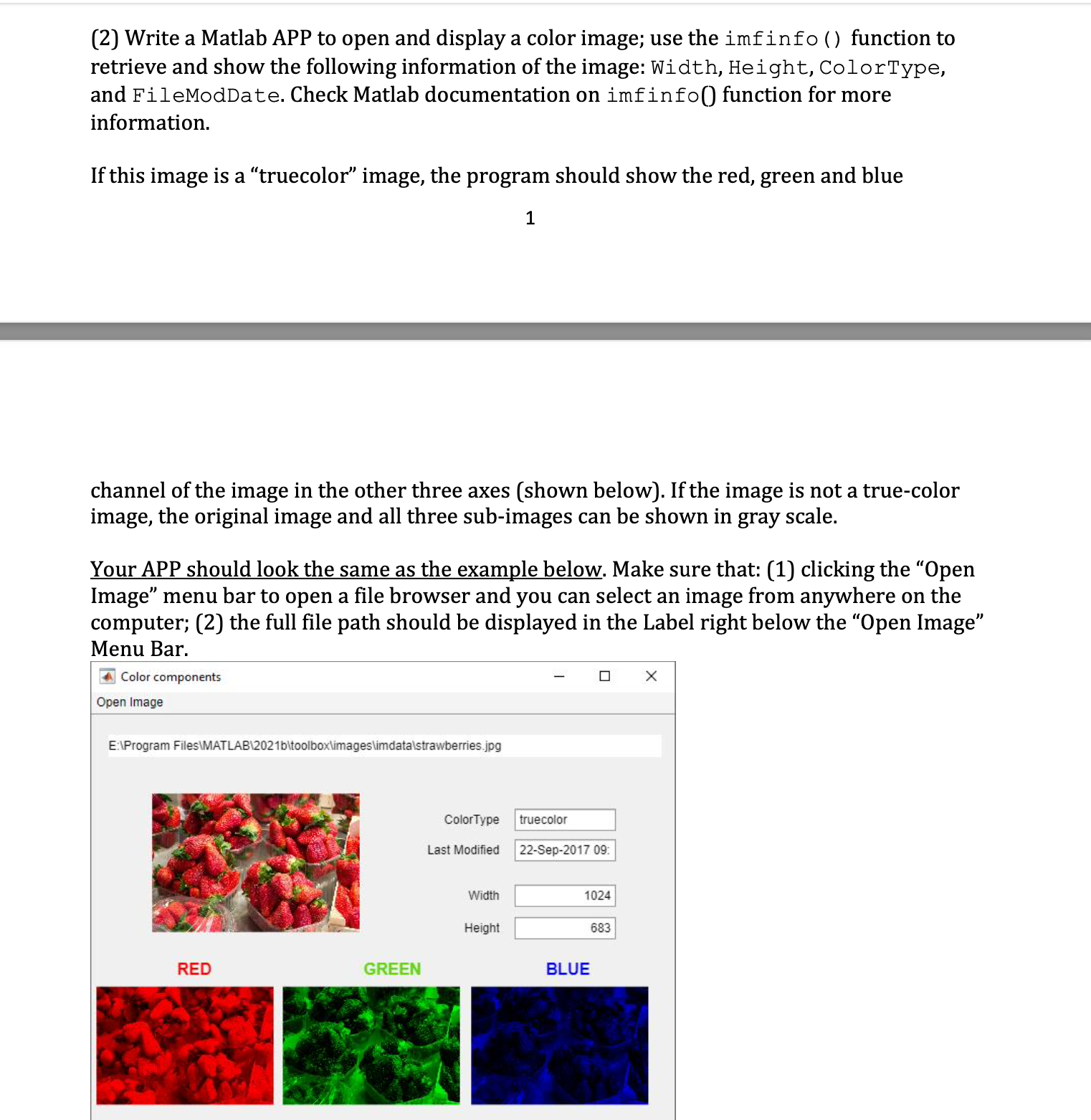
If this image is a "truecolor" image, the program should show the red, green and blue
channel of the image in the other three axes shown below If the image is not a truecolor
image, the original image and all three subimages can be shown in gray scale.
Your APP should look the same as the example below. Make sure that: clicking the "Open
Image" menu bar to open a file browser and you can select an image from anywhere on the
computer; the full file path should be displayed in the Label right below the "Open Image"
Menu Bar.
Color components
Open Image
Step by Step Solution
There are 3 Steps involved in it
1 Expert Approved Answer
Step: 1 Unlock

Question Has Been Solved by an Expert!
Get step-by-step solutions from verified subject matter experts
Step: 2 Unlock
Step: 3 Unlock
 Study Help