







Question: 25 26 T HELPER FUNCTIONS /// 27 28 function drive_vehicle) 29 { 30 31 This function should do the following: 32 - increment DetectiveCar's DistAmnt
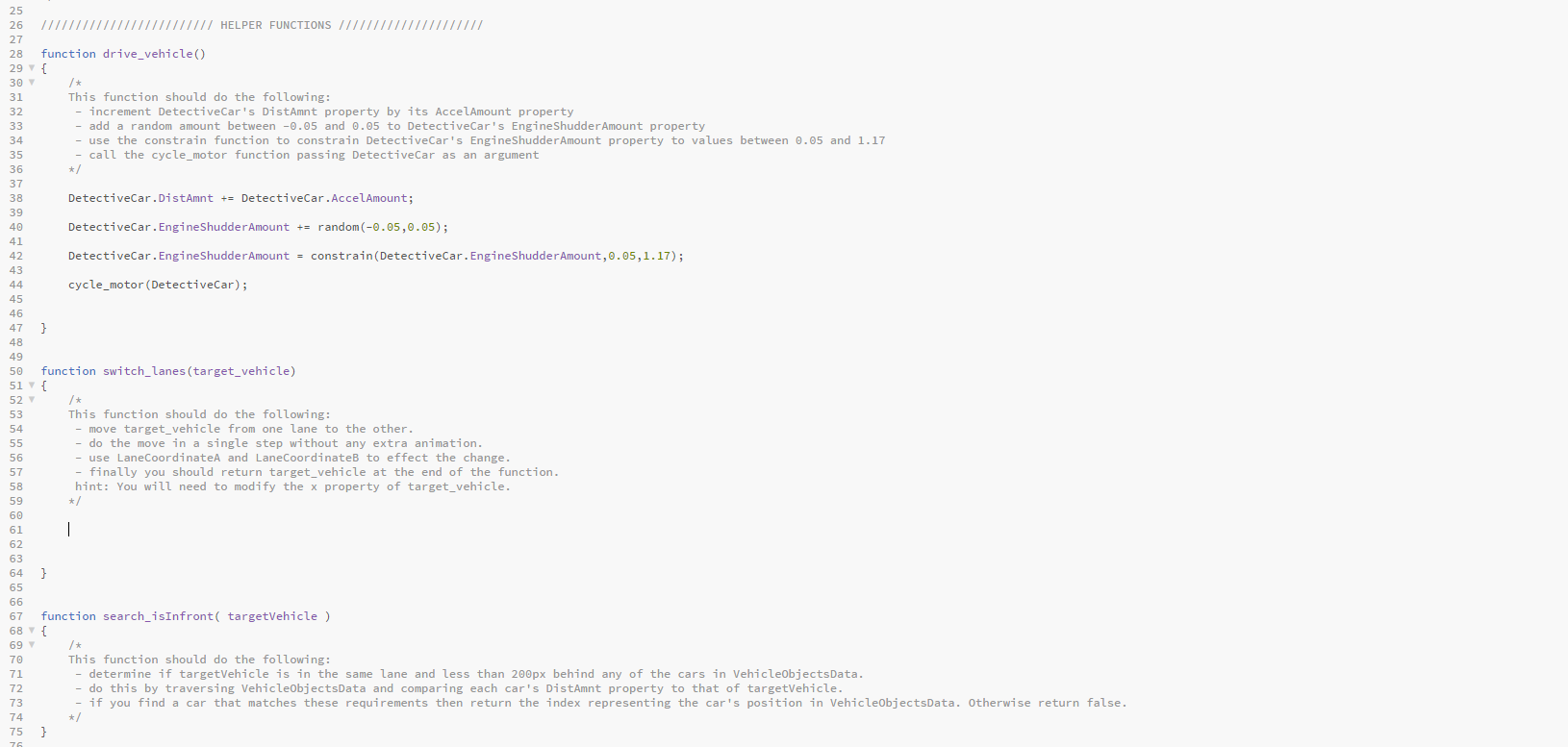
25 26 T HELPER FUNCTIONS /// 27 28 function drive_vehicle) 29 { 30 31 This function should do the following: 32 - increment DetectiveCar's DistAmnt property by its AccelAmount property 33 - add a random amount between -0.05 and 0.05 to DetectiveCar's Engine ShudderAmount property 34 - use the constrain function to constrain DetectiveCar's EngineShudder Amount property to values between 0.05 and 1.17 35 - call the cycle_motor function passing DetectiveCar as an argument 36 */ 37 38 DetectiveCar.DistAmnt += DetectiveCar.AccelAmount; 39 40 DetectiveCar.EngineShudder Amount += random(-0.05,0.05); 41 42 DetectiveCar.EngineShudder Amount = constrain(DetectiveCar.EngineShudder Amount, 0.05,1.17); 43 44 cycle_motor (DetectiveCar); 45 46 47 } 48 49 50 function switch_lanes (target_vehicle) 51 { 52 53 This function should do the following: 54 - move target_vehicle from one lane to the other. 55 - do the move in a single step without any extra animation. 56 - use LaneCoordinate and LaneCoordinates to effect the change. 57 finally you should return target_vehicle at the end of the function. 58 hint: You will need to modify the x property of target_vehicle. 59 */ 60 61 | 62 63 64 } 65 66 67 function search_isInfront( targetVehicle ) 68 { 69 /* 70 This function should do the following: 71 - determine if targetVehicle is in the same lane and less than 200px behind any of the cars in VehicleObjectsData. 72 do this by traversing VehicleObjectsData and comparing each car's DistAmnt property to that of targetVehicle. 73 if you find a car that matches these requirements then return the index representing the car's position in VehicleObjectsData. Otherwise return false. 74 */ 75 } 76 25 26 T HELPER FUNCTIONS /// 27 28 function drive_vehicle) 29 { 30 31 This function should do the following: 32 - increment DetectiveCar's DistAmnt property by its AccelAmount property 33 - add a random amount between -0.05 and 0.05 to DetectiveCar's Engine ShudderAmount property 34 - use the constrain function to constrain DetectiveCar's EngineShudder Amount property to values between 0.05 and 1.17 35 - call the cycle_motor function passing DetectiveCar as an argument 36 */ 37 38 DetectiveCar.DistAmnt += DetectiveCar.AccelAmount; 39 40 DetectiveCar.EngineShudder Amount += random(-0.05,0.05); 41 42 DetectiveCar.EngineShudder Amount = constrain(DetectiveCar.EngineShudder Amount, 0.05,1.17); 43 44 cycle_motor (DetectiveCar); 45 46 47 } 48 49 50 function switch_lanes (target_vehicle) 51 { 52 53 This function should do the following: 54 - move target_vehicle from one lane to the other. 55 - do the move in a single step without any extra animation. 56 - use LaneCoordinate and LaneCoordinates to effect the change. 57 finally you should return target_vehicle at the end of the function. 58 hint: You will need to modify the x property of target_vehicle. 59 */ 60 61 | 62 63 64 } 65 66 67 function search_isInfront( targetVehicle ) 68 { 69 /* 70 This function should do the following: 71 - determine if targetVehicle is in the same lane and less than 200px behind any of the cars in VehicleObjectsData. 72 do this by traversing VehicleObjectsData and comparing each car's DistAmnt property to that of targetVehicle. 73 if you find a car that matches these requirements then return the index representing the car's position in VehicleObjectsData. Otherwise return false. 74 */ 75 } 76
Step by Step Solution
There are 3 Steps involved in it

Get step-by-step solutions from verified subject matter experts
 Study Help