Question: 2:55 Assignment Details ASSIGNMENT #3: EMAIL MEMO Weight: 15% Now, working on your own, you will get a chance to practice the basic business communication
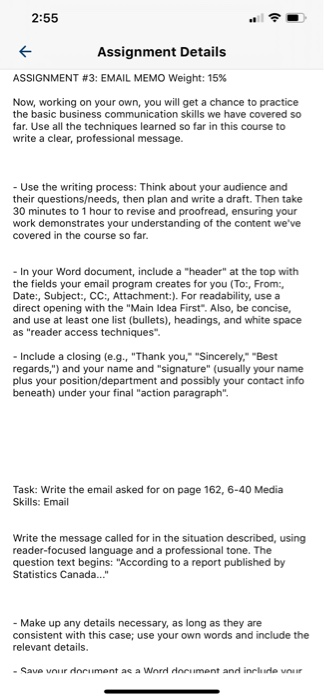
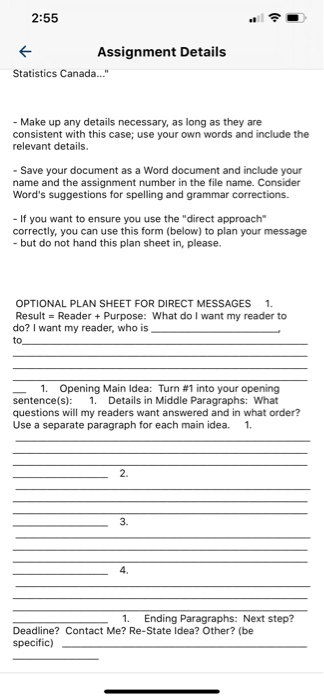
2:55 Assignment Details ASSIGNMENT #3: EMAIL MEMO Weight: 15% Now, working on your own, you will get a chance to practice the basic business communication skills we have covered so far. Use all the techniques learned so far in this course to write a clear, professional message. - Use the writing process: Think about your audience and their questionseeds, then plan and write a draft. Then take 30 minutes to 1 hour to revise and proofread, ensuring your work demonstrates your understanding of the content we've covered in the course so far. - In your Word document, include a "header" at the top with the fields your email program creates for you (To:, From:, Date:, Subject:, CC:, Attachment:). For readability, use a direct opening with the "Main Idea First". Also, be concise, and use at least one list (bullets), headings, and white space as "reader access techniques". - Include a closing (e.g., "Thank you," "Sincerely," "Best regards,") and your name and "signature" (usually your name plus your position/department and possibly your contact info beneath) under your final "action paragraph". Task: Write the email asked for on page 162, 6-40 Media Skills: Email Write the message called for in the situation described, using reader-focused language and a professional tone. The question text begins: "According to a report published by Statistics Canada..." - Make up any details necessary, as long as they are consistent with this case; use your own words and include the relevant details. - Save your document ae a Word document and include nur 2:55 Assignment Details Statistics Canada..." - Make up any details necessary, as long as they are consistent with this case; use your own words and include the relevant details. - Save your document as a Word document and include your name and the assignment number in the file name. Consider Word's suggestions for spelling and grammar corrections. - If you want to ensure you use the "direct approach correctly, you can use this form (below) to plan your message - but do not hand this plan sheet in, please. OPTIONAL PLAN SHEET FOR DIRECT MESSAGES 1. Result = Reader + Purpose: What do I want my reader to do? I want my reader, who is to 1. Opening Main Idea: Turn #1 into your opening sentence(s): 1. Details in Middle Paragraphs: What questions will my readers want answered and in what order? Use a separate paragraph for each main idea. 1. 2. 3. 4. 1. Ending Paragraphs: Next step? Deadline? Contact Me? Re-State Idea? Other? (be specific)









 Study Help