







Question: 2-Consider the image shown in the following matrix using 0 as the background. Label (use the characters a, b, c... exclude the background as an
2-Consider the image shown in the following matrix using 0 as the background. Label (use the characters a, b, c... exclude the background as an empty cell) and count all subsets that are:(a) 4-adjacent, (b) 8-adjacent, or (c) m-adjacent.
3- Develop a Matlab code that can convert the matrix in problem 2, into an image.
a- Use the actual elements as pixels in the above matrix and use imresize command to display the resulting image as a 256x256 image.
b- Convert the matrix into background and objects by assigning a new value of 255 to any cell that has a value > 0, represent each cell with 20x20 pixels and display the resulting image.
the set values for grey level is 0, 50, & 100
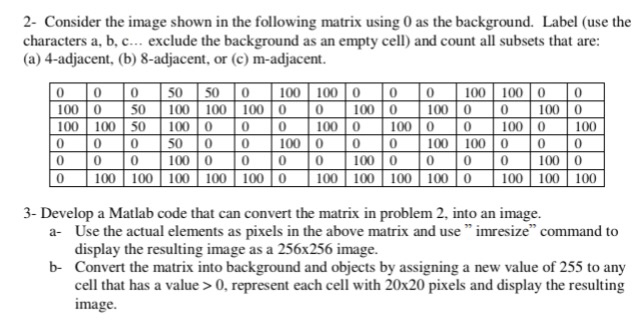
2- Consider the image shown in the following matrix using 0 as the background. Label (use the characters a, b, c... exclude the background as an empty cell) and count all subsets that are (a) 4-adjacent, (b) 8-adjacent, or (c) m-adjacent. 0 0050 50 0 100100 0 00 100 100 00 100 50 100 100 100 0 0100 0 100 0 0100 0 100 100 50 100 00 0 100 0 100 0 0 100 0 100 0 0 0 50 00 100 0 0 0100 100 000 0 0 0 100 0 0 0 0 100 0 0 0 0 100 0 0 100 100 100 100 100 0100 100 100 100 0 1 100 100 100 3- Develop a Matlab code that can convert the matrix in problem 2, into an image. a- Use the actual elements as pixels in the above matrix and use" imresize" command to display the resulting image as a 256x256 image. Convert the matrix into background and objects by assigning a new value of 255 to any cell that has a value>0, represent each cell with 20x20 pixels and display the resulting image b
Step by Step Solution
There are 3 Steps involved in it

Get step-by-step solutions from verified subject matter experts
 Study Help