Question: 3 96 der - instructions Excel 2010 Pro Paints Possible Step Instructions 4 11 9 en a row above the potable. If necessary, and in
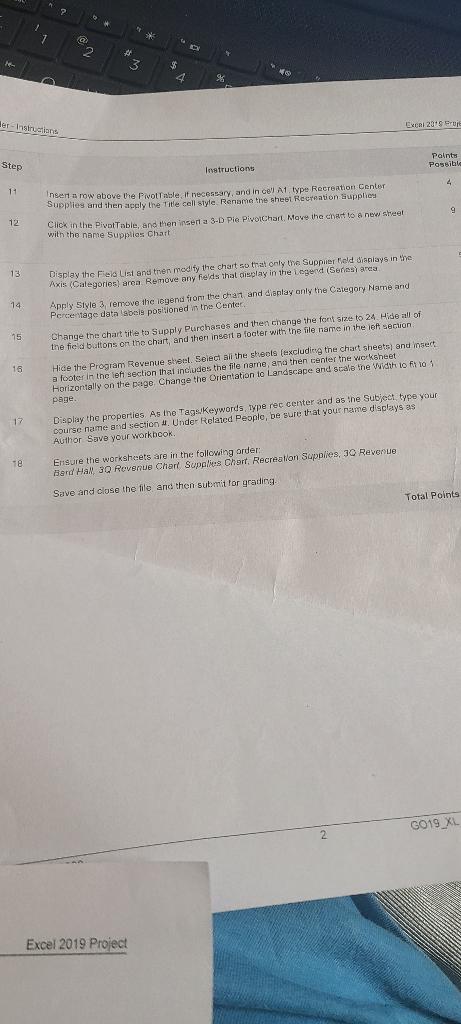
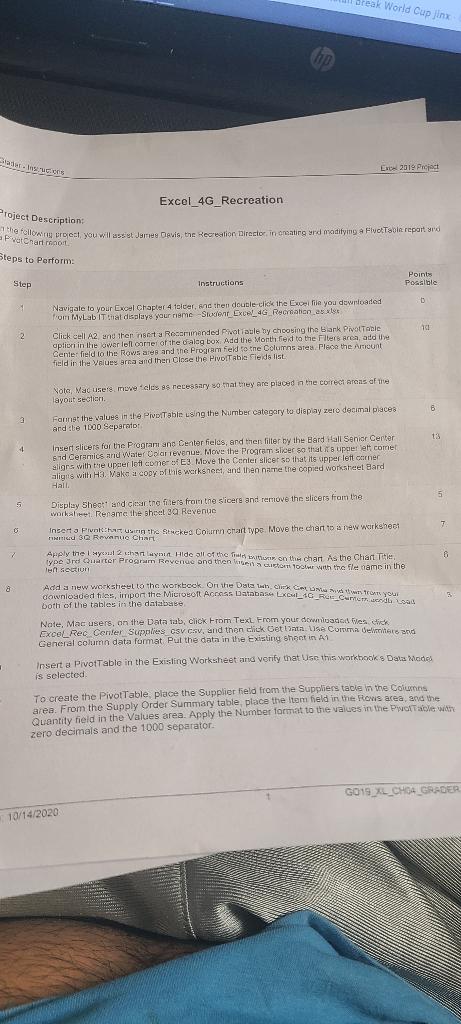
3 96 der - instructions Excel 2010 Pro Paints Possible Step Instructions 4 11 9 en a row above the potable. If necessary, and in collat type Recreation Center Supplies and then apply the title cell style. Rename the sheel Recreation Supplies Click in the Pivot Table, and then insert a 3-D Pie PloiChart Move the chart to a new Sheet with the name Supplies Chart 12 a , 13 14 15 Display the field List and then modify the chart so that only the supplier Meld deplays in the Axis Categories) area Remove any fields that display in the Legend (Senin area Apply Style 3 remove the legend from the chant and display only the Category Name and Percentage data isbeis positioned in the Center, Change the chartsite to Supply Purchases and then change the font size to 24 Hide all of the field buttons on the churt, and then insert a footer with the file name in the left section Hide the Program Revenue sent. Select all the streets (excluding the chart sheets) and insert a footer in the left section that includes the file name, and then center the worksheet Horizontally on the page Change the Orientation to Landscape and scale the width to fino page Display the properties. As the Tags Keywords, type rec center and as the Subject type your course name and section 4. Under Related People, be sure that your name displays as Author Save your workbook 16 17 Te Ensure the worksheets are in the following order: Band Hall 3Q Revenue Chart Supplies Chart, Recreation Supplies, 30 Revenue Save and close the file and then submit tor grading Total Points G019_XL 2 Excel 2019 Project Break World Cup Jinx WWW. Ex 2019 Project Excel_4G Recreation Project Description a Poartrit You will st Jamey Davis, the Recreation Director in nating and modifying a Five Tabi repartid Steps to Perform Points Possible Step Instructions D Navigate to your Excel Chapter 4 toler, sac then double-click the Excel file you downloaded from MyLab IT that display your rieme Student Excel 4G Recreationalt 101 2 Click cell A2 and then not a Rocorimanded Pwatiable by choosing the Blank Pivot Table option in the ower loll one of the calog box. Add the Month led to the Filters area and the Cente: field to the Rows are and the Program field to the Columns are place the amount field in the values and and then close the PivoTable Fields list Nota, Mac users, we clos es necessary at they are placed in the correct areas of the layout section B Farmst the values in the Pivo Table using the Number category to display zero decimal places and be 1000 Separador 13 4 Insert slicers for the Program and Center fields, and then filter by the Bard Call Senior Center sud Ceramics and Water Ola revenue Move the program slicer so that it's upcelet come alors with the upcer left come E3 Move tho Center slicer so that its upper left corner aligns with Ha. Make a copy of this workshem, and then name the copied worksheet Bard Hall 0 A Add a new worksheel the workbook Ort the attack on your 5 5 Display Shett and clear tre fiders from the sicers and remove the slicers from the work. Rename the sheet 39 Revenue Inserto Pokhan the stacked Column Chart type: Move the chart to a new workshei 7 TINIG 3Q Rovnue Chart 7 Apply the Iyul 2 channut Hide all of the won the chant As the Chart Title ype 3rd Quarter Program Revenue and then 100 with the flet came in the len section 8 to downloaded files, import the Microsoft Access Databa LXL_16_Re: Cum Lau both of the tables in the database Note, Mac users, on the Data tab, click From Text From your download frestick Excel Rec Center Supplies osv cav, and then click Gettoma Use Comma Clare and General column data format Put the data in the Existing shoot in A1 Insert a PivotTable in the Existing Worksheet and verify that Use this workbooks Data Modes is selected To create the Pivot Table place the Supplier field from the Suppliers table in the Columns area. From the Supply Order Summary table place the item field in the Rows area, and the Quantity field in the values area. Apply the Number format to the values in the wore wide zero decimals and the 1000 separator. G019_XL_CH04_GRADER 10/14/2020 3 96 der - instructions Excel 2010 Pro Paints Possible Step Instructions 4 11 9 en a row above the potable. If necessary, and in collat type Recreation Center Supplies and then apply the title cell style. Rename the sheel Recreation Supplies Click in the Pivot Table, and then insert a 3-D Pie PloiChart Move the chart to a new Sheet with the name Supplies Chart 12 a , 13 14 15 Display the field List and then modify the chart so that only the supplier Meld deplays in the Axis Categories) area Remove any fields that display in the Legend (Senin area Apply Style 3 remove the legend from the chant and display only the Category Name and Percentage data isbeis positioned in the Center, Change the chartsite to Supply Purchases and then change the font size to 24 Hide all of the field buttons on the churt, and then insert a footer with the file name in the left section Hide the Program Revenue sent. Select all the streets (excluding the chart sheets) and insert a footer in the left section that includes the file name, and then center the worksheet Horizontally on the page Change the Orientation to Landscape and scale the width to fino page Display the properties. As the Tags Keywords, type rec center and as the Subject type your course name and section 4. Under Related People, be sure that your name displays as Author Save your workbook 16 17 Te Ensure the worksheets are in the following order: Band Hall 3Q Revenue Chart Supplies Chart, Recreation Supplies, 30 Revenue Save and close the file and then submit tor grading Total Points G019_XL 2 Excel 2019 Project Break World Cup Jinx WWW. Ex 2019 Project Excel_4G Recreation Project Description a Poartrit You will st Jamey Davis, the Recreation Director in nating and modifying a Five Tabi repartid Steps to Perform Points Possible Step Instructions D Navigate to your Excel Chapter 4 toler, sac then double-click the Excel file you downloaded from MyLab IT that display your rieme Student Excel 4G Recreationalt 101 2 Click cell A2 and then not a Rocorimanded Pwatiable by choosing the Blank Pivot Table option in the ower loll one of the calog box. Add the Month led to the Filters area and the Cente: field to the Rows are and the Program field to the Columns are place the amount field in the values and and then close the PivoTable Fields list Nota, Mac users, we clos es necessary at they are placed in the correct areas of the layout section B Farmst the values in the Pivo Table using the Number category to display zero decimal places and be 1000 Separador 13 4 Insert slicers for the Program and Center fields, and then filter by the Bard Call Senior Center sud Ceramics and Water Ola revenue Move the program slicer so that it's upcelet come alors with the upcer left come E3 Move tho Center slicer so that its upper left corner aligns with Ha. Make a copy of this workshem, and then name the copied worksheet Bard Hall 0 A Add a new worksheel the workbook Ort the attack on your 5 5 Display Shett and clear tre fiders from the sicers and remove the slicers from the work. Rename the sheet 39 Revenue Inserto Pokhan the stacked Column Chart type: Move the chart to a new workshei 7 TINIG 3Q Rovnue Chart 7 Apply the Iyul 2 channut Hide all of the won the chant As the Chart Title ype 3rd Quarter Program Revenue and then 100 with the flet came in the len section 8 to downloaded files, import the Microsoft Access Databa LXL_16_Re: Cum Lau both of the tables in the database Note, Mac users, on the Data tab, click From Text From your download frestick Excel Rec Center Supplies osv cav, and then click Gettoma Use Comma Clare and General column data format Put the data in the Existing shoot in A1 Insert a PivotTable in the Existing Worksheet and verify that Use this workbooks Data Modes is selected To create the Pivot Table place the Supplier field from the Suppliers table in the Columns area. From the Supply Order Summary table place the item field in the Rows area, and the Quantity field in the values area. Apply the Number format to the values in the wore wide zero decimals and the 1000 separator. G019_XL_CH04_GRADER 10/14/2020









 Study Help