







Question: 3. Create a Pareto chart (without using any Excel template) based on the information in the following table. First, create a spreadsheet in Excel using
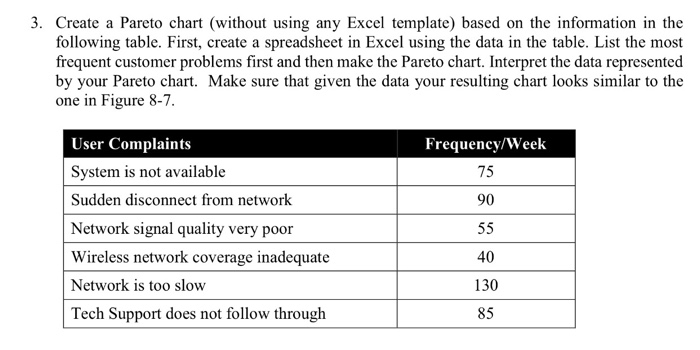
3. Create a Pareto chart (without using any Excel template) based on the information in the following table. First, create a spreadsheet in Excel using the data in the table. List the most frequent customer problems first and then make the Pareto chart. Interpret the data represented by your Pareto chart. Make sure that given the data your resulting chart looks similar to the one in Figure 8-7 Frequency/Week 75 90 User Complaints System is not available Sudden disconnect from network Network signal quality very poor Wireless network coverage inadequate Network is too slow Tech Support does not follow through 40 130 85
Step by Step Solution
There are 3 Steps involved in it
1 Expert Approved Answer
Step: 1 Unlock

Question Has Been Solved by an Expert!
Get step-by-step solutions from verified subject matter experts
Step: 2 Unlock
Step: 3 Unlock
 Study Help