







Question: 3. Create a user defined function that takes the temperature and humidity percent as inputs and writes a decision according to the following: Turn on
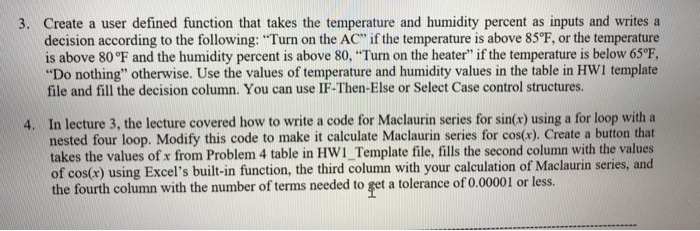
3. Create a user defined function that takes the temperature and humidity percent as inputs and writes a decision according to the following: "Turn on the AC" if the temperature is above 85F, or the temperature is above 80F and the humidity percent is above 80, "Turn on the heater" if the temperature is below 65F, "Do nothing" otherwise. Use the values of temperature and humidity values in the table in HWI template file and fill the decision column. You can use IF-Then-Else or Select Case control structures. 4. In lecture 3, the lecture covered how to write a code for Maclaurin series for sin(x) using a for loop with a nested four loop. Modify this code to make it calculate Maclaurin series for cos(x). Create a button that takes the values of x from Problem 4 table in HWI_Template file, fills the second column with the values of cos(x) using Excel's built-in function, the third column with your calculation of Maclaurin series, and the fourth column with the number of terms needed to get a tolerance of 0.00001 or less
Step by Step Solution
There are 3 Steps involved in it

Get step-by-step solutions from verified subject matter experts
 Study Help