





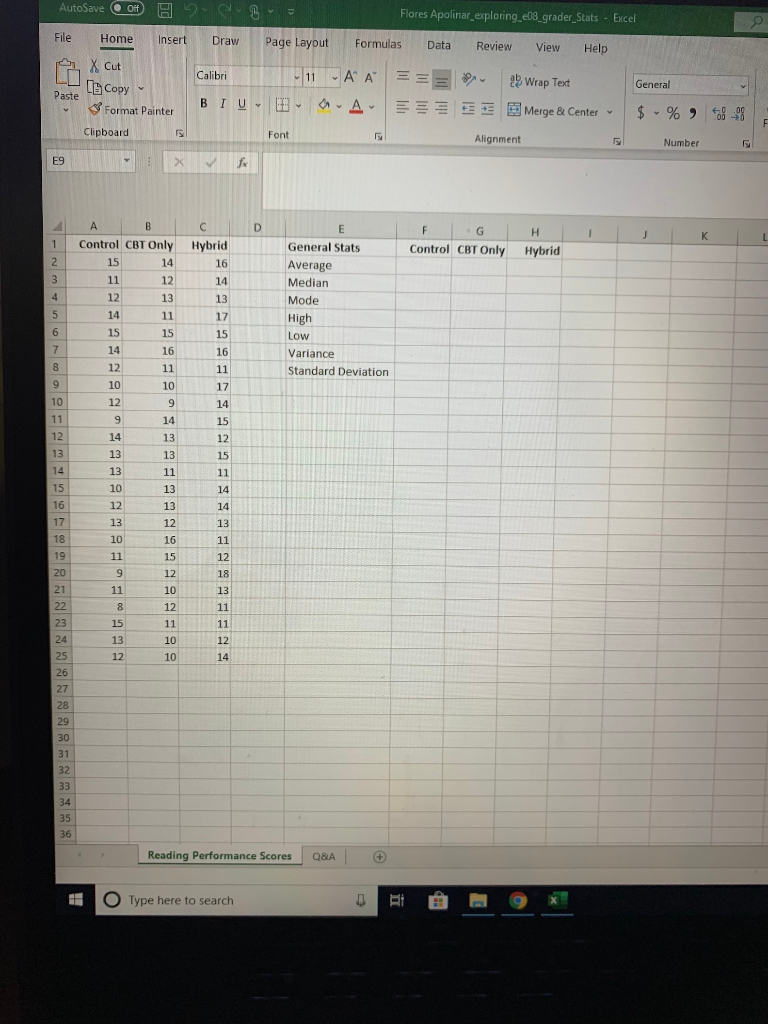
Question: 3 Flores Apolinar_exploring e08 grader_Stats - Excel Draw Page Layout Formulas Data Review View Help AutoSave 0 File Home Insert A X Cut Paste LCopy
3 Flores Apolinar_exploring e08 grader_Stats -3 Flores Apolinar_exploring e08 grader_Stats -

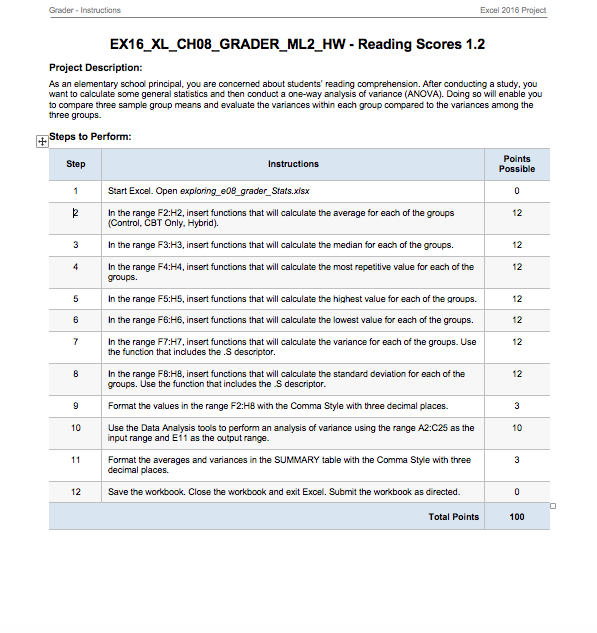
3 Flores Apolinar_exploring e08 grader_Stats - Excel Draw Page Layout Formulas Data Review View Help AutoSave 0 File Home Insert A X Cut Paste LCopy ~ Format Painter Calibri 11 A == General - A A BTU - B Wrap Text Merge & Center E $ - % - Clipboard Font Alignment Number E9 Hybrid Control CBT Only 15 14 Control CBT Only Hybrid General Stats Average Median Mode High Low Variance Standard Deviation 12 Reading Performance Scores Q&A Type here to search Grader. Instructions Excel 2018 Project EX16_XL_CHO_GRADER_ML2_HW - Reading Scores 1.2 Project Description: As an elementary school principal, you are concerned about students' reading comprehension. After conducting a study, you want to calculate some general statistics and then conduct a one-way analysis of variance (ANOVA). Doing so will enable you to compare three sample group means and evaluate the variances within each group compared to the variances among the three groups. + Steps to Perform: Step Instructions Points Possible Start Excel. Open exploring_08_grader_Stats.xlsx In the range F2:H2, insert functions that will calculate the average for each of the groups (Control, CBT Only. Hybrid). In the range F3:43, insert functions that will calculate the median for each of the groups. In the range F4:H4, insert functions that will calculate the most repetitive value for each of the groups. In the range F5:15, insert functions that will calculate the highest value for each of the groups. In the range F6:16, insert functions that will calculate the lowest value for each of the groups. In the range F7:H7, insert functions that will calculate the variance for each of the groups. Use the function that includes the .S descriptor. In the range FB:HB.insert functions that will calculate the standard deviation for each of the groups. Use the function that includes the .S descriptor. Format the values in the range F2:H8 with the Comma Style with three decimal places. Use the Data Analysis tools to perform an analysis of variance using the range A2:C25 as the input range and E11 as the output range. Format the averages and variances in the SUMMARY table with the Comma Style with three decimal places. Save the workbook. Close the workbook and exit Excel. Submit the workbook as directed 0 100

Step by Step Solution

There are 3 Steps involved in it

1 Expert Approved Answer
Step: 1 Unlock blur-text-image

Question Has Been Solved by an Expert!

Get step-by-step solutions from verified subject matter experts

Step: 2 Unlock
Step: 3 Unlock

Students Have Also Explored These Related General Management Questions!