







Question: 3. Instructions In the shop.py file, create a function called pickltems() which takes no parameters and acts as the heart of the program. This function
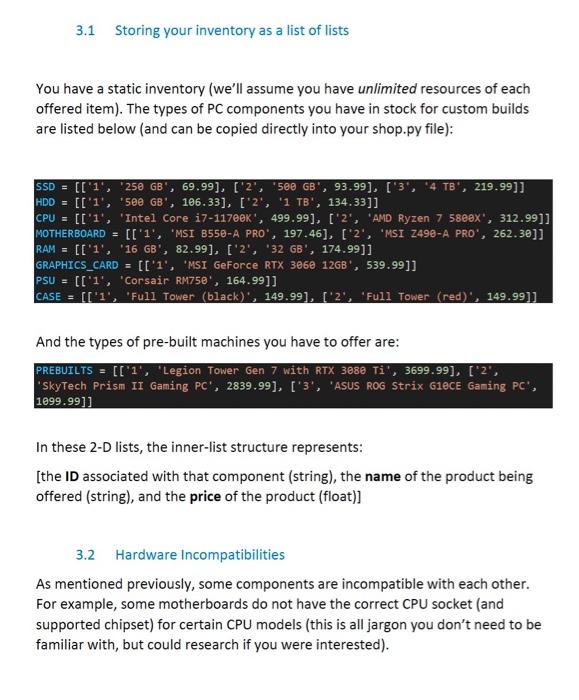
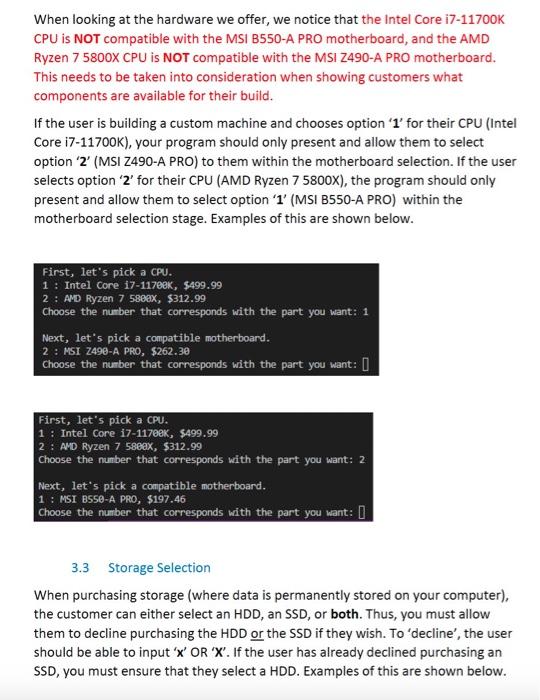
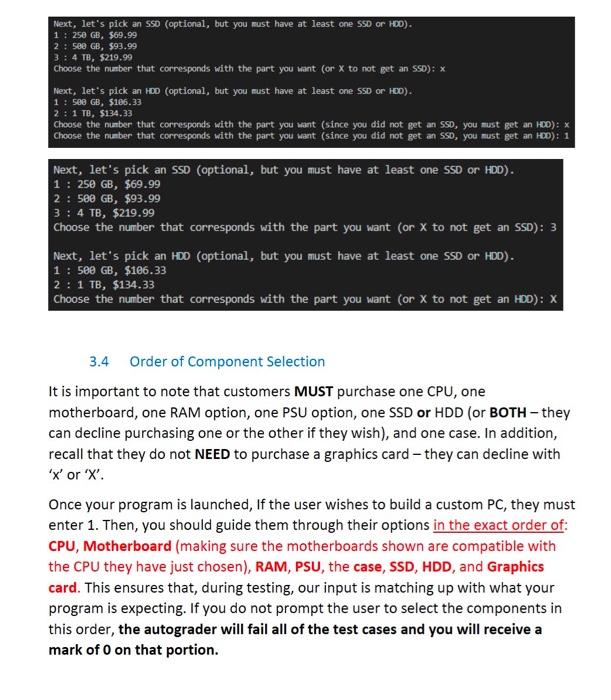
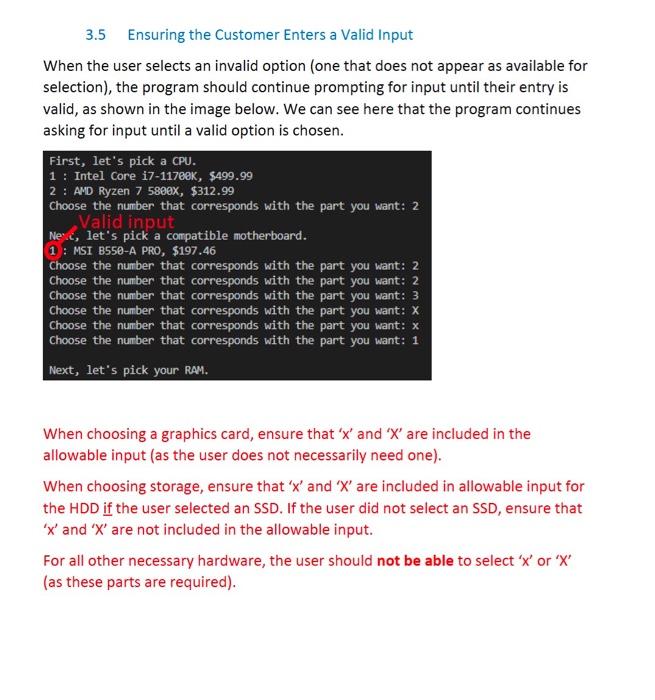
3. Instructions In the shop.py file, create a function called pickltems() which takes no parameters and acts as the heart of the program. This function will mainly consist of a userinput-driven system for ordering PCs, but can (and definitely should) get help from separate helper functions (you'll decide what those helper functions are and what they do). The pickltems() function will walk the user through their order using print statements and collecting user input, and will ultimately return a list with the prices of each PC a user has purchased (whether they built it themselves or bought a pre-built). You have a static inventory (we'll assume you have unlimited resources of each offered item). The types of PC components you have in stock for custom builds are listed below (and can be copied directly into your shop.py file): And the types of pre-built machines you have to offer are: PREBUILTS =[[1 ', 'Legion Tower Gen 7 with RTX 3080 Ti', 3699.99], ['2', 'SkyTech Prism II Gaming PC', 2839.99], ['3', 'ASUS ROG Strix G1eCE Gaming PC', 1099.99]] In these 2-D lists, the inner-list structure represents: [the ID associated with that component (string), the name of the product being offered (string), and the price of the product (float)] 3.2 Hardware Incompatibilities As mentioned previously, some components are incompatible with each other. For example, some motherboards do not have the correct CPU socket (and supported chipset) for certain CPU models (this is all jargon you don't need to be familiar with, but could research if you were interested). When looking at the hardware we offer, we notice that the Intel Core i7-11700K CPU is NOT compatible with the MSI B550-A PRO motherboard, and the AMD Ryzen 75800 CPU is NOT compatible with the MSI Z490-A PRO motherboard. This needs to be taken into consideration when showing customers what components are available for their build. If the user is building a custom machine and chooses option ' 1 ' for their CPU (Intel Core i7-11700K), your program should only present and allow them to select option ' 2 ' (MSI Z490-A PRO) to them within the motherboard selection. If the user selects option ' 2 ' for their CPU (AMD Ryzen 75800X ), the program should only present and allow them to select option ' 1 ' (MSI B550-A PRO) within the motherboard selection stage. Examples of this are shown below. First, let's pick a CPU. 1 : Intel core 1711760K,$499.99 2: AND Ryzen 75809x,$312.99 Choose the number that corresponds with the part you want: 1 Next, let's pick a compatible motherboard. 2: MSI Z49e-A PRO, $262.30 choose the number that corresponds with the part you want: First, let's pick a CPU. 1 : Intel core 17-117ek, $499.99 2 : AVD Ryzen 7 58eax, $312.99 Choose the number that corresponds with the part you want: 2 Next, let's pick a compatible motherboard. 1 : MSI BS50-A PRO, $197.46 choose the number that corresponds with the part you want: 3.3 Storage Selection When purchasing storage (where data is permanently stored on your computer), the customer can either select an HDD, an SSD, or both. Thus, you must allow them to decline purchasing the HDD or the SSD if they wish. To 'decline', the user should be able to input ' X ' OR ' X '. If the user has already declined purchasing an SSD, you must ensure that they select a HDD. Examples of this are shown below. Next, let's pick an 550 (optional, but you must have at least one 550 or 100 ). 1:250GB,$69.99 2:500GB,$93.99 3:4TB,5219.99 Choose the number that corresponds with the part you want (or x to not get an SSD): x Mext, let's pick an 100 (optional, but you nust have at least one 5SD or HOD). 1:500GB,$106.35 2:1TB,$134,33 Choose the number that corresponds with the part you want (since you did not get an 590 , you must get an hoo): x Choose the number that corresponds with the part you want (since you did not get an 550 , you must get an HoD): 1. Next, let's pick an SSD (optional, but you must have at least one SSD or HDD). 1=250GB,$69.99 2:500GB,$93.99 3:4TB,$219.99 Choose the number that corresponds with the part you want (or X to not get an SSD): 3 Next, let's pick an HDO (optional, but you must have at least one SSD or HDD). 1:500GB,$106.33 2:1TB,$134.33 Choose the number that corresponds with the part you want (or X to not get an HDD): X 3.4 Order of Component Selection It is important to note that customers MUST purchase one CPU, one motherboard, one RAM option, one PSU option, one SSD or HDD (or BOTH - they can decline purchasing one or the other if they wish), and one case. In addition, recall that they do not NEED to purchase a graphics card - they can decline with ' x ' or ' x '. Once your program is launched, If the user wishes to build a custom PC, they must enter 1 . Then, you should guide them through their options in the exact order of: CPU, Motherboard (making sure the motherboards shown are compatible with the CPU they have just chosen), RAM, PSU, the case, SSD, HDD, and Graphics card. This ensures that, during testing, our input is matching up with what your program is expecting. If you do not prompt the user to select the components in this order, the autograder will fail all of the test cases and you will receive a mark of 0 on that portion. When the user selects an invalid option (one that does not appear as available for selection), the program should continue prompting for input until their entry is valid, as shown in the image below. We can see here that the program continues asking for input until a valid option is chosen. First, let's pick a CPU. 1 : Intel core 1711760K,$499.99 2: AND Ryzen 7 5800x, $312.99 Choose the number that corresponds with the part you want: 2 Ne'c, let's pick a compatible motherboard. 1 : MSI B550-A PRO, $197.46 Choose the number that corresponds with the part you want: 2 Choose the number that corresponds with the part you want: 2 Choose the number that corresponds with the part you want: 3 Choose the number that corresponds with the part you want: X Choose the number that corresponds with the part you want: x Choose the number that corresponds with the part you want: 1 Next, let's pick your RAM. When choosing a graphics card, ensure that ' x ' and ' X ' are included in the allowable input (as the user does not necessarily need one). When choosing storage, ensure that ' x ' and ' X ' are included in allowable input for the HDD if the user selected an SSD. If the user did not select an SSD, ensure that ' x ' and ' X ' are not included in the allowable input. For all other necessary hardware, the user should not be able to select ' x ' or ' X ' (as these parts are required). 3.6 What is Returned from pickltems()? When building a custom-build, once all of the parts are successfully picked, the total price of all the parts combined should be added to a list that will eventually be returned from pickitems() (once the user selects that they're ready to checkout with ' 3 '). The user, if they wish, can also continue to either build another PC (by pressing ' 1 '), or add a pre-built PC to their cart (by pressing ' 2 '). The pickltems() function should return a list of prices of each PC ordered by one customer in the order that they were purchased. Again, one customer could order as many custom-built and pre-built machines as they wish (before pressing ' 3 ' to checkout) and the total price of each should be returned in a list in the order that the customer purchased them once they do press ' 3 ' to checkout. Note that if the user does not order anything, an empty list should be returned. 3.7 After the user selects ' 3 ' to checkout, you should simply print the list that is returned from pickltems(). 3.8 After completing a custom-build, you should print 'You have selected all of the required parts! Your total for this PC is $ 'where' is replaced with the price for that specific PC. If a pre-built is added, you should print ' Your total price for this pre-built is $ ' where '__ 'is replaced with the price for that specific pre-built. This allows the user to know how much every individual PC costs before checking out
Step by Step Solution
There are 3 Steps involved in it

Get step-by-step solutions from verified subject matter experts
 Study Help