







Question: 3. MATLAB. Write a MATLAB function that will generate nodal coordinates for a 2d or 3d grid (lattice) pattern. The nodal coordinates will be stored
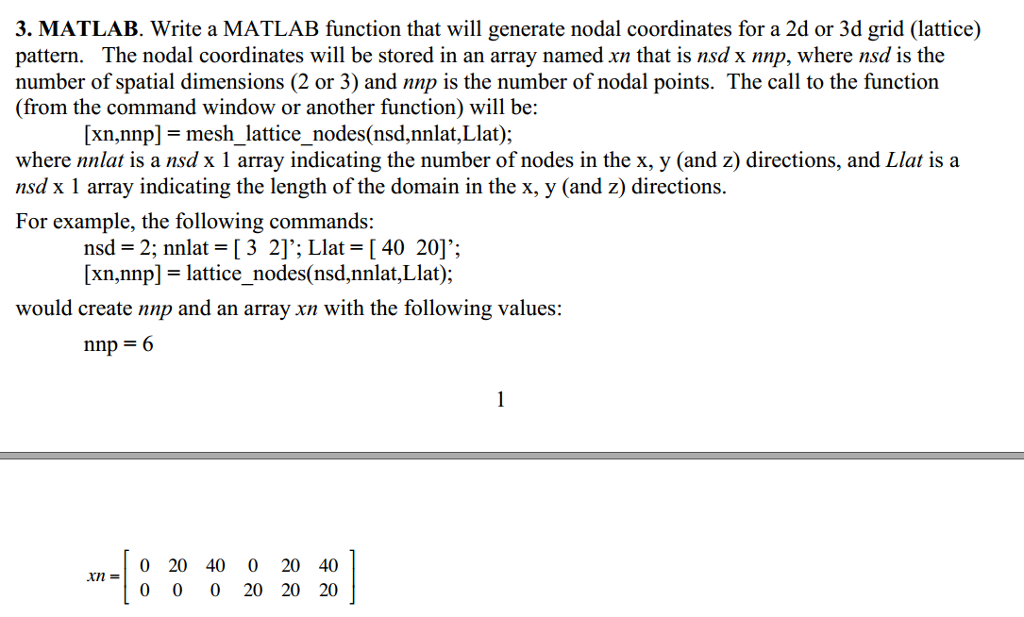
3. MATLAB. Write a MATLAB function that will generate nodal coordinates for a 2d or 3d grid (lattice) pattern. The nodal coordinates will be stored in an array named xn that is nsd x nnp, where nsd is the number of spatial dimensions (2 or 3) and nnp is the number of nodal points. The call to the function (from the command window or another function) will be: [xn,nnp]- mesh lattice nodes(nsd,nnlat,Llat); where nnlat is a nsd x 1 array indicating the number of nodes in the x, y (and z) directions, and Llat isa nsd x 1 array indicating the length of the domain in the x, y (and z) directions For example, the following commands: nsd = 2; nnlat = [ 3 2]'; Llat = [ 40 20]. ; xn.nnpl- lattice nodes(nsd.nnlat,Llat ); would create nnp and an array xn with the following values: nnp = 6 0 20 40 0 20 40 0 0 0 20 20 20 xn = 3. MATLAB. Write a MATLAB function that will generate nodal coordinates for a 2d or 3d grid (lattice) pattern. The nodal coordinates will be stored in an array named xn that is nsd x nnp, where nsd is the number of spatial dimensions (2 or 3) and nnp is the number of nodal points. The call to the function (from the command window or another function) will be: [xn,nnp]- mesh lattice nodes(nsd,nnlat,Llat); where nnlat is a nsd x 1 array indicating the number of nodes in the x, y (and z) directions, and Llat isa nsd x 1 array indicating the length of the domain in the x, y (and z) directions For example, the following commands: nsd = 2; nnlat = [ 3 2]'; Llat = [ 40 20]. ; xn.nnpl- lattice nodes(nsd.nnlat,Llat ); would create nnp and an array xn with the following values: nnp = 6 0 20 40 0 20 40 0 0 0 20 20 20 xn =
Step by Step Solution
There are 3 Steps involved in it

Get step-by-step solutions from verified subject matter experts
 Study Help