Question: 3) Once you have converted the program to C++, modify the program to implement the following features (using C++ features and syntax): 1. Modify the
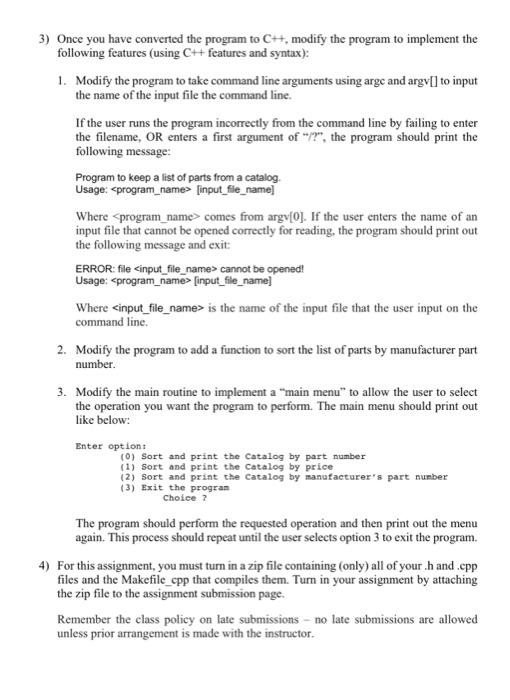
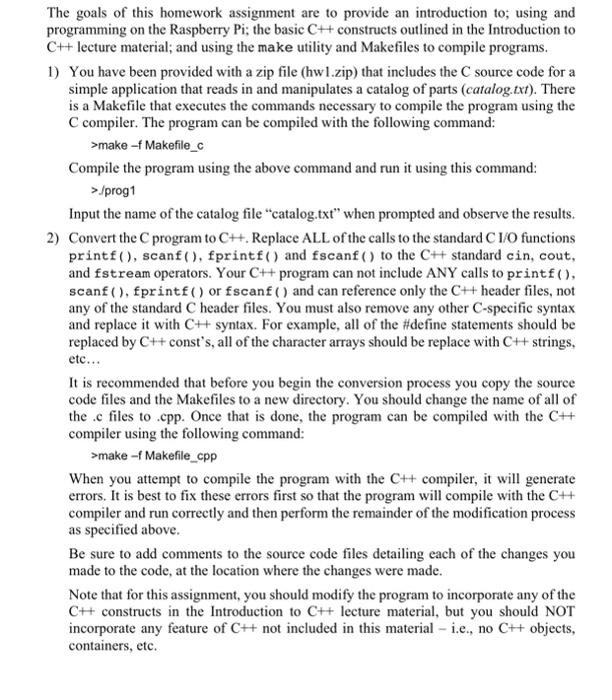
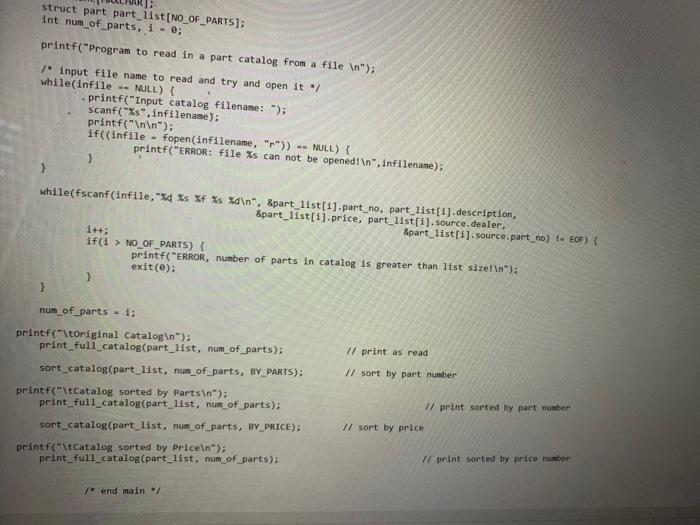
3) Once you have converted the program to C++, modify the program to implement the following features (using C++ features and syntax): 1. Modify the program to take command line arguments using arge and argv[] to input the name of the input file the command line. If the user runs the program incorrectly from the command line by failing to enter the filename, OR enters a first argument of "?", the program should print the following message: Program to keep a list of parts from a catalog Usage: [input_file_name] Where program_name> comes from argv[0]. If the user enters the name of an input file that cannot be opened correctly for reading, the program should print out the following message and exit: ERROR: file cannot be opened! Usage: {input_file_name] Where is the name of the input file that the user input on the command line. 2. Modify the program to add a function to sort the list of parts by manufacturer part number. 3. Modify the main routine to implement a "main menu" to allow the user to select the operation you want the program to perform. The main menu should print out like below: Enter option: (0) Sort and print the Catalog by part number (1) Sort and print the catalog by price (2) Sort and print the Catalog by manufacturer's part number (3) Exit the program Choice ? The program should perform the requested operation and then print out the menu again. This process should repeat until the user selects option 3 to exit the program. 4) For this assignment, you must turn in a zip file containing (only) all of your hand.cpp files and the Makefile_cpp that compiles them. Turn in your assignment by attaching the zip file to the assignment submission page. Remember the class policy on late submissions - no late submissions are allowed unless prior arrangement is made with the instructor The goals of this homework assignment are to provide an introduction to; using and programming on the Raspberry Pi; the basic C++ constructs outlined in the Introduction to C++ lecture material; and using the make utility and Makefiles to compile programs. 1) You have been provided with a zip file (hw1.zip) that includes the source code for a simple application that reads in and manipulates a catalog of parts (catalog.txt). There is a Makefile that executes the commands necessary to compile the program using the C compiler. The program can be compiled with the following command: >make - Makefile_c Compile the program using the above command and run it using this command: > /prog1 Input the name of the catalog file "catalog.txt" when prompted and observe the results. 2) Convert the program to Ch. Replace ALL of the calls to the standard C 1/0 functions printf(), scanf(), fprintf() and fscanf() to the C++ standard cin, cout, and fstream operators. Your C++ program can not include ANY calls to printf(), scanf(), fprintf() or fscanf() and can reference only the C++ header files, not any of the standard C header files. You must also remove any other C-specific syntax and replace it with C++ syntax. For example, all of the #define statements should be replaced by C++ const's, all of the character arrays should be replace with C++ strings. etc... It is recommended that before you begin the conversion process you copy the source code files and the Makefiles to a new directory. You should change the name of all of the .c files to .cpp. Once that is done, the program can be compiled with the C# compiler using the following command: >make - Makefile_cpp When you attempt to compile the program with the C++ compiler, it will generate errors. It is best to fix these errors first so that the program will compile with the C++ compiler and run correctly and then perform the remainder of the modification process as specified above. Be sure to add comments to the source code files detailing each of the changes you made to the code, at the location where the changes were made. Note that for this assignment, you should modify the program to incorporate any of the CH constructs in the Introduction to C++ lecture material, but you should NOT incorporate any feature of C++ not included in this material - i.e., no C++ objects, containers, etc. 110.h> #include include "hu. void print_full_catalog(struct part list[], int num_parts); void print_catalog(struct part list[], int num_parts); void sort_catalog(struct part list[], int num parts, int price_or_parts); void main(void) FILE "infile - NULL; char infilename[MAXCHAR); char line [MAXCHAR): struct part part_list [NO_OF_PARTS); Int num_of_parts, i = 0; printf("Program to read in a part catalog from a file "); / Input File name to read and try and open it "/ while(infile -- NULL) { printf("thput catalog Filename: "); scanf("%s".infilename); printf(" "); if((infile = fopen(Infilename, "r">) -- NULL) { printf("ERROR: File Xs can not be opened! ".infilename); } 2 while(fscanf(infile,"%d XF Xs xd ", Spart_list(1).part_no, part list[1].description, Spart_list[1].price, part_list[1]. source dealer, Spart_list[1]. source.part.no) te EOF) if(1 > NO_OF_PARTS) printf("ERROR, number of parts in catalog is greater than list size!"); exit(); Il print as read nun of parts - 1; printf("\toriginal Catalog in); print_full_catalog(part_list, num_of_parts): sort_catalog(part list, num of parts, BY PARTS); printf("\tCatalog sorted by PartsIn"); print_full_catalog(part_11st, num_of_parts) // Sort by part number Il print sorted by part number // sort by price sort_catalog(part list, nun of parts, BY PRICE); tristel hy Price struct part part list [NO_OF_PARTS); int num_of_parts, i -e; printf("Program to read in a part catalog from a file "); input file name to read and try and open it */ while(infile -- NULL) { printf("Input catalog filename: "); scanf("%s", infilename); printf(" "); if((infile - fopen(infilename, "r")) -- NULL) { printf("ERROR: File %s can not be opened! ", infilename); } > while(fscanf(infile, "x4 %s %f %s %d ", part list[i].part_no, part_list[1].description, &part_list[i].price, part_list[i].source.dealer. &part_list[1]. source.part_no) - EOF) ( i++; if(i > NO_OF_PARTS) { printf("ERROR, number of parts in catalog is greater than list size! "); exit(e) > } num_of_parts - i; // print as read // sort by part number printf("\tOriginal Catalog "); print_full_catalog(part_list, num_of_parts); sort_catalog(part_list, num_of_parts, BY_PARTS); printf("\tCatalog sorted by Parts "); print_full_catalog(part list, num of parts); sort_catalog(part_list, num_of_parts, BY_PRICE); printf("\tCatalog sorted by Price "); print_full_catalog(part_list, num of parts); // print sorted by part number // sort by price Il print sorted by price number end main/ 3) Once you have converted the program to C++, modify the program to implement the following features (using C++ features and syntax): 1. Modify the program to take command line arguments using arge and argv[] to input the name of the input file the command line. If the user runs the program incorrectly from the command line by failing to enter the filename, OR enters a first argument of "?", the program should print the following message: Program to keep a list of parts from a catalog Usage: [input_file_name] Where program_name> comes from argv[0]. If the user enters the name of an input file that cannot be opened correctly for reading, the program should print out the following message and exit: ERROR: file cannot be opened! Usage: {input_file_name] Where is the name of the input file that the user input on the command line. 2. Modify the program to add a function to sort the list of parts by manufacturer part number. 3. Modify the main routine to implement a "main menu" to allow the user to select the operation you want the program to perform. The main menu should print out like below: Enter option: (0) Sort and print the Catalog by part number (1) Sort and print the catalog by price (2) Sort and print the Catalog by manufacturer's part number (3) Exit the program Choice ? The program should perform the requested operation and then print out the menu again. This process should repeat until the user selects option 3 to exit the program. 4) For this assignment, you must turn in a zip file containing (only) all of your hand.cpp files and the Makefile_cpp that compiles them. Turn in your assignment by attaching the zip file to the assignment submission page. Remember the class policy on late submissions - no late submissions are allowed unless prior arrangement is made with the instructor The goals of this homework assignment are to provide an introduction to; using and programming on the Raspberry Pi; the basic C++ constructs outlined in the Introduction to C++ lecture material; and using the make utility and Makefiles to compile programs. 1) You have been provided with a zip file (hw1.zip) that includes the source code for a simple application that reads in and manipulates a catalog of parts (catalog.txt). There is a Makefile that executes the commands necessary to compile the program using the C compiler. The program can be compiled with the following command: >make - Makefile_c Compile the program using the above command and run it using this command: > /prog1 Input the name of the catalog file "catalog.txt" when prompted and observe the results. 2) Convert the program to Ch. Replace ALL of the calls to the standard C 1/0 functions printf(), scanf(), fprintf() and fscanf() to the C++ standard cin, cout, and fstream operators. Your C++ program can not include ANY calls to printf(), scanf(), fprintf() or fscanf() and can reference only the C++ header files, not any of the standard C header files. You must also remove any other C-specific syntax and replace it with C++ syntax. For example, all of the #define statements should be replaced by C++ const's, all of the character arrays should be replace with C++ strings. etc... It is recommended that before you begin the conversion process you copy the source code files and the Makefiles to a new directory. You should change the name of all of the .c files to .cpp. Once that is done, the program can be compiled with the C# compiler using the following command: >make - Makefile_cpp When you attempt to compile the program with the C++ compiler, it will generate errors. It is best to fix these errors first so that the program will compile with the C++ compiler and run correctly and then perform the remainder of the modification process as specified above. Be sure to add comments to the source code files detailing each of the changes you made to the code, at the location where the changes were made. Note that for this assignment, you should modify the program to incorporate any of the CH constructs in the Introduction to C++ lecture material, but you should NOT incorporate any feature of C++ not included in this material - i.e., no C++ objects, containers, etc. 110.h> #include include "hu. void print_full_catalog(struct part list[], int num_parts); void print_catalog(struct part list[], int num_parts); void sort_catalog(struct part list[], int num parts, int price_or_parts); void main(void) FILE "infile - NULL; char infilename[MAXCHAR); char line [MAXCHAR): struct part part_list [NO_OF_PARTS); Int num_of_parts, i = 0; printf("Program to read in a part catalog from a file "); / Input File name to read and try and open it "/ while(infile -- NULL) { printf("thput catalog Filename: "); scanf("%s".infilename); printf(" "); if((infile = fopen(Infilename, "r">) -- NULL) { printf("ERROR: File Xs can not be opened! ".infilename); } 2 while(fscanf(infile,"%d XF Xs xd ", Spart_list(1).part_no, part list[1].description, Spart_list[1].price, part_list[1]. source dealer, Spart_list[1]. source.part.no) te EOF) if(1 > NO_OF_PARTS) printf("ERROR, number of parts in catalog is greater than list size!"); exit(); Il print as read nun of parts - 1; printf("\toriginal Catalog in); print_full_catalog(part_list, num_of_parts): sort_catalog(part list, num of parts, BY PARTS); printf("\tCatalog sorted by PartsIn"); print_full_catalog(part_11st, num_of_parts) // Sort by part number Il print sorted by part number // sort by price sort_catalog(part list, nun of parts, BY PRICE); tristel hy Price struct part part list [NO_OF_PARTS); int num_of_parts, i -e; printf("Program to read in a part catalog from a file "); input file name to read and try and open it */ while(infile -- NULL) { printf("Input catalog filename: "); scanf("%s", infilename); printf(" "); if((infile - fopen(infilename, "r")) -- NULL) { printf("ERROR: File %s can not be opened! ", infilename); } > while(fscanf(infile, "x4 %s %f %s %d ", part list[i].part_no, part_list[1].description, &part_list[i].price, part_list[i].source.dealer. &part_list[1]. source.part_no) - EOF) ( i++; if(i > NO_OF_PARTS) { printf("ERROR, number of parts in catalog is greater than list size! "); exit(e) > } num_of_parts - i; // print as read // sort by part number printf("\tOriginal Catalog "); print_full_catalog(part_list, num_of_parts); sort_catalog(part_list, num_of_parts, BY_PARTS); printf("\tCatalog sorted by Parts "); print_full_catalog(part list, num of parts); sort_catalog(part_list, num_of_parts, BY_PRICE); printf("\tCatalog sorted by Price "); print_full_catalog(part_list, num of parts); // print sorted by part number // sort by price Il print sorted by price number end main/








![Modify the program to take command line arguments using arge and argv[]](https://dsd5zvtm8ll6.cloudfront.net/si.experts.images/questions/2024/09/66f009a21d1b4_13766f009a1b1b4e.jpg)

 Study Help