







Question: 3. PIVOTING DIE (5 MARKS) Consider the board below, which can be imagined as being infinite, so only a small part is represented. A
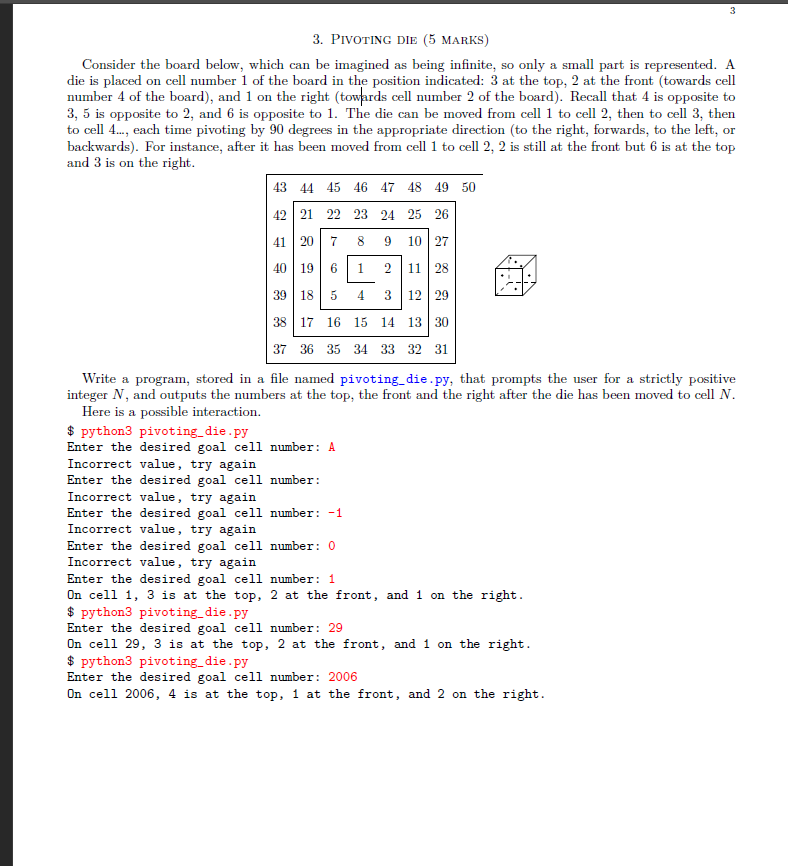
3. PIVOTING DIE (5 MARKS) Consider the board below, which can be imagined as being infinite, so only a small part is represented. A die is placed on cell number 1 of the board in the position indicated: 3 at the top, 2 at the front (towards cell number 4 of the board), and 1 on the right (towards cell number 2 of the board). Recall that 4 is opposite to 3, 5 is opposite to 2, and 6 is opposite to 1. The die can be moved from cell 1 to cell 2, then to cell 3, then to cell 4..., each time pivoting by 90 degrees in the appropriate direction (to the right, forwards, to the left, or backwards). For instance, after it has been moved from cell 1 to cell 2, 2 is still at the front but 6 is at the top and 3 is on the right. 43 44 45 46 47 48 49 42 21 22 23 24 25 26 41 20 7 8 9 10 27 19 6 1 2 11 28 40 39 18 5 4 3 12 29 38 17 16 15 14 13 30 37 36 35 34 33 32 31 Enter the desired goal cell number: A Incorrect value, try again Enter the desired goal cell number: Incorrect value, try again Enter the desired goal cell number: -1 Incorrect value, try again 50 Write a program, stored in a file named pivoting_die.py, that prompts the user for a strictly positive integer N, and outputs the numbers at the top, the front and the right after the die has been moved to cell N. Here is a possible interaction. $python3 pivoting_die.py Enter the desired goal cell number: 0 Incorrect value, try again . Enter the desired goal cell number: 1 On cell 1, 3 is at the top, 2 at the front, and 1 on the right. $ python3 pivoting_die.py 3 Enter the desired goal cell number: 29 On cell 29, 3 is at the top, 2 at the front, and 1 on the right. $python3 pivoting_die.py Enter the desired goal cell number: 2006 On cell 2006, 4 is at the top, 1 at the front, and 2 on the right.
Step by Step Solution
3.42 Rating (155 Votes )
There are 3 Steps involved in it
this task in Python by implementing a function that calculates the positions of the t... View full answer

Get step-by-step solutions from verified subject matter experts
 Study Help