







Question: 3) Your Event Handler Code for the Button object a. b. c. d. Call method to flip the coin Use the String returned from the
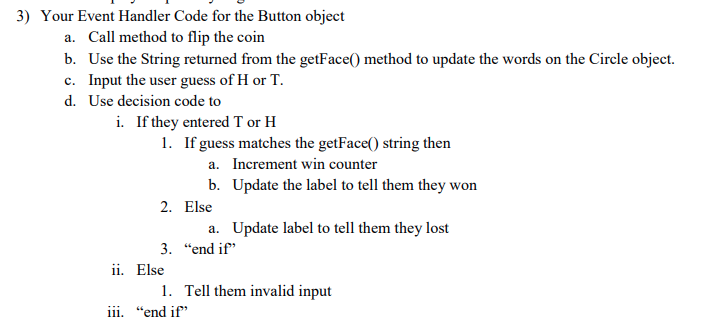
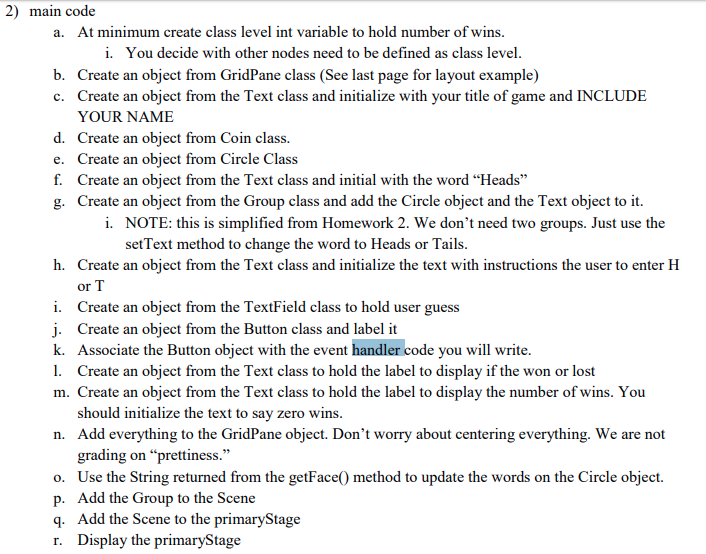
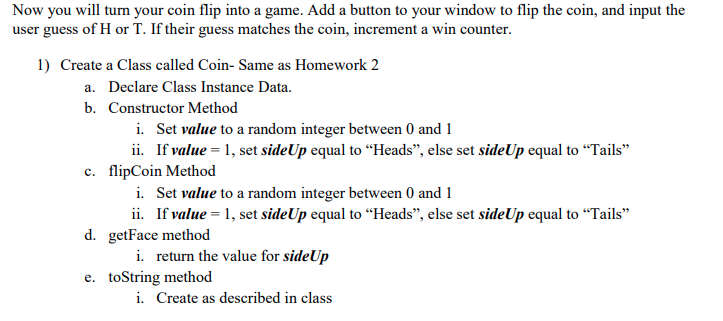
3) Your Event Handler Code for the Button object a. b. c. d. Call method to flip the coin Use the String returned from the getFace) method to update the words on the Circle object Input the user guess of H or T. Use decision code to i. If they entered T orH 1. If guess matches the getFace() string then Increment win counter a. b. Update the label to tell them they won 2. Else 3. "end if 1. Tell them invalid input a. Update label to tell them they lost ii. Else iii. "end if 2) main code a. At minimum create class level int variable to hold number of wins i. You decide with other nodes need to be defined as class level b. Create an object from GridPane class (See last page for layout example) Create an object from the Text class and initialize with your title of game and INCLUDE YOUR NAME Create an obiect from Coin class. Create an obiect from Circle Class Create an object from the Text class and initial with the word "Heads" Create an object from the Group class and add the Circle object and the Text object to it. c. d. e. f. g. i. NOTE: this is simplified from Homework 2. We don't need two groups. Just use the setText method to change the word to Heads or Tails h. Create an object from the Text class and initialize the text with instructions the user to enter H or T i. Create an object from the TextField class to hold user guess i. Create an obiect from the Button class and label it k. Associate the Button object with the event handler code you will write 1. Create an object from the Text class to hold the label to display if the won or lost m. Create an object from the Text class to hold the label to display the number of wins. You should initialize the text to say zero wins Add everything to the GridPane object. Don't worry about centering everything. We are not grading on "prettiness." Use the String returned from the getFace(0 method to update the words on the Circle object. Add the Group to the Scene Add the Scene to the primaryStage Display the primaryStage n. o. p. 9 r. Now you will turn your coin flip into a game. Add a button to your window to flip the coin, and input the user guess of H or T. If their guess matches the coin, increment a win counter. 1) Create a Class called Coin- Same as Homework 2 a. Declare Class Instance Data. b. Constructor Method Set value to a random integer between 0 and 1 ii. i. If value -1, set sideUp equal to "Heads", else set sideUp equal to "Tails" c. flipCoin Method i. Set value to a random integer between 0 and 1 ii. If valueesideUp equal to "Heads", else set sideUp equal to "Tails" i. return the value for sideUp i. Create as described in class d. getFace method e. toString method 3) Your Event Handler Code for the Button object a. b. c. d. Call method to flip the coin Use the String returned from the getFace) method to update the words on the Circle object Input the user guess of H or T. Use decision code to i. If they entered T orH 1. If guess matches the getFace() string then Increment win counter a. b. Update the label to tell them they won 2. Else 3. "end if 1. Tell them invalid input a. Update label to tell them they lost ii. Else iii. "end if 2) main code a. At minimum create class level int variable to hold number of wins i. You decide with other nodes need to be defined as class level b. Create an object from GridPane class (See last page for layout example) Create an object from the Text class and initialize with your title of game and INCLUDE YOUR NAME Create an obiect from Coin class. Create an obiect from Circle Class Create an object from the Text class and initial with the word "Heads" Create an object from the Group class and add the Circle object and the Text object to it. c. d. e. f. g. i. NOTE: this is simplified from Homework 2. We don't need two groups. Just use the setText method to change the word to Heads or Tails h. Create an object from the Text class and initialize the text with instructions the user to enter H or T i. Create an object from the TextField class to hold user guess i. Create an obiect from the Button class and label it k. Associate the Button object with the event handler code you will write 1. Create an object from the Text class to hold the label to display if the won or lost m. Create an object from the Text class to hold the label to display the number of wins. You should initialize the text to say zero wins Add everything to the GridPane object. Don't worry about centering everything. We are not grading on "prettiness." Use the String returned from the getFace(0 method to update the words on the Circle object. Add the Group to the Scene Add the Scene to the primaryStage Display the primaryStage n. o. p. 9 r. Now you will turn your coin flip into a game. Add a button to your window to flip the coin, and input the user guess of H or T. If their guess matches the coin, increment a win counter. 1) Create a Class called Coin- Same as Homework 2 a. Declare Class Instance Data. b. Constructor Method Set value to a random integer between 0 and 1 ii. i. If value -1, set sideUp equal to "Heads", else set sideUp equal to "Tails" c. flipCoin Method i. Set value to a random integer between 0 and 1 ii. If valueesideUp equal to "Heads", else set sideUp equal to "Tails" i. return the value for sideUp i. Create as described in class d. getFace method e. toString method
Step by Step Solution
There are 3 Steps involved in it

Get step-by-step solutions from verified subject matter experts
 Study Help