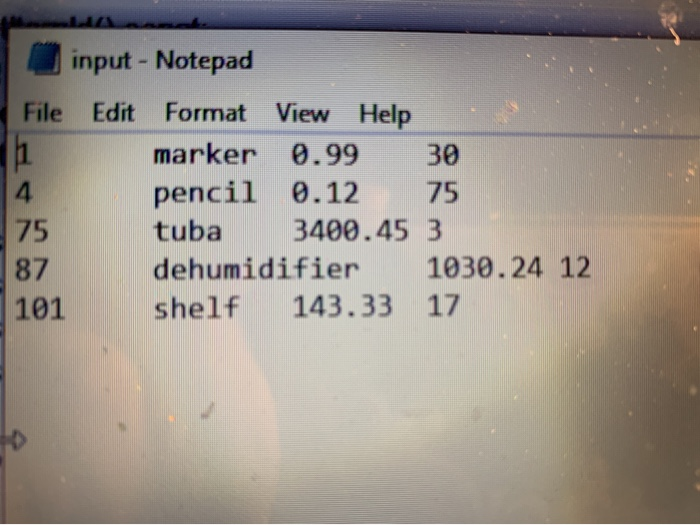
Question: 3:13 #include #include #include #include item.h using namespace std; const int ARR_SIZE = 5; const string FILENAME = input.txt; int main() Item itemList[ARR_SIZE]; ifstream inData;
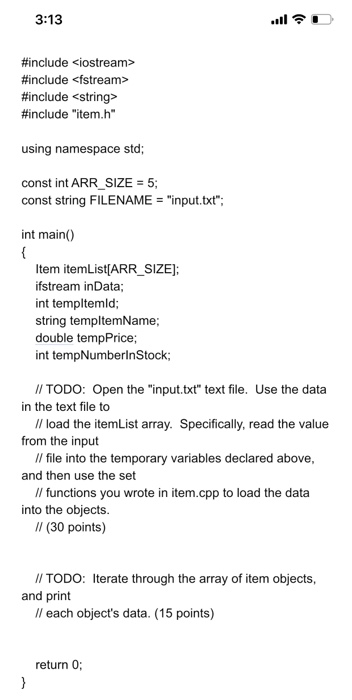
 3:13 #include #include #include #include "item.h" using namespace std; const int
ARR_SIZE = 5; const string FILENAME = "input.txt"; int main() Item itemList[ARR_SIZE];
ifstream inData; int templtemld; string templtemName; double tempPrice; int tempNumberinStock; I/ TODO:

3:13 #include #include #include #include "item.h" using namespace std; const int ARR_SIZE = 5; const string FILENAME = "input.txt"; int main() Item itemList[ARR_SIZE]; ifstream inData; int templtemld; string templtemName; double tempPrice; int tempNumberinStock; I/ TODO: Open the "input.txt" text file. Use the data in the text file to I/ load the itemList array. Specifically, read the value from the input I/ file into the temporary variables declared above, and then use the set Il functions you wrote in item.cpp to load the data into the objects. II (30 points) II TODO: Iterate through the array of item objects, and print Il each object's data. (15 points) return 0; } #pragma once #include #include using namespace std; class Item { public: Item(); Item(int, string, double, int); int getltemld() const; string getltemName() const; double getPrice() const; int getNumberlnStock() const; void setltemld(int); void setltemName(string); void setPrice(double); void setNumberlnStock(int); void printltem() const; private: int itemld; string itemName; double price; int numberlnStock; }; input - Notepad File Edit Format View Help marker 0.99 30 4. pencil 0.12 75 75 87 101 tuba 3400.45 3 1030.24 12 dehumidifier 143.33 17 shelf

Step by Step Solution

There are 3 Steps involved in it

1 Expert Approved Answer
Step: 1 Unlock blur-text-image
Question Has Been Solved by an Expert!

Get step-by-step solutions from verified subject matter experts

Step: 2 Unlock
Step: 3 Unlock

Students Have Also Explored These Related Databases Questions!