







Question: 3.3 Task 10: Generating Two Executable Files with the Same MD5 Hash [7 Marks] In this task, you ace ginn the folkwing C program. Your
![Hash [7 Marks] In this task, you ace ginn the folkwing C](https://dsd5zvtm8ll6.cloudfront.net/si.experts.images/questions/2024/09/66f3219248187_87366f32191b0a20.jpg)
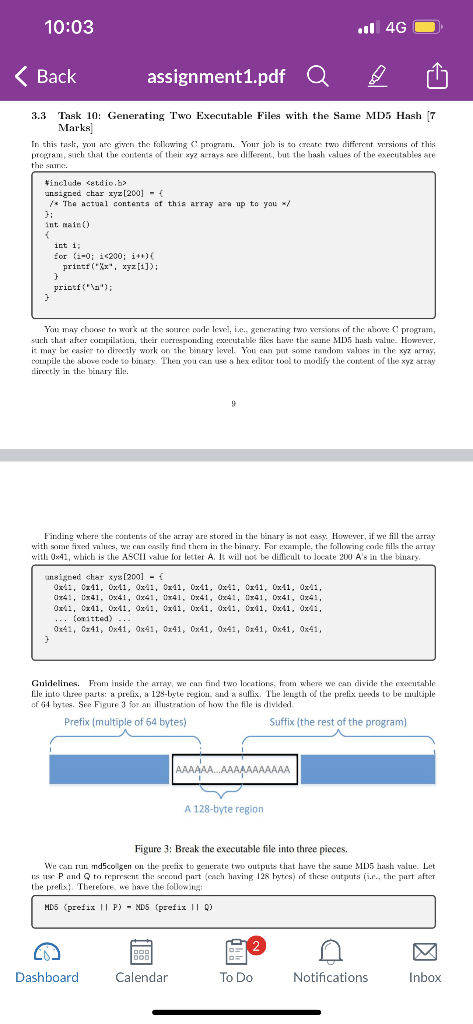
3.3 Task 10: Generating Two Executable Files with the Same MD5 Hash [7 Marks] In this task, you ace ginn the folkwing C program. Your job is to exeste two diffrrent versions of this propran, such that the coutents of theit xyz atrays are different, but the hash values of the executables ate the same. You may choos to work at the suurce sode leswi, i.e. generating two wersions of the ahowe C program, suith that iffer compilation, their ceermponding executilble fikes have the silns MD5 hask value. Humever, it may be easiey to divectly work on the binary level. You can jut some random values in the xyz artay, compile the abone code to binary. Thea you can use s lex edibot tool to modify the coutent of the xyz atray tiecetly in the binary file. y Finding wbere the coutents af the array are stored in the binary is not ensy. However, if we fill the array with some ixed mines, we cas ersily find them in the bianyy. For example, the following onde filk the array with 041, which is the ASCII value for lecter A. It will bot be diffcult to locate 200 A's in the binary. Guidelines. From inside the array, we can find two locations, from where we can divide the execatable Ble iute tlese parts: a peelix, a 12s-byte region, and a sullix. The length of the prefix seeds to be mullijple of 64 bytes. See Figure 3 for an illustration of how the file is dividei. Figure 3: Break the executable file into three pieces. We can run md5collgen on the prefix to generate two outputs that have the sampe MD5 hash value. Let 1s us: P and Q to mprrsent the sreond pat (coch having 128 bytes) of these outputs (i.ce, the part after the preflix?. Therefote, ue bave the following ; with 041, which is the ASCIT valne for letter A. It will not be diffeult to locate 200 As in the binary. Guidelines. From inside the array, we cin tiad two locations, fom where we caa divide the cxesutable file into three perts: a prefix, a 129-byte rezion, and a suffix. The leggth of the prefix needs to be multiple of tid bytes. Sce Figure 3 for an illestration of bow the file is divided. Figure 3: Break the executable file into three pieces. We eas rub md5collgen on the prefix to genterate two outputs that bave the same MD5 lase value. Let us use P and Q to represent the seoud part (each having 128 bytes) of these sutpats (i.e., the part after the prefx;. Therefore, we have the following: Based on the property of MM5, we knww that if me append the sane sullix to the above tav outputs, the resilltiont ditt will also have the sime hash vilue Rhssully, the following is troe for any sitix: MDE (pretix || F || autfix) = MDE (pretix || Q || eutix) Therefore, we just noxd to use P and Q to roplace 128 hytes of the array (betwome the two dividing pointil, sud ue will be able to create two binary progratns that have the same lhab value. Theit outcounes are different, hecane they each print aut thrir cwn artays, which hav diffrent contrats. Tools. You can use bless to view the binaty executable file andi End the location for the array. For dividing a bimary file, there are some tools that me can use to divide a file from a particular keation. The head and tail conunads are such wseful tooks. You ean look at theit manuaks to learu how to use themb. We give thiee exumples in the folloming: 10 $headc3200a.cut>pretix$t.ailc100a.out>auffix3tailc+3360a.out>cuffix The first counmazd above saves the firot 3200 bytes of a.out to prefox. The second counmand saves the lest 100 bytes of a cut to suffix. The third command saycs the data from the 3300 h byte to the end of the Gile a out to sutii. With these two exmmands, me cam divide a binary file iuto pieces fram any locatson. If we nosd to glae some piors together, we cen ise the cat command. If you use bless to copy-and-paste a block of data from one binary file to abother file, the menu item "Edit Select llange" is quite handy, because youl can walect at black of data using a starting point and a tange, instead of mamally couting how many be les are selected
Step by Step Solution
There are 3 Steps involved in it

Get step-by-step solutions from verified subject matter experts
 Study Help