







Question: *3.8 (Financial application: monetary units) Rewrite Listing 3.4, ComputeChange.py, to fix the possible loss of accuracy when converting a float value to an int value.
*3.8 (Financial application: monetary units) Rewrite Listing 3.4, ComputeChange.py, to fix the possible loss of accuracy when converting a float value to an int value. Enter the input as an integer whose last two digits represent the cents. For example, the input 1156 represents 11 dollars and 56 cents.
Python Help! PLEASE EXPLAIN IT TO ME HOW YOU SOLVE THIS.
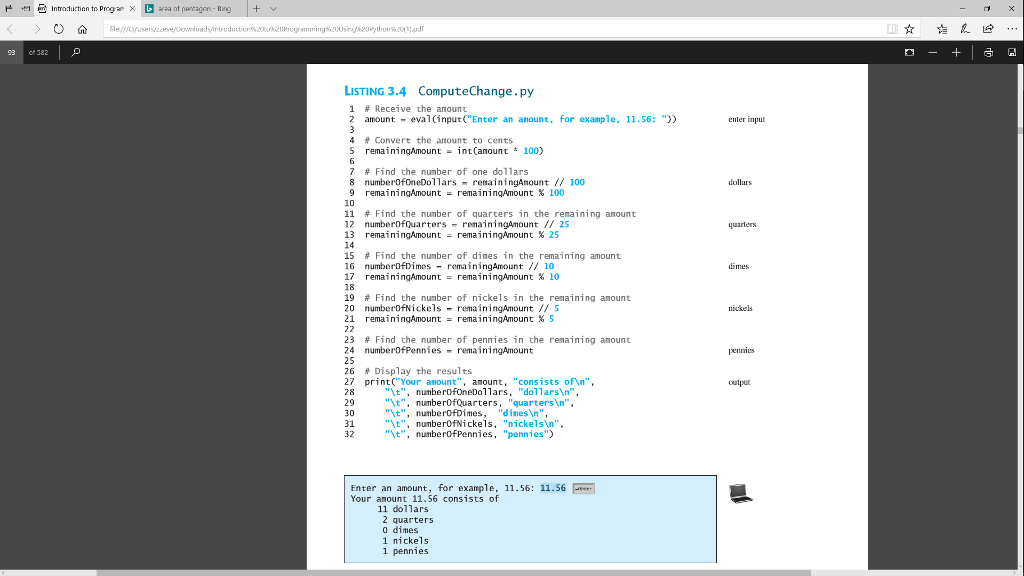
1 Introduction to progan area atnentagon in LISTING 3.4 ComputeChange.py 1 # Receive the amount 2 amount eval(inputC"Enter an anount, for example, 11.56: ")) enter input # Convert the amount to cents S remainingAmountint(anount 100) 7 # Find the number of one dollars 8 numberDfoneDollars remainingAnount 100 dollars 9 remaining/mount = remainingAmount % 100 10 11 # Find the number of quarters in the remaining amount 12 numberDfquarters -remainingAmount 25 13 remainingAmount=remainingAmount %25 14 15 # Find the number of dimes in the remaining amount 16 numberDfDimes remainingAmount10O 17 remainingAmount = remainingAmount % 10 18 19 # Find the number of nickels in the remaining amount 20 numberofNickels remainingAmount S 21 remainingAmount=remainingAmount %5 quarters dimes nickels 23 # Find the number of pennies in the remaining amount 24 numberOfPennies remainingAmount 25 26 Display the results 27 print( Your amount", anount, "consists ofn" 28 29 30 31 32 peunies outpu "t", nunberofonelars, "dollars ", "t", numberOfQuarters, "quarters ". "\t", numberOfDimes, "dinesn" "t", numberOfNickels, "nickels'n". "t", numberOfPennies, "pennies") Enter an amount, for example, 11.56: 11.56 Your anount 11.56 consists of 11 do1lars 2 quarters 0 dimes 1 nickels 1 pennies
Step by Step Solution
There are 3 Steps involved in it

Get step-by-step solutions from verified subject matter experts
 Study Help