







Question: 3o Tools Window Help IMG_2719.jpeg (3 documents, 3 total pages) Q Search Objectives: Simple Classes and objects What to submit Consider the Account class given
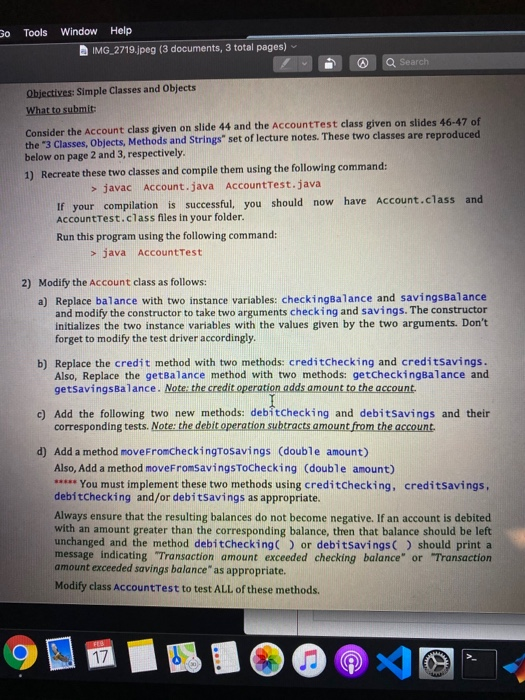
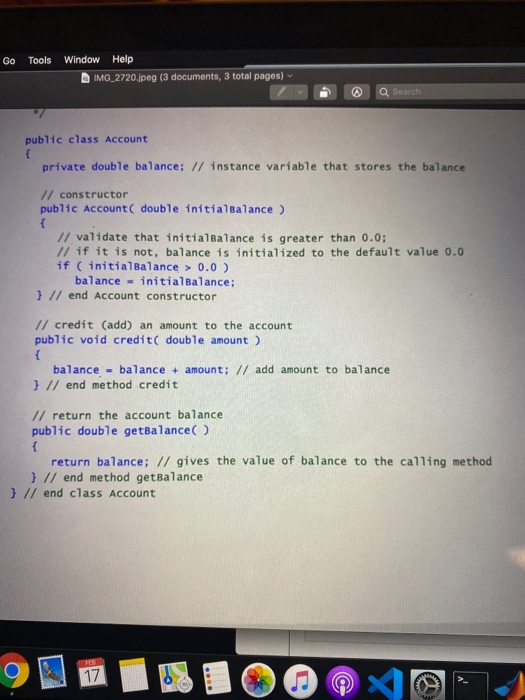
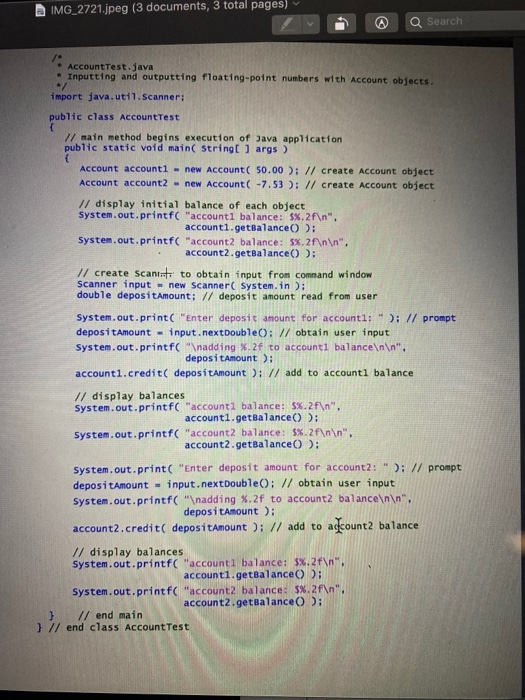
3o Tools Window Help IMG_2719.jpeg (3 documents, 3 total pages) Q Search Objectives: Simple Classes and objects What to submit Consider the Account class given on slide 44 and the Account Test class given on slides 46-47 of the "3 Classes, Objects, Methods and Strings" set of lecture notes. These two classes are reproduced below on page 2 and 3, respectively. 1) Recreate these two classes and compile them using the following command: > javac Account.java AccountTest.java If your compilation is successful, you should now have account.class and AccountTest.class files in your folder. Run this program using the following command: > java Account Test 2) Modify the Account class as follows: a) Replace balance with two instance variables: checkingBalance and savingsBalance and modify the constructor to take two arguments checking and savings. The constructor Initializes the two instance variables with the values given by the two arguments. Don't forget to modify the test driver accordingly. b) Replace the credit method with two methods: creditchecking and creditsavings. Also, Replace the getBalance method with two methods: getcheckingBalance and getSavingsbalance. Note: the credit operation adds amount to the account. c) Add the following two new methods: debitchecking and debitSavings and their corresponding tests. Note: the debit operation subtracts amount from the account d) Add a method moveFromCheckingTosavings (double amount) Also, Add a method moveFromSavingstochecking (double amount) ***** You must implement these two methods using creditchecking, creditsavings. debitchecking and/or debitsavings as appropriate. Always ensure that the resulting balances do not become negative. If an account is debited with an amount greater than the corresponding balance, then that balance should be left unchanged and the method debitChecking or debitSavings() should print a message indicating "Transaction amount exceeded checking balance" or Transaction amount exceeded savings balance as appropriate. Modify class AccountTest to test ALL of these methods. Go Tools Window Help IMG_2720.jpeg (3 documents, 3 total pages) @ Q Search public class Account private double balance; // instance variable that stores the balance! // constructor public Account ( double initialBalance ) // validate that initialBalance is greater than 0.0; // if it is not, balance is initialized to the default value 0.0 if (initialBalance > 0.0) balance - initialBalance; } // end Account constructor // credit (add) an amount to the account public void credit double amount ) balance - balance + amount; // add amount to balance } // end method credit // return the account balance public double getBalance return balance; // gives the value of balance to the calling method } // end method getBalance } // end class Account 9111510040-14 IMG_2721.jpeg (3 documents, 3 total pages) @ Q Search Account Test.java Inputting and outputting floating-point numbers with account obiects import java.util.Scanner: public class AccountTest // main method begins execution of Java application public static void main(String[] args) Account account - new Account( 50.00); // create Account object Account account 2 - new Account( -7.53 ); // create Account object // display initial balance of each object System.out.printf( "account balance: 5%.2f ", account.getBalance : System.out.printf( "account balance: 5%.2f ". account2.getBalance(): // create Scania to obtain input from command window Scanner input - new Scanner(System.in); double depositAmount; // deposit amount read from user System.out.print("Enter deposit amount for accounti: "); // prompt depositAmount - input.nextDouble: // obtain user input System.out.printf(" adding %.2f to accounti balance ". depositAmount); account.credit( depositAmount); // add to accounti balance // display balances System.out.printf("account balance: 5%.2f ". accounti.getBalance(): System.out.printf("account balance: $%.2f ", account2.getBalance ): System.out.print("Enter deposit amount for account2: "); // prompt depositamount - input.nextDouble(); // obtain user input System.out.printf(" adding %.2f to account balance ", depositAmount); account2.credit depositAmount ); // add to account balance // display balances System.out.printf("accountl balance: $%.2f " accounti.getBalance : System.out.printf("account balance: 5%.2f ", account2.getBalance(): } // end main } // end class Account Test
Step by Step Solution
There are 3 Steps involved in it

Get step-by-step solutions from verified subject matter experts
 Study Help