







Question: 4 . 1 Retrieve the document you saved as SPRING CONCERT. 4 . 2 Change QUESTION 3 in the footer to QUESTION 4 . 4
Retrieve the document you saved as SPRING CONCERT.
Change QUESTION in the footer to QUESTION
Insert the header Passionate about spring in capital letter, bold, italics and centre.
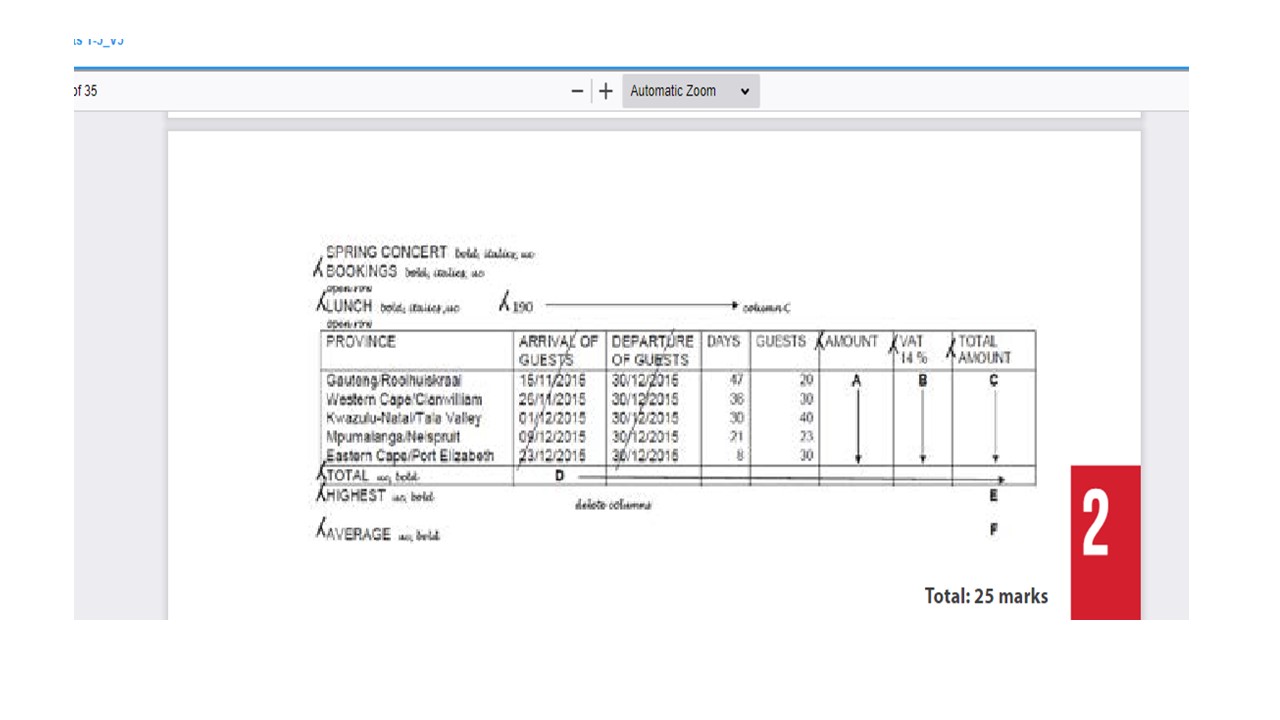
Make all the changes as indicated on the spreadsheet and according to the instructions
below.
Change the paper orientation to landscape.
Insert rows, columns and text as indicated on the spreadsheet.
Insert formulae where the letters of the alphabet appear to do the following calculations:
A AMOUNT GUESTS multiplied by DAYS multiplied by LUNCH use absolute cell address
B VAT of AMOUNT use absolute cell address
C TOTAL AMOUNT The sum of AMOUNT and VAT
D TOTAL TOTAL of each column
E HIGHEST TOTAL AMOUNT
F AVERAGE of GUESTS
Copy the formulae to the other cells as indicated on the spreadsheet.
Display AMOUNT, VAT TOTAL AMOUNT and HIGHEST as currency with TWO decimals.
Display TOTAL of DAYS and GUEST as well as AVERAGE as integers.
Insert horizontal lines as indicated using the method with which you are familiar.
Step by Step Solution
There are 3 Steps involved in it
1 Expert Approved Answer
Step: 1 Unlock

Question Has Been Solved by an Expert!
Get step-by-step solutions from verified subject matter experts
Step: 2 Unlock
Step: 3 Unlock
 Study Help