







Question: 4 5 6 7 18 19 Documentation LEN A Aud CONCATENATE Product SKU 48650284639521586023274957 11111111 29375937395739275947273958 97058706846251648482637482 190999999 LEN B COUNTA Length of SKU A4
4 5 6 7 18 19 Documentation LEN A Aud CONCATENATE Product SKU 48650284639521586023274957 11111111 29375937395739275947273958 97058706846251648482637482 190999999 LEN B COUNTA Length of SKU A4 4846294750283590000000 i.e- number converted to scientific notation DAYS NETWORKDAYS C D E COUNTIFS F G SUMIFS H One issue in Excel - when you want to store a number with more than 20 digits (SKUS, bar codes, etc) they need to be formatted as TEXT. Otherwise, Excel will automatically convert to scientific notation. See example in cell A15. AVERAGEIF 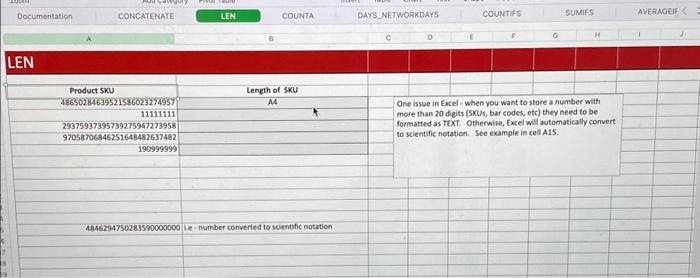
Documentation CORCATENATE LEN COUNTA \begin{tabular}{l|l} COUNTIFS & SUMIFS \end{tabular} AVERAGEIF: A B c D E F. a One issue in Excel - when you want to store a number with Product sku 48650284639521586023274957 Length of SKU 29375937395739275947273958 A4 more than 20 digits ( $1 s, bar codes, etc) they need to be formatted as TEXI. Otherwise, Excel will automatically convert 97058706546251648482637482 to scientific notation. See example in cell A.15. 4846794750283590000000 Le - number comverted to scientific notation Step by Step Solution
There are 3 Steps involved in it
1 Expert Approved Answer
Step: 1 Unlock

Question Has Been Solved by an Expert!
Get step-by-step solutions from verified subject matter experts
Step: 2 Unlock
Step: 3 Unlock
 Study Help