



Question: 4. Read the following code, and answering the questions. LRESULT CALLBACK WndProc (HWND hwnd, UINT message, WPARAM wParam, LPARAM IParam) { case WM_LBUTTONDOWN: xPos =
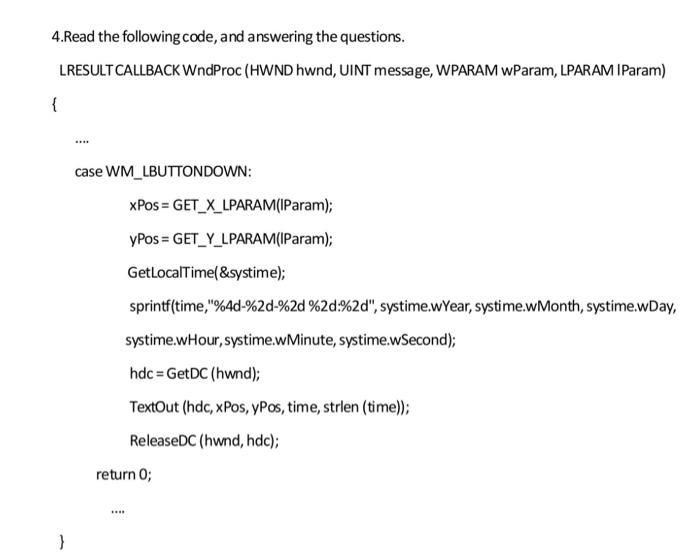
4. Read the following code, and answering the questions. LRESULT CALLBACK WndProc (HWND hwnd, UINT message, WPARAM wParam, LPARAM IParam) { case WM_LBUTTONDOWN: xPos = GET_X_LPARAM(IParam); yPos = GET_Y_LPARAM(IParam); GetLocalTime(&systime); sprintf(time, "%4d-%2d-%2d %2d:%2d", systime.wYear, systime.wMonth, systime.wDay, systime.wHour, systime.wMinute, systime.wSecond); hdc = GetDC (hwnd); TextOut (hdc, xPos, ypos, time, strlen (time)); ReleaseDC (hwnd, hdc); return 0; } 4. Read the following code, and answering the questions. LRESULT CALLBACK WndProc (HWND hwnd, UINT message, WPARAM wParam, LPARAM IParam) { case WM_LBUTTONDOWN: xPos = GET_X_LPARAM(IParam); yPos = GET_Y_LPARAM(IParam); GetLocalTime(&systime); sprintf(time, "%4d-%2d-%2d %2d:%2d", systime.wYear, systime.wMonth, systime.wDay, systime.wHour, systime.wMinute, systime.wSecond); hdc = GetDC (hwnd); TextOut (hdc, xPos, ypos, time, strlen (time)); ReleaseDC (hwnd, hdc); return 0; }
Step by Step Solution
There are 3 Steps involved in it

Get step-by-step solutions from verified subject matter experts