







Question: 4.18 Multi-Way IF Lab - Calculating Grade Averages Use the provided index.html template file to create a web page that will calculate grade averages and
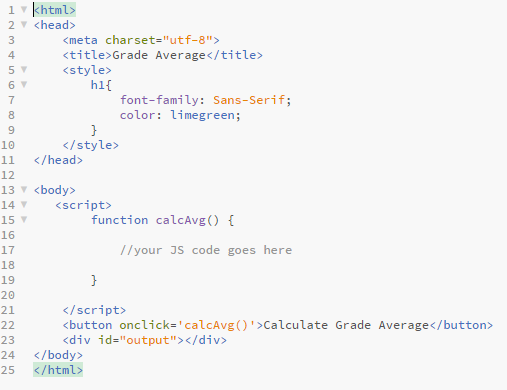
4.18 Multi-Way IF Lab - Calculating Grade Averages Use the provided index.html template file to create a web page that will calculate grade averages and output the letter grade. Note: When you download index.html, make sure you extract the file in Windows' File Explorer before opening it to edit in Brackets. Your web page should contain: Make a title for the browser tab A main web page heading that says Grade Average JS script to do the following in this order: o Prompt the user to input their homework average. o Prompt the user to input their work average. o Prompt the user to input their final work score. o Calculate their weighted course average assuming the homework average is worth 50% of their grade, work average is worth 30% and final work is worth 20%. o Use a multi-way if with a single simple criteria (i.e. no ands or ors in your statements) for each if or if else statement to assign the letter grade for this course grade based on the following grading scale: Weighted Average = 89.5 . . . . . . . . . . . . Letter Grade is A o Write the input from the user to the web page using the sentences below (include the periods): Your homework average is 'user input'. Your work average is 'user input'. Your final work score is 'user input'. o Write the student's weighted course average and letter grade to the web page: If the student made an A, B or C in the course, write to the web page that they passed the class and can move on to the next course in the program. Use this output if they passed: Your weighted course average is "their average" and your final letter grade is a "their letter grade". You can now take the next course in the program. If the student made a D or F in the course, write to the web page that they failed the course and must retake the course. Use this output if they failed: Your weighted course average is "their average" and your final letter grade is a "their letter grade". You are going to have to retake the course. Note: o Use document.getElementById('output').innerHTML to display the user's input in
tags. Make sure to use += when adding each additional line of output to
. o Use document.getElementById('output').innerHTML to display the user's overall grade average and letter grade output in
tags
4 5 NO 000 10 1 Khtml> 2 3
11 12 13 14 22
Step by Step Solution
There are 3 Steps involved in it

Get step-by-step solutions from verified subject matter experts
 Study Help