







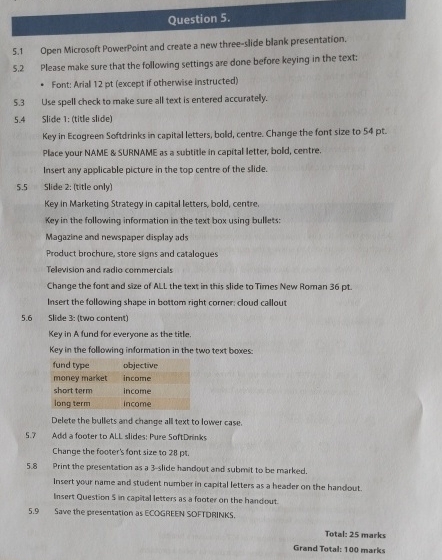
Question: 5 . 1 Open Microsoft PowerPoint and create a new three - slide blank presentation. 5 . 2 Please make sure that the following settings
Open Microsoft PowerPoint and create a new threeslide blank presentation.
Please make sure that the following settings are done before keying in the text:
Font: Arial pt except if otherwise instructed
Use spell check to make sure all text is entered accurately.
Slide : title slide
Key in Ecogreen Softdrinks in capital letters, bold, centre. Change the font size to pt
Place your NAME & SURNAME as a subtitle in capital letter, bold, centre.
Insert any applicable picture in the top centre of the slide.
Slide : title only
Key in Marketing Strategy in capital letters, bold, centre.
Key in the following information in the text box using bullets:
Magazine and newspaper display ads
Product brochure, store signs and catalogues
Television and radio commercials
Change the font and size of ALL the text in this slide to Times New Roman pt
Insert the following shape in bottom right corner: doud callout
Slide : two content
Key in A fund for everyone as the title.
Key in the following information in the two text boxes:
Delete the bullets and change all text to lower case.
Add a footer to ALL slides: Pure SoftDrinks
Change the footer's font size to pt
Print the presentation as a slide handout and submit to be marked.
Insert your name and student number in capital letters as a header on the handout.
Insert Question in capital letters as a footer on the handout.
Save the presentation as ECOGREEN SOFTDRINKS.
Step by Step Solution
There are 3 Steps involved in it
1 Expert Approved Answer
Step: 1 Unlock

Question Has Been Solved by an Expert!
Get step-by-step solutions from verified subject matter experts
Step: 2 Unlock
Step: 3 Unlock
 Study Help