







Question: 5 . 2 3 LAB * : Program: Data visualization ( 1 ) Prompt the user for a title for data. Output the title. (
LAB: Program: Data visualization
Prompt the user for a title for data. Output the title. pt
Ex:
Enter a title for the data:
Number of Novels Authored
You entered: Number of Novels Authored
Prompt the user for the headers of two columns of a table. Output the column headers. pt
Ex:
Enter the column header:
Author name
You entered: Author name
Enter the column header:
Number of novels
You entered: Number of novels
Prompt the user for data points. Data points must be in this format: string, int. Store the information before the comma into a string variable and the information after the comma into an integer. The user will enter when they have finished entering data points. Output the data points. Store the string components of the data points in a list of strings. Store the integer components of the data points in a list of integers. pts
Ex:
Enter a data point to stop input:
Jane Austen,
Data string: Jane Austen
Data integer:
Perform error checking for the data point entries. If any of the following errors occurs, output the appropriate error message and prompt again for a valid data point.
If entry has no comma
Output: Error: No comma in string. pt
If entry has more than one comma
Output: Error: Too many commas in input. pt
If entry after the comma is not an integer
Output: Error: Comma not followed by an integer. pts
Ex:
Enter a data point to stop input:
Ernest Hemingway
Error: No comma in string.
Enter a data point to stop input:
Ernest, Hemingway,
Error: Too many commas in input.
Enter a data point to stop input:
Ernest Hemingway, nine
Error: Comma not followed by an integer.
Enter a data point to stop input:
Ernest Hemingway,
Data string: Ernest Hemingway
Data integer:
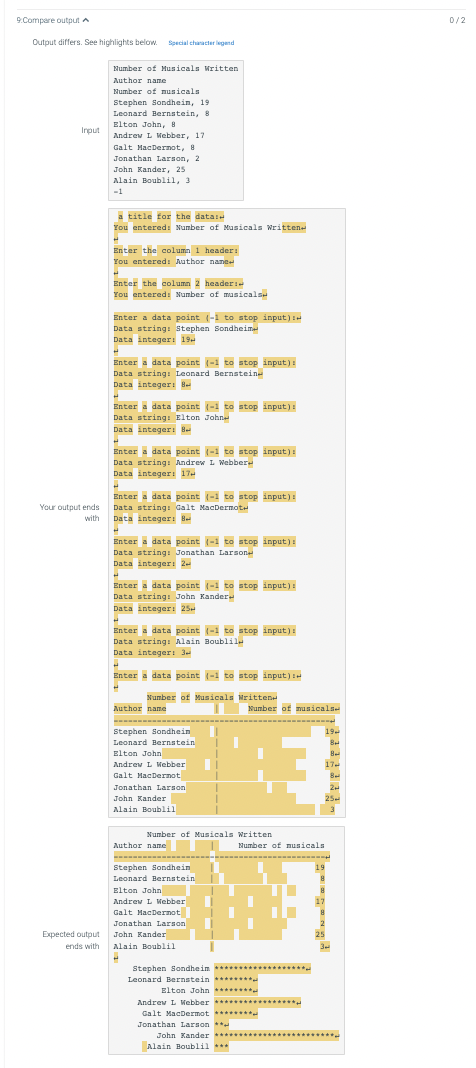
Output the information in a formatted table. The title is right justified with a minimum field width value of Column has a minimum field width value of Column has a minimum field width value of pts
Ex:
Number of Novels Authored
Author name Number of novels
Jane Austen
Charles Dickens
Ernest Hemingway
Jack Kerouac
F Scott Fitzgerald
Mary Shelley
Charlotte Bronte
Mark Twain
Agatha Christie
Ian Flemming
Stephen King
Oscar Wilde
Output the information as a formatted histogram. Each name is right justified with a minimum field width value of pts
Ex:
Jane Austen
Charles Dickens
Ernest Hemingway
Jack Kerouac
F Scott Fitzgerald
Mary Shelley
Charlotte Bronte
Mark Twain
Agatha Christie
Ian Flemming
Stephen King
Oscar Wilde
My current Python code:
title inputEnter a title for the data:
printYou entered:", title
header input
Enter the column header:
printYou entered:", header
header input
Enter the column header:
printYou entered:", header
datapoint input
Enter a data point to stop input:
data
while datapoint :
words datapoint.split
if lenwords:
printError: No comma in string."
elif lenwords:
printError: Too many commas in input."
else:
try:
Datastring wordsstrip
Datainteger intwords
printData string:", Datastring
printData integer:", Datainteger
data.appendDatastring, Datainteger
except ValueError:
printError: Comma not followed by an integer."
datapoint input
Enter a data point to stop input:
print
s title
printssheader header
print
for item in data:
printsditem item
print
for item in data:
printformatitemrjust item
How do I correct my code so that I will recieve full points on the attached photo?
Step by Step Solution
There are 3 Steps involved in it
1 Expert Approved Answer
Step: 1 Unlock

Question Has Been Solved by an Expert!
Get step-by-step solutions from verified subject matter experts
Step: 2 Unlock
Step: 3 Unlock
 Study Help