







Question: 5. Based on the tutorial in lecture 9, complete the following table, showing how to multiply 13 x 22. Use 13 as the Multiplier. I've
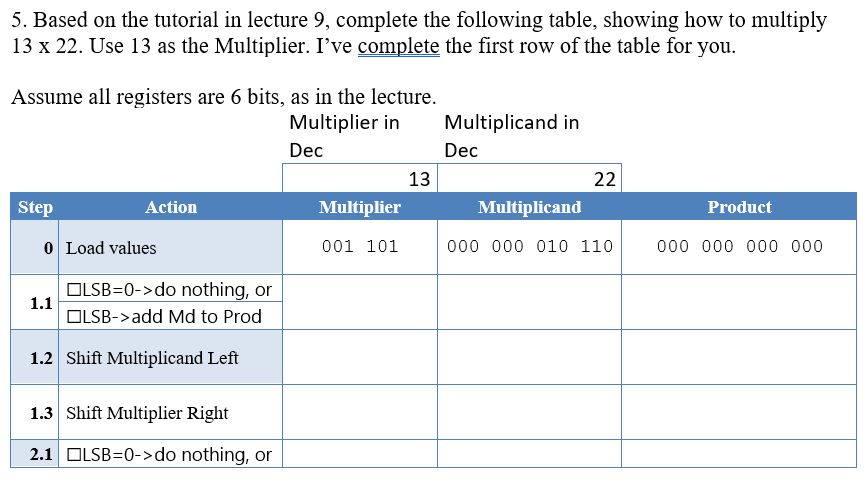
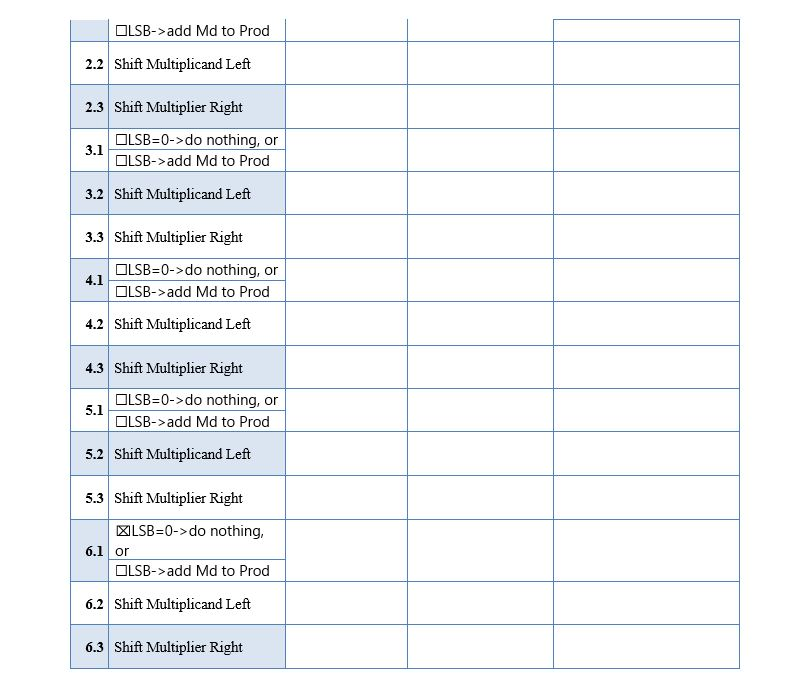
5. Based on the tutorial in lecture 9, complete the following table, showing how to multiply 13 x 22. Use 13 as the Multiplier. I've complete the first row of the table for you. Assume all registers are 6 bits, as in the lecture. Multiplier in Multiplicand in Dec Dec 13 22 Step Action Multiplier Product Multiplicand 000 000 010 110 Load values 001 101 000 000 000 000 1.1 OLSB=0->do nothing, or OLSB->add Md to Prod 1.2 Shift Multiplicand Left 1.3 Shift Multiplier Right 2.1 OLSB=0->do nothing, or OLSB->add Md to Prod 2.2 Shift Multiplicand Left 2.3 Shift Multiplier Right OLSB=0->do nothing, or OLSB->add Md to Prod 3.2 Shift Multiplicand Left 3.3 Shift Multiplier Right OLSB=0->do nothing, or OLSB->add Md to Prod 4.2 Shift Multiplicand Left 4.3 Shift Multiplier Right OLSB=0->do nothing, or 5.1 OLSB->add Md to Prod 5.2 Shift Multiplicand Left 5.3 Shift Multiplier Right LSB=0->do nothing, 6.1 or OLSB->add Md to Prod 6.2 Shift Multiplicand Left 6.3 Shift Multiplier Right
Step by Step Solution
There are 3 Steps involved in it

Get step-by-step solutions from verified subject matter experts
 Study Help