







Question: 5) Create a constructor for FastFoodKitchen that populates orderList with an initial set of three orders using the same numbers of items as the three
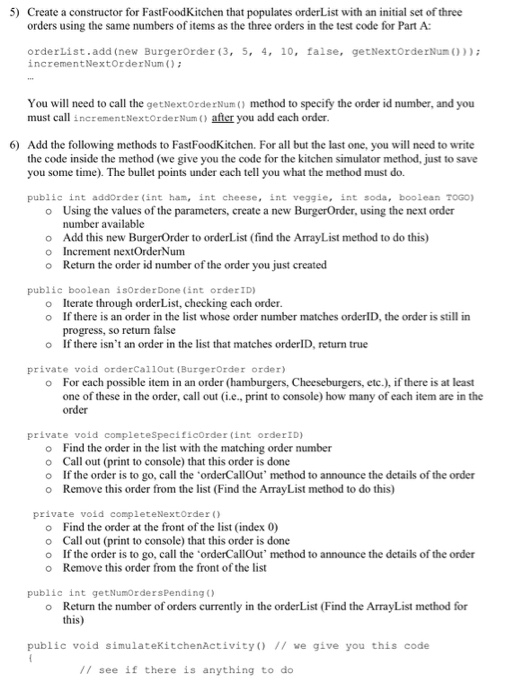
5) Create a constructor for FastFoodKitchen that populates orderList with an initial set of three orders using the same numbers of items as the three orders in the test code for Part A orderList.add(new Burgerorder (3, 5, 4, 10, false, getNextOrderNun()); increment NextOrder Num(); You will need to call the getNextOrder Num() method to specify the order id number, and you must call increment NextOrder Num() after you add cach order. 6) Add the following methods to FastFoodKitchen. For all but the last one, you will need to write the code inside the method (we give you the code for the kitchen simulator method, just to save you some time). The bullet points under each tell you what the method must do. public int addorder (int ham, int cheese, int veggie, int soda, boolean TOGO) o Using the values of the parameters, create a new BurgerOrder, using the next order number available Add this new BurgerOrder to orderList (find the ArrayList method to do this) O Increment nextOrder Num o Return the order id number of the order you just created public boolean isorder Done (int order ID) o Iterate through order List, checking each order. o If there is an order in the list whose order number matches orderID, the order is still in progress, so retum false o If there isn't an order in the list that matches orderID, return true private void orderCallout (BurgerOrder order) o For each possible item in an order (hamburgers, Cheeseburgers, etc.), if there is at least one of these in the order, call out (i.e., print to console) how many of each item are in the order private void complete Specificorder (int orderID) Find the order in the list with the matching order number O Call out (print to console) that this order is done o If the order is to go, call the orderCallOut' method to announce the details of the order o Remove this order from the list (Find the ArrayList method to do this) private void completeNext Order() Find the order at the front of the list (index 0) o Call out (print to console) that this order is done If the order is to go, call the orderCallOut' method to announce the details of the order o Remove this order from the front of the list public int get NumOrders Pending) o Return the number of orders currently in the orderList (Find the ArrayList method for this) public void simulateKitchenActivity() // we give you this code // see if there is anything to do 5) Create a constructor for FastFoodKitchen that populates orderList with an initial set of three orders using the same numbers of items as the three orders in the test code for Part A orderList.add(new Burgerorder (3, 5, 4, 10, false, getNextOrderNun()); increment NextOrder Num(); You will need to call the getNextOrder Num() method to specify the order id number, and you must call increment NextOrder Num() after you add cach order. 6) Add the following methods to FastFoodKitchen. For all but the last one, you will need to write the code inside the method (we give you the code for the kitchen simulator method, just to save you some time). The bullet points under each tell you what the method must do. public int addorder (int ham, int cheese, int veggie, int soda, boolean TOGO) o Using the values of the parameters, create a new BurgerOrder, using the next order number available Add this new BurgerOrder to orderList (find the ArrayList method to do this) O Increment nextOrder Num o Return the order id number of the order you just created public boolean isorder Done (int order ID) o Iterate through order List, checking each order. o If there is an order in the list whose order number matches orderID, the order is still in progress, so retum false o If there isn't an order in the list that matches orderID, return true private void orderCallout (BurgerOrder order) o For each possible item in an order (hamburgers, Cheeseburgers, etc.), if there is at least one of these in the order, call out (i.e., print to console) how many of each item are in the order private void complete Specificorder (int orderID) Find the order in the list with the matching order number O Call out (print to console) that this order is done o If the order is to go, call the orderCallOut' method to announce the details of the order o Remove this order from the list (Find the ArrayList method to do this) private void completeNext Order() Find the order at the front of the list (index 0) o Call out (print to console) that this order is done If the order is to go, call the orderCallOut' method to announce the details of the order o Remove this order from the front of the list public int get NumOrders Pending) o Return the number of orders currently in the orderList (Find the ArrayList method for this) public void simulateKitchenActivity() // we give you this code // see if there is anything to do
Step by Step Solution
There are 3 Steps involved in it

Get step-by-step solutions from verified subject matter experts
 Study Help