







Question: . 5. Regarding the text document you created in Step 4: a. Hide the text document. b. List the steps used to hide the document.
 . 5. Regarding the text document you created in Step 4: a. Hide the text document. b. List the steps used to hide the document. 6. Regarding the text document you created in Step 4: a. Make the text document read-only. b. List the steps used to make the document read-only. 7. Regarding the Legal Matters folder: a. Rename the Legal Matters folder to Legal Items. b. Identify the steps used to rename. 8. Copy Jan01 to South and identify the steps used.
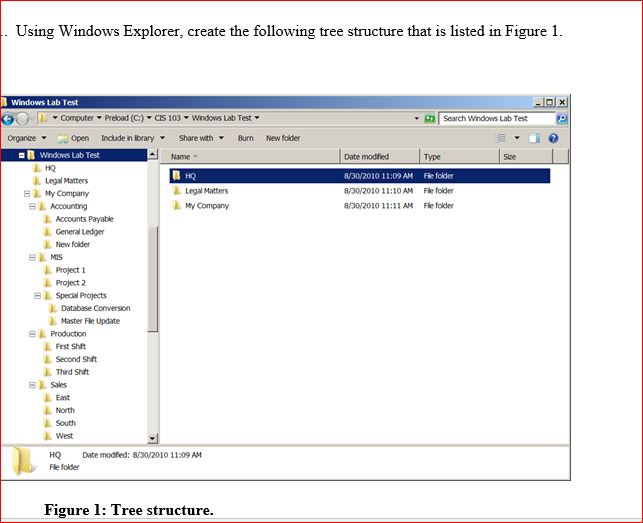
. Using Windows Explorer, create the following tree structure that is listed in Figure 1. K Search Windows Lab Test New folder Size Date modified 8/30/2010 11:09 AM 8/30/2010 11:10 AM 8/30/2010 11:11 AM Type Fle folder File folder File folder Windows Lab Test - Computer Preload (C:) - OS 103 - Windows Lab Test Organize - Open Indude in library - share with Burn Windows Lab Test Name HQ HQ Legal Matters B My Company Legal Matters Accounting My Company Accounts Payable General Ledger New folder BMS Project 1 Project 2 Special Projects Database Conversion Master File Update B Production First Shift Second Shift Third Shift B Sales East North South West HQ Date modified: 8/30/2010 11:09 AM File folder Figure 1: Tree structure
Step by Step Solution
There are 3 Steps involved in it

Get step-by-step solutions from verified subject matter experts
 Study Help