







Question: 5. Write a query to show the order Number, product name, and quantity ordered 6. Write a query to show the product code, product name,

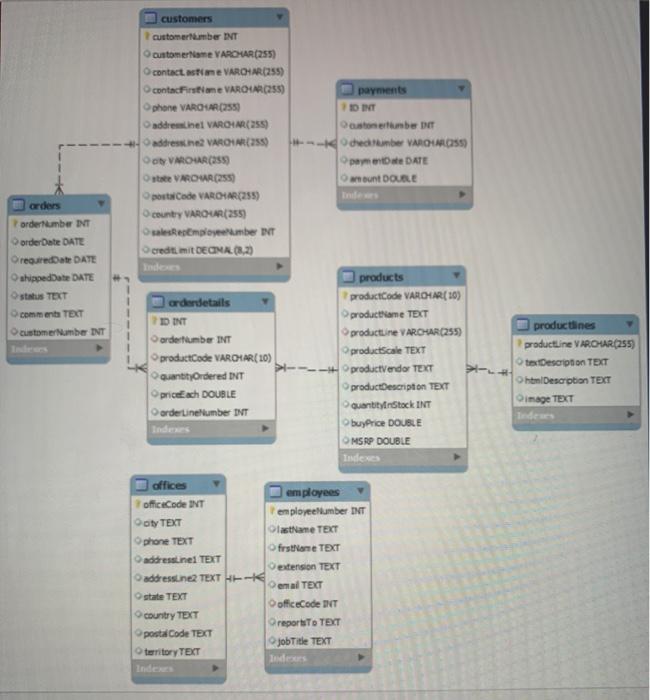
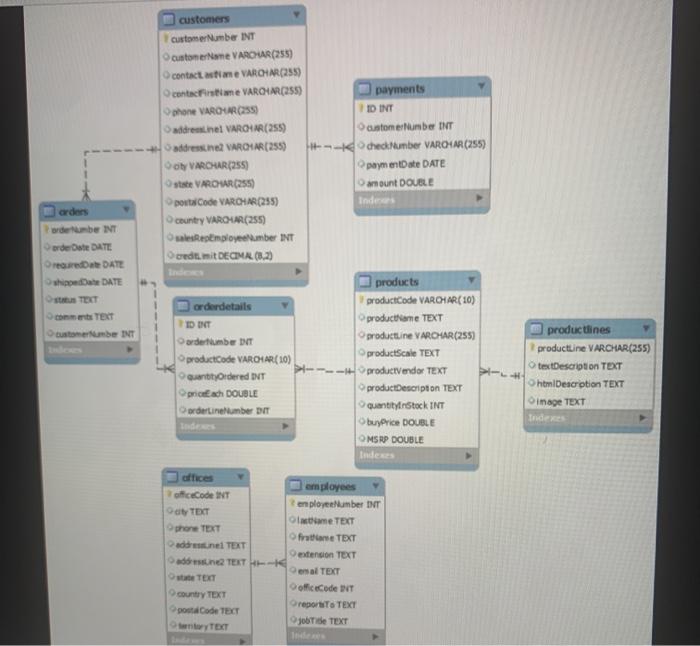
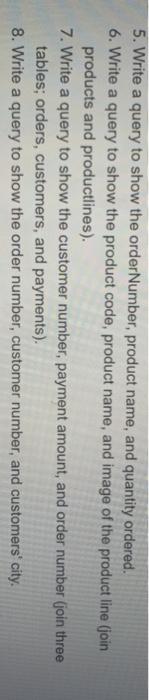
5. Write a query to show the order Number, product name, and quantity ordered 6. Write a query to show the product code, product name, and image of the product line (join products and productlines). 7. Write a query to show the customer number, payment amount, and order number (join three tables; orders, customers, and payments). 8. Write a query to show the order number, customer number, and customers' city customers customerhamber INT customerne VARCHAR(255) contactatie VARCHAR(255) contacFistine VARIA(255) phone VAROSAR(255 address inel VARON (255) address VARI(255) VAROR(255 ste VAROUR(255) post Code VARCHAR(255) country VAROVUAR (255) osalesRemployembe INT credit mit DEONA (8,23 payments ID INT custobe De Odredbe VAROHLOSS) pamentowe DATE anunt DOUBLE orders orderumbe INT order Date DATE OrequiredDate DATE shippedDate DATE stus TECT comments TEXT customer Number INT orderdetails 2D INT orderumber INT product Code VAR OLAR(10) quantityOrdered INT priceach DOUBLE orderline tumbe INT products product Code VARCHAR(10) product lame TEXT productLine VAROSAR(255) productScale TEXT productVendor TEXT productescription TEXT Quantity Stock INT buy Price DOUBLE MSRP DOUBLE Index producties productLine VAROR(255) textDescription TEXT htmlDescription TEXT image TEXT de offices officeCode INT oty TEXT phone TEXT addressLine1 TEXT addressine TEXT HE- state TEXT country TEXT postal Code TEXT territory TEXT employees employeeliumber INT lastame TEXT frstrane TEXT Dextension TEXT enad TEXT officeCode INT Oreports to TEXT jobTitle TEXT customers customer Number INT customerName VAROUR(255) contact me VARCHAR(255) contacte VAROTAR(255) phone VAROVARC255 addresine VARCHAR(255) address VARCHAR(255) Soy VARCHAR(255) state VAROR(255 LA CO VARCH (248 country VAROM (255) Repemployee umber INT Oceditimit DECIMA, (0.2) payments ID INT customer Number INT check Number VARONA (255) paymentDate DATE amount DOUBLE orders ordube INT order Date DATE Date DATE Oshiete DATE 1 1 come TEXT customer Number INT orderdetails IDENT ordertumbe DNT product Code VARCHAR(10) QuantityOrdered INT prickach DOUBLE ordertinetumber DIT products product Code VARCHAR(10) productieme TEXT productLine VARCHAR(255) productScale TEXT product vendor TEXT productDescription TEXT quantityinStock INT buyPrice DOUBLE MSRP DOUBLE Indes productlines productLine VARCHAR(255) textDescription TEXT htmlDescription TEXT image TEXT officeCode INT TET phone TEXT del TEXT address TEXT- TEXT country TEXT post CodeTECT toryTECT employees employee Number NT Omame TEXT frute TEXT extension TEXT al TEXT officeCode INT reportTo TEXT joide TEXT 5. Write a query to show the order Number, product name, and quantity ordered. 6. Write a query to show the product code, product name, and image of the product line (join products and productlines). 7. Write a query to show the customer number, payment amount, and order number (join three tables; orders, customers, and payments). 8. Write a query to show the order number, customer number, and customers' city
Step by Step Solution
There are 3 Steps involved in it

Get step-by-step solutions from verified subject matter experts
 Study Help