







Question: 5.4 Using Files - Numeric Processing 8 points Download the following file from the Gaddis textbook Chapter 5 source code folder > random.txt This file
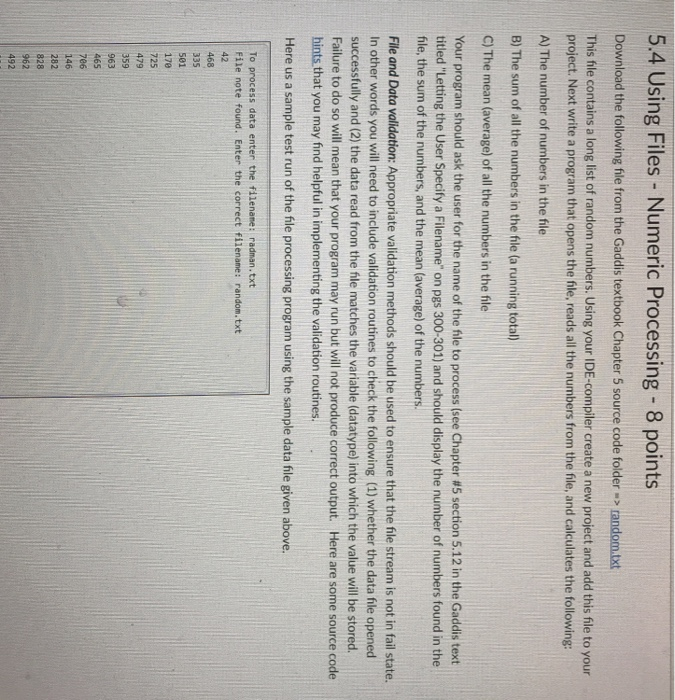
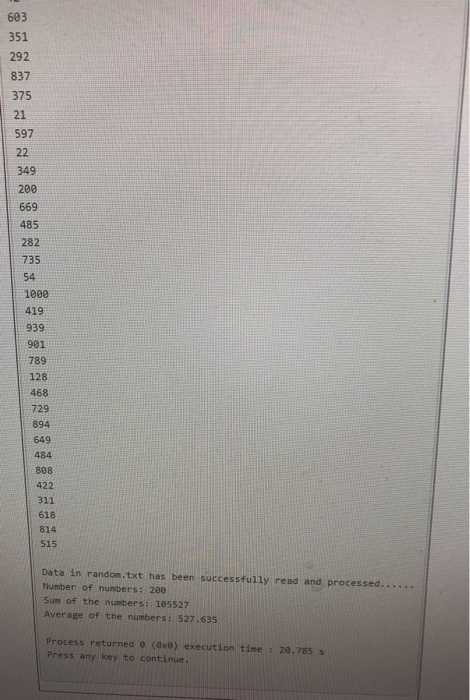
5.4 Using Files - Numeric Processing 8 points Download the following file from the Gaddis textbook Chapter 5 source code folder > random.txt This file contains a long list of random numbers. Using your IDE-compiler create a new project and add this file to your project. Next write a program that opens the file, reads all the numbers from the file, and calculates the following: A) The number of numbers in the file B) The sum of all the numbers in the file (a running total) C) The mean (average) of all the numbers in the file Your program should ask the user for the name of the file to process (see Chapter #5 section 5.12 in the Gaddis text titled "Letting the User Specify a Filename" on pgs 300-301) and should display the number of numbers found in the file, the sum of the numbers, and the mean (average) of the numbers. File and Data validation: Appropriate validation methods should be used to ensure that the file stream is not in fail state. In other words you will need to include validation routines to check the following (1) whether the data file opened successfully and (2) the data read from the file matches the variable (datatype) into which the value will be stored. Failure to do so will mean that your program may run but will not produce correct output. Here are some source code hints that you may find helpful in implementing the validation routines. Here us a sample test run of the file processing program using the sample data file given above. To process data enter the filenane: radman.txt File note found. Enter the correct filename: random.txt 468 501 170 725 479 963 465 146 282 828 962 492
Step by Step Solution
There are 3 Steps involved in it

Get step-by-step solutions from verified subject matter experts
 Study Help