







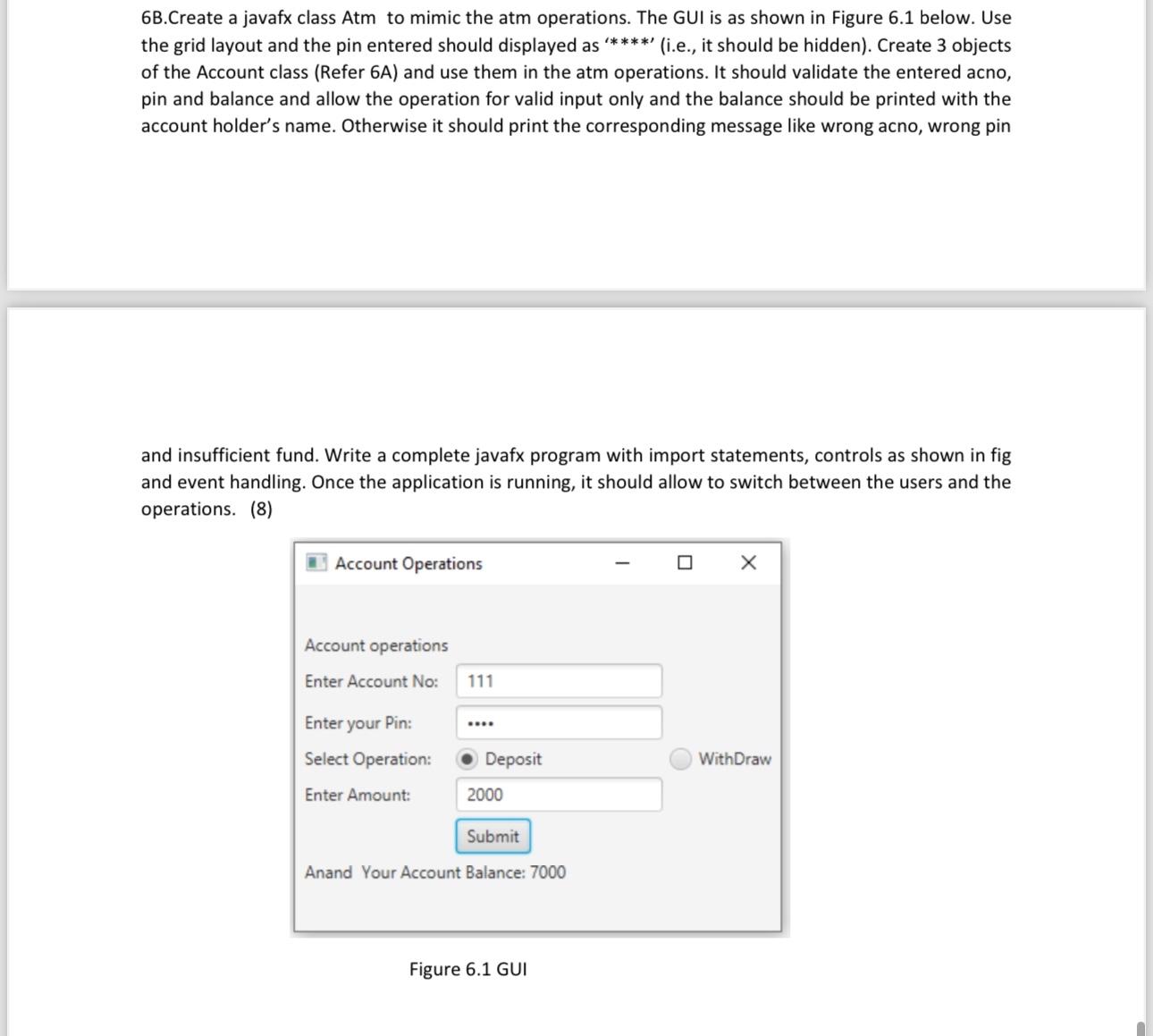
Question: 6 B . Create a javafx class Atm to mimic the atm operations. The GUI is as shown in Figure 6 . 1 below. Use
BCreate a javafx class Atm to mimic the atm operations. The GUI is as shown in Figure below. Use the grid layout and the pin entered should displayed as ie it should be hidden Create objects of the Account class Refer A and use them in the atm operations. It should validate the entered acno, pin and balance and allow the operation for valid input only and the balance should be printed with the account holder's name. Otherwise it should print the corresponding message like wrong acno, wrong pin
and insufficient fund. Write a complete javafx program with import statements, controls as shown in fig and event handling. Once the application is running, it should allow to switch between the users and the operations.
Account Operations
Account operations
Enter Account No:
Enter your Pin:
Select Operation:
Deposit
WithDraw
Enter Amount:
Anand Your Account Balance:
Figure GUI
Step by Step Solution
There are 3 Steps involved in it
1 Expert Approved Answer
Step: 1 Unlock

Question Has Been Solved by an Expert!
Get step-by-step solutions from verified subject matter experts
Step: 2 Unlock
Step: 3 Unlock
 Study Help