







Question: (6 points) Write a MATLAB program (a4q1.m) to have some fun with random numbers. Begin with a banner message (see below) and then use MATLAB's
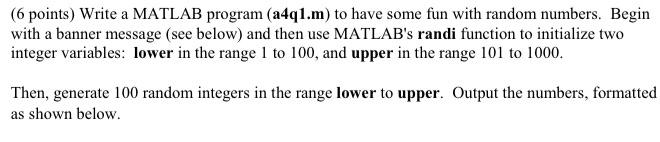
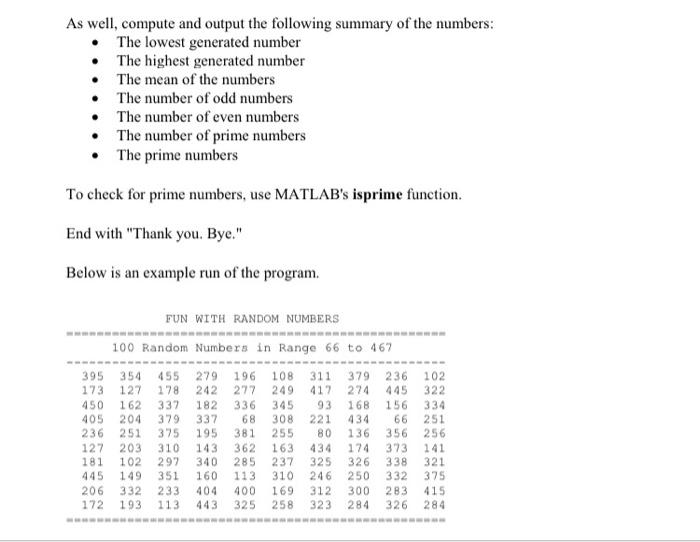
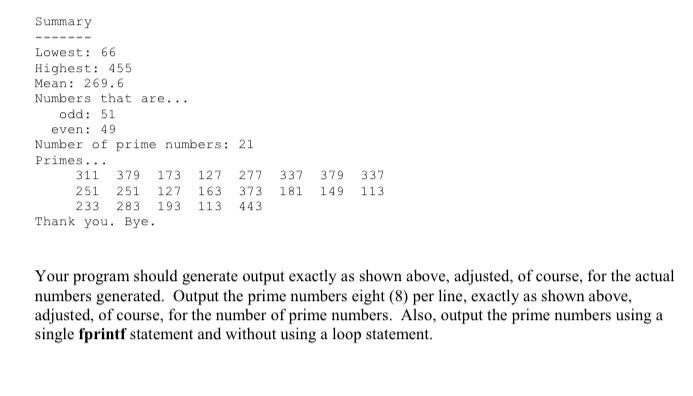
(6 points) Write a MATLAB program (a4q1.m) to have some fun with random numbers. Begin with a banner message (see below) and then use MATLAB's randi function to initialize two integer variables: lower in the range 1 to 100, and upper in the range 101 to 1000. Then, generate 100 random integers in the range lower to upper. Output the numbers, formatted as shown below. As well, compute and output the following summary of the numbers: The lowest generated number The highest generated number The mean of the numbers The number of odd numbers The number of even numbers The number of prime numbers The prime numbers To check for prime numbers, use MATLAB's isprime function. End with "Thank you. Bye." Below is an example run of the program. FUN WITH RANDOM NUMBERS 100 Random Numbers in Range 66 to 467 102 322 395 354 173 127 450 162 405 204 236 251 127 203 181 102 445 149 206 332 172 193 455 178 337 379 375 310 297 351 233 113 279 242 182 337 195 143 340 160 404 443 196 277 336 68 381 362 285 113 400 325 108 249 345 308 255 163 237 310 169 258 311 417 93 221 80 434 325 246 312 323 379 274 168 434 136 174 326 250 300 284 236 445 156 66 356 373 338 332 283 326 251 256 141 321 375 415 284 Summary Lowest: 66 Highest: 455 Mean: 269.6 Numbers that are... odd: 51 even: 49 Number of prime numbers: 21 Primes... 311 379 173 127 277 251 251 127 163 373 233 283 193 113 443 Thank you. Bye. 337 181 379 149 337 113 Your program should generate output exactly as shown above, adjusted, of course, for the actual numbers generated. Output the prime numbers eight (8) per line, exactly as shown above, adjusted, of course, for the number of prime numbers. Also, output the prime numbers using a single fprintf statement and without using a loop statement
Step by Step Solution
There are 3 Steps involved in it

Get step-by-step solutions from verified subject matter experts
 Study Help