







Question: 7 . 8 LAB - Database programming with Python ( SQLite ) Complete the Python program to create a Horse table, insert one row, and
LAB Database programming with Python SQLite
Complete the Python program to create a Horse table, insert one row, and display the row. The main program calls four functions:
createconnection creates a connection to the database.
createtable creates the Horse table.
inserthorse inserts one row into Horse.
selectallhorses outputs all Horse rows.
Complete all four functions. Function parameters are described in the template. Do not modify the main program.
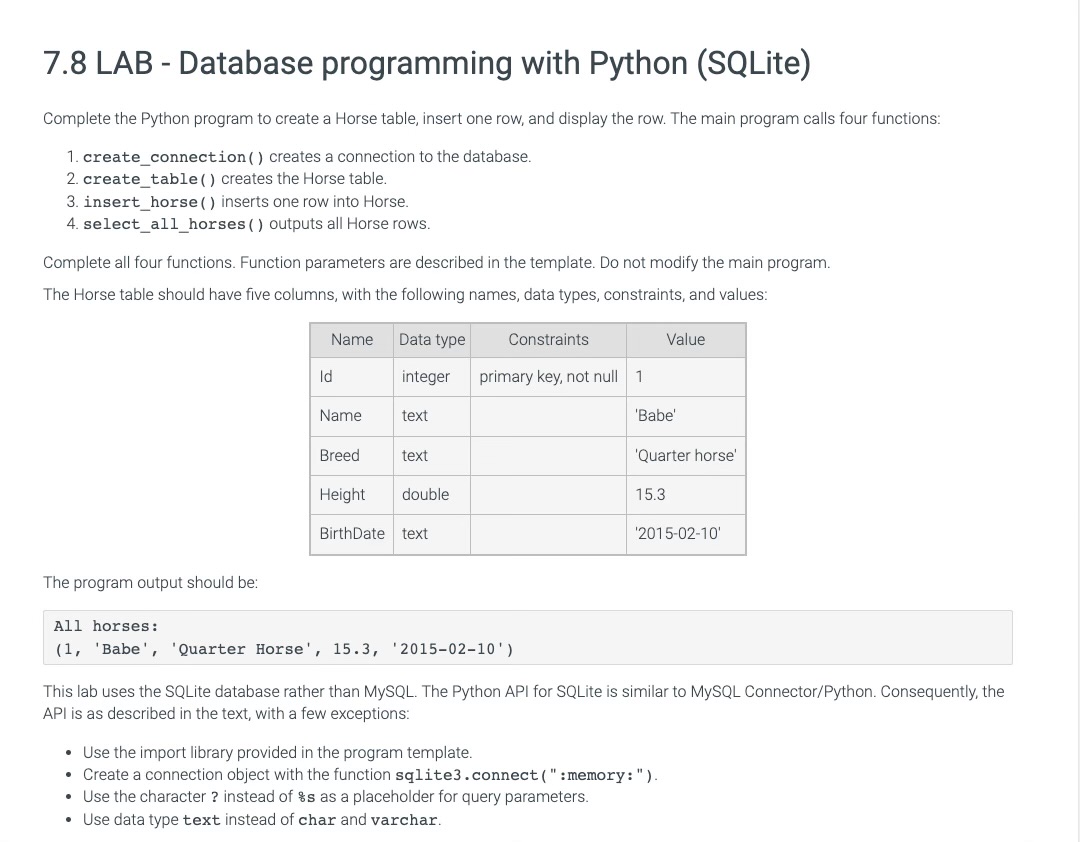
The Horse table should have five columns, with the following names, data types, constraints, and values:
tableNameData type,Constraints,ValueIdinteger,primary key, not null,Nametext,,'Babe'Breedtext,,'Quarter horse'Heightdouble,,BirthDatetext,,
The program output should be:
All horses:
'Babe', 'Quarter Horse',
This lab uses the SQLite database rather than MySQL The Python API for SQLite is similar to MySQL ConnectorPython Consequently, the API is as described in the text, with a few exceptions:
Use the import library provided in the program template.
Create a connection object with the function sqliteconnect : memory :
Use the character instead of s as a placeholder for query parameters.
Use data type text instead of char and varchar.
Step by Step Solution
There are 3 Steps involved in it
1 Expert Approved Answer
Step: 1 Unlock

Question Has Been Solved by an Expert!
Get step-by-step solutions from verified subject matter experts
Step: 2 Unlock
Step: 3 Unlock
 Study Help