







Question: 7. Apply and modify the Heading 2 style and delete blank lines. a. Apply the Heading 2 style to each of the bold section headings.
![section headings. b. Select the first section heading ("Emergency Telephones [Blue Phones]").](https://dsd5zvtm8ll6.cloudfront.net/si.experts.images/questions/2024/11/673e4fd9c4a23_921673e4fd93c077.jpg)
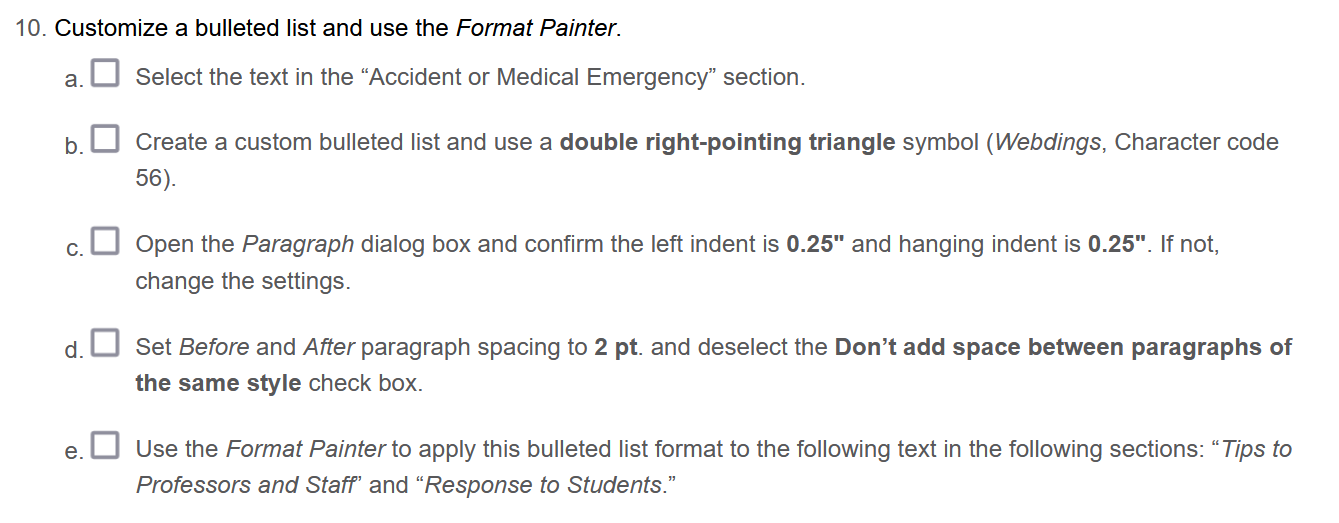
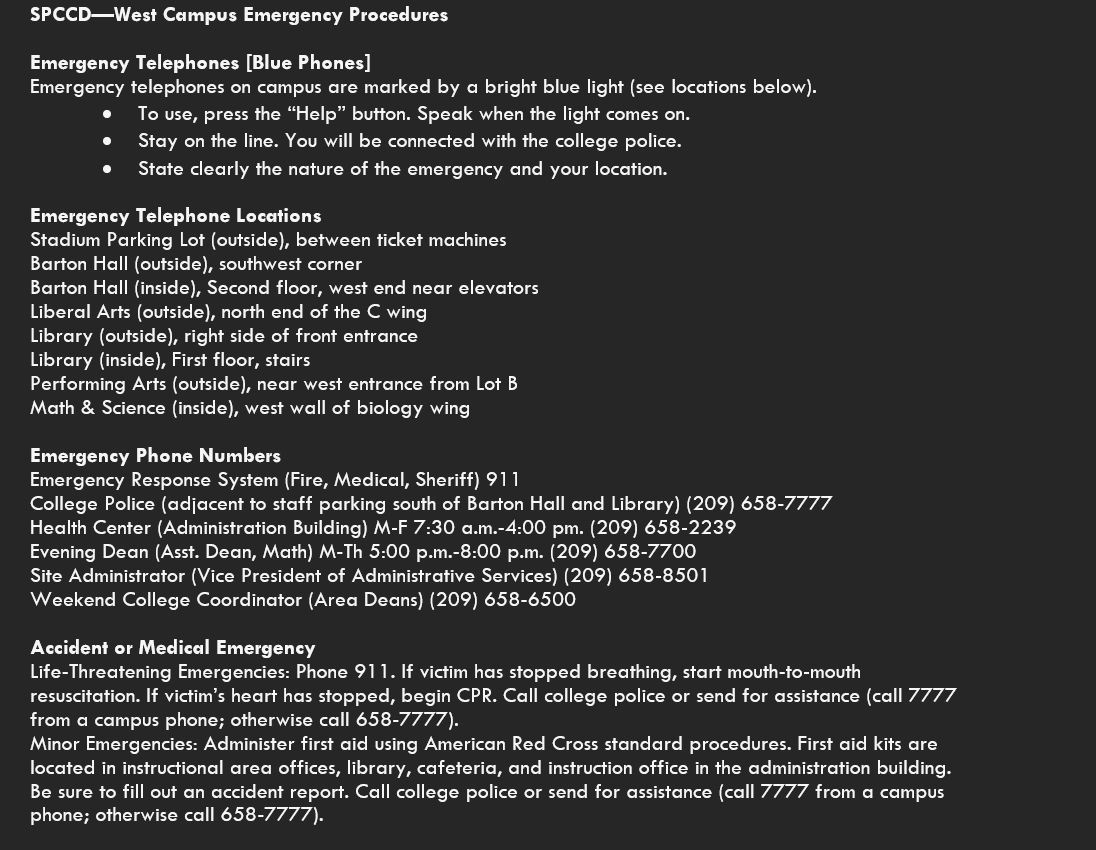
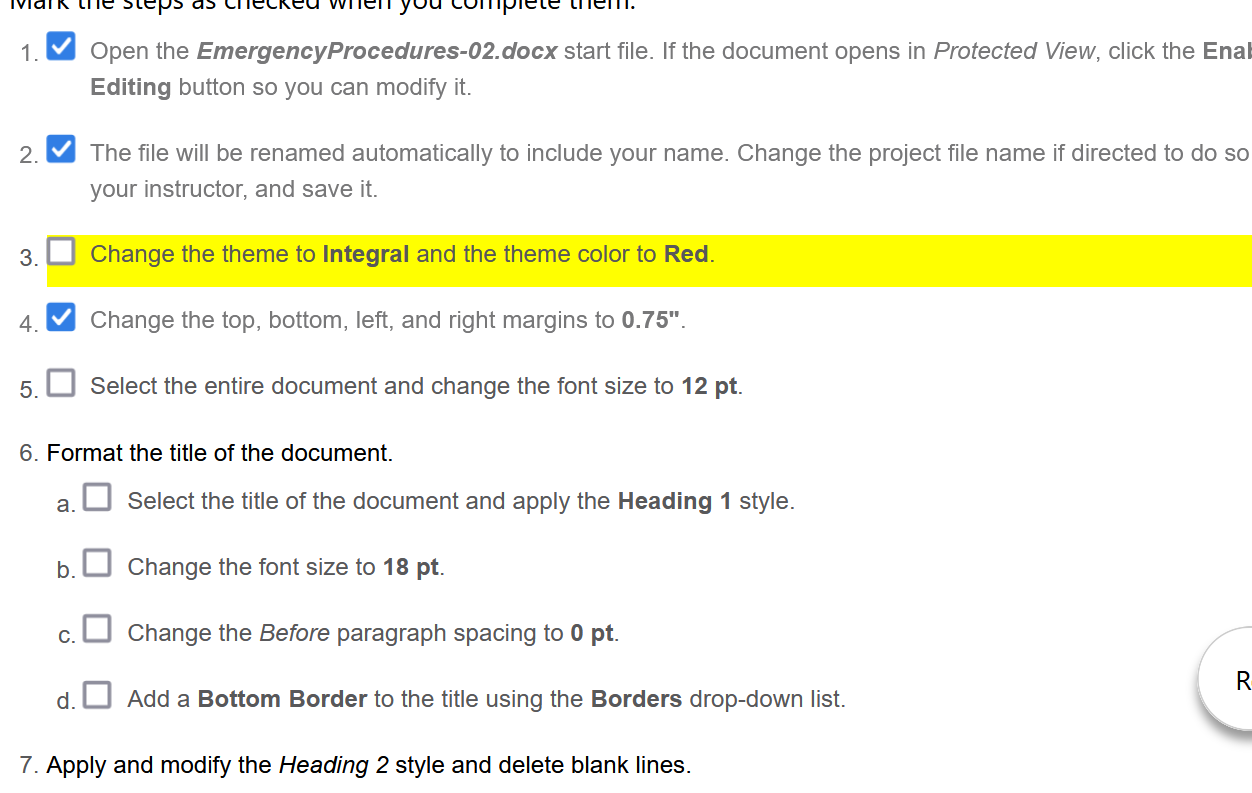
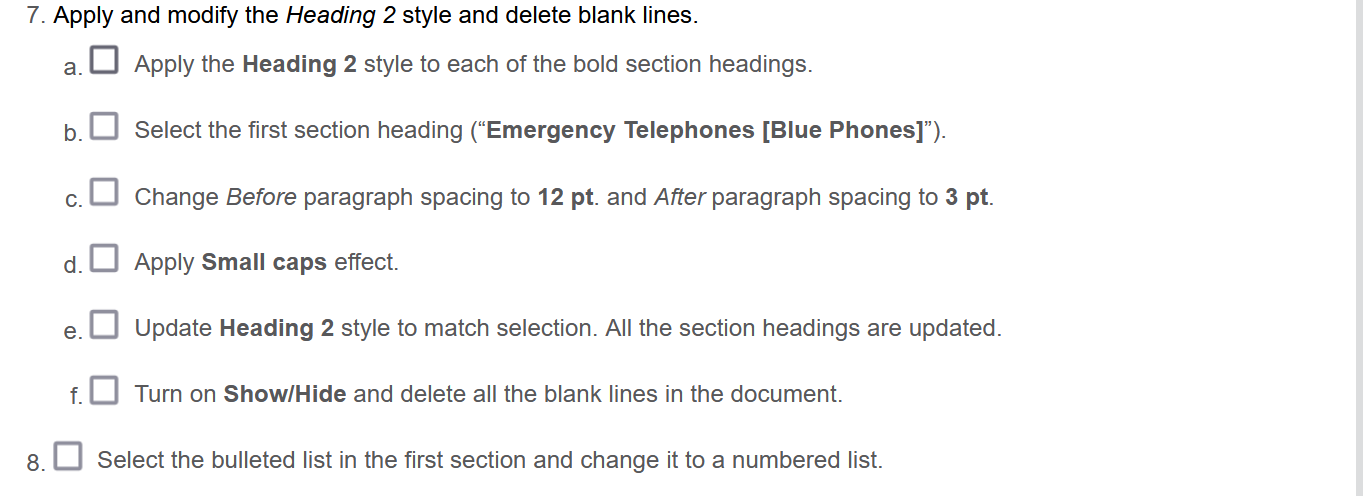
7. Apply and modify the Heading 2 style and delete blank lines. a. Apply the Heading 2 style to each of the bold section headings. b. Select the first section heading ("Emergency Telephones [Blue Phones]"). c. Change Before paragraph spacing to 12pt. and After paragraph spacing to 3pt. d. Apply Small caps effect. e. Update Heading 2 style to match selection. All the section headings are updated. f. Turn on Show/Hide and delete all the blank lines in the document. 8. Select the bulleted list in the first section and change it to a numbered list. 0. Customize a bulleted list and use the Format Painter. a. Select the text in the "Accident or Medical Emergency" section. b. Create a custom bulleted list and use a double right-pointing triangle symbol (Webdings, Character code 56). c. Open the Paragraph dialog box and confirm the left indent is 0.25 " and hanging indent is 0.25 ". If not, change the settings. d. Set Before and After paragraph spacing to 2 pt. and deselect the Don't add space between paragraphs of the same style check box. e. Use the Format Painter to apply this bulleted list format to the following text in the following sections: "Tips to Professors and Staff" and "Response to Students." 9. Apply numbering format, apply formatting changes, and use the Format Painter. a. Apply numbering to the text below the section headings in the following sections: "Assaults, Fights, or Emotional Disturbances"; "Power Failure"; "Fire"; "Earthquake"; and "Bomb Threat." b. Select the numbered list in the "Bomb Threat" section. c. Open the Paragraph dialog box, set Before and After paragraph spacing to 2 pt., deselect the Don't add space between paragraphs of the same style check box, and click OK to close the dialog box. d. Use the Format Painter to copy this numbering format to each of the other numbered lists. e. Reset each numbered list so it begins with 1. Select the items in each numbered list, right-click the selected items, and select Restart at 1 from the context menu. For a list that continues to the second page, be sure t select the entire list. 1. Open the EmergencyProcedures-02.docx start file. If the document opens in Protected View, click the Enal Editing button so you can modify it. 2. The file will be renamed automatically to include your name. Change the project file name if directed to do so your instructor, and save it. 3. Change the theme to Integral and the theme color to Red. 4. Change the top, bottom, left, and right margins to 0.75". 5. Select the entire document and change the font size to 12pt. 6. Format the title of the document. a. Select the title of the document and apply the Heading 1 style. b. Change the font size to 18pt. c. Change the Before paragraph spacing to 0pt. d. Add a Bottom Border to the title using the Borders drop-down list. 7. Apply and modify the Heading 2 style and delete blank lines. Emergency Telephones [Blue Phones] Emergency telephones on campus are marked by a bright blue light (see locations below). - To use, press the "Help" button. Speak when the light comes on. - Stay on the line. You will be connected with the college police. - State clearly the nature of the emergency and your location. Emergency Telephone Locations Stadium Parking Lot (outside), between ticket machines Barton Hall (outside), southwest corner Barton Hall (inside), Second floor, west end near elevators Liberal Arts (outside), north end of the C wing Library (outside), right side of front entrance Library (inside), First floor, stairs Performing Arts (outside), near west entrance from Lot B Math \& Science (inside), west wall of biology wing Emergency Phone Numbers Emergency Response System (Fire, Medical, Sheriff) 911 College Police (adjacent to staff parking south of Barton Hall and Library) (209) 658-7777 Health Center (Administration Building) M-F 7:30 a.m.-4:00 pm. (209) 658-2239 Evening Dean (Asst. Dean, Math) M-Th 5:00 p.m.-8:00 p.m. (209) 658-7700 Site Administrator (Vice President of Administrative Services) (209) 658-8501 Weekend College Coordinator (Area Deans) (209) 658-6500 Accident or Medical Emergency Life-Threatening Emergencies: Phone 911 . If victim has stopped breathing, start mouth-to-mouth resuscitation. If victim's heart has stopped, begin CPR. Call college police or send for assistance (call 7777 from a campus phone; otherwise call 658-7777). Minor Emergencies: Administer first aid using American Red Cross standard procedures. First aid kits are located in instructional area offices, library, cafeteria, and instruction office in the administration building. Be sure to fill out an accident report. Call college police or send for assistance (call 7777 from a campus phone; otherwise call 658-7777). 7. Apply and modify the Heading 2 style and delete blank lines. a. Apply the Heading 2 style to each of the bold section headings. b. Select the first section heading ("Emergency Telephones [Blue Phones]"). c. Change Before paragraph spacing to 12pt. and After paragraph spacing to 3pt. d. Apply Small caps effect. e. Update Heading 2 style to match selection. All the section headings are updated. f. Turn on Show/Hide and delete all the blank lines in the document. 8. Select the bulleted list in the first section and change it to a numbered list. 0. Customize a bulleted list and use the Format Painter. a. Select the text in the "Accident or Medical Emergency" section. b. Create a custom bulleted list and use a double right-pointing triangle symbol (Webdings, Character code 56). c. Open the Paragraph dialog box and confirm the left indent is 0.25 " and hanging indent is 0.25 ". If not, change the settings. d. Set Before and After paragraph spacing to 2 pt. and deselect the Don't add space between paragraphs of the same style check box. e. Use the Format Painter to apply this bulleted list format to the following text in the following sections: "Tips to Professors and Staff" and "Response to Students." 9. Apply numbering format, apply formatting changes, and use the Format Painter. a. Apply numbering to the text below the section headings in the following sections: "Assaults, Fights, or Emotional Disturbances"; "Power Failure"; "Fire"; "Earthquake"; and "Bomb Threat." b. Select the numbered list in the "Bomb Threat" section. c. Open the Paragraph dialog box, set Before and After paragraph spacing to 2 pt., deselect the Don't add space between paragraphs of the same style check box, and click OK to close the dialog box. d. Use the Format Painter to copy this numbering format to each of the other numbered lists. e. Reset each numbered list so it begins with 1. Select the items in each numbered list, right-click the selected items, and select Restart at 1 from the context menu. For a list that continues to the second page, be sure t select the entire list. 1. Open the EmergencyProcedures-02.docx start file. If the document opens in Protected View, click the Enal Editing button so you can modify it. 2. The file will be renamed automatically to include your name. Change the project file name if directed to do so your instructor, and save it. 3. Change the theme to Integral and the theme color to Red. 4. Change the top, bottom, left, and right margins to 0.75". 5. Select the entire document and change the font size to 12pt. 6. Format the title of the document. a. Select the title of the document and apply the Heading 1 style. b. Change the font size to 18pt. c. Change the Before paragraph spacing to 0pt. d. Add a Bottom Border to the title using the Borders drop-down list. 7. Apply and modify the Heading 2 style and delete blank lines. Emergency Telephones [Blue Phones] Emergency telephones on campus are marked by a bright blue light (see locations below). - To use, press the "Help" button. Speak when the light comes on. - Stay on the line. You will be connected with the college police. - State clearly the nature of the emergency and your location. Emergency Telephone Locations Stadium Parking Lot (outside), between ticket machines Barton Hall (outside), southwest corner Barton Hall (inside), Second floor, west end near elevators Liberal Arts (outside), north end of the C wing Library (outside), right side of front entrance Library (inside), First floor, stairs Performing Arts (outside), near west entrance from Lot B Math \& Science (inside), west wall of biology wing Emergency Phone Numbers Emergency Response System (Fire, Medical, Sheriff) 911 College Police (adjacent to staff parking south of Barton Hall and Library) (209) 658-7777 Health Center (Administration Building) M-F 7:30 a.m.-4:00 pm. (209) 658-2239 Evening Dean (Asst. Dean, Math) M-Th 5:00 p.m.-8:00 p.m. (209) 658-7700 Site Administrator (Vice President of Administrative Services) (209) 658-8501 Weekend College Coordinator (Area Deans) (209) 658-6500 Accident or Medical Emergency Life-Threatening Emergencies: Phone 911 . If victim has stopped breathing, start mouth-to-mouth resuscitation. If victim's heart has stopped, begin CPR. Call college police or send for assistance (call 7777 from a campus phone; otherwise call 658-7777). Minor Emergencies: Administer first aid using American Red Cross standard procedures. First aid kits are located in instructional area offices, library, cafeteria, and instruction office in the administration building. Be sure to fill out an accident report. Call college police or send for assistance (call 7777 from a campus phone; otherwise call 658-7777)
Step by Step Solution
There are 3 Steps involved in it

Get step-by-step solutions from verified subject matter experts
 Study Help