







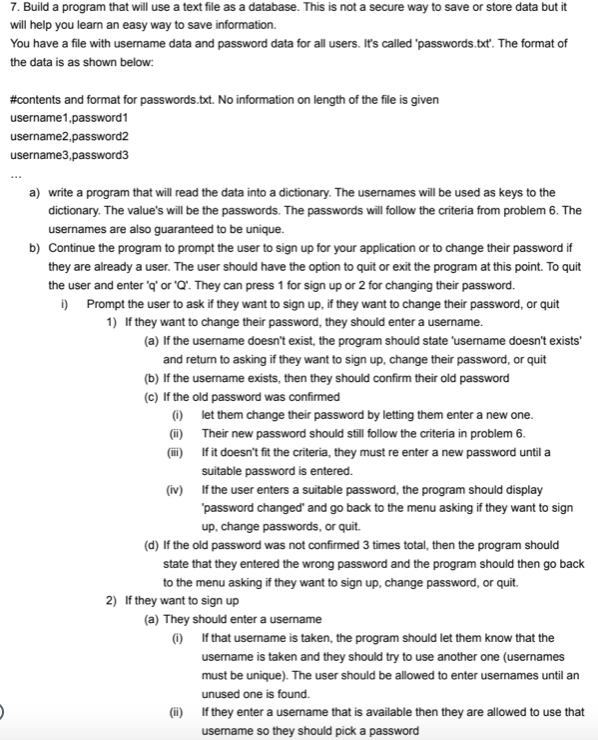
Question: 7 . Build a program that will use a text file as a database. This is not a secure way to save or store data
Build a program that will use a text file as a database. This is not a secure way to save or store data but it
will help you learn an easy way to save information.
You have a file with username data and password data for all users. It's called 'passwords.txt The format of
the data is as shown below:
#contents and format for passwords.txt No information on length of the file is given
usernamepassword
usernamepassword
usernamepassword
a write a program that will read the data into a dictionary. The usernames will be used as keys to the
dictionary. The value's will be the passwords. The passwords will follow the criteria from problem The
usernames are also guaranteed to be unique.
b Continue the program to prompt the user to sign up for your application or to change their password if
they are already a user. The user should have the option to quit or exit the program at this point. To quit
the user and enter q or Q They can press for sign up or for changing their password.
i Prompt the user to ask if they want to sign up if they want to change their password, or quit
If they want to change their password, they should enter a username.
a If the username doesn't exist, the program should state 'username doesn't exists'
and return to asking if they want to sign up change their password, or quit
b If the username exists, then they should confirm their old password
c If the old password was confirmed
i let them change their password by letting them enter a new one.
ii Their new password should still follow the criteria in problem
iii If it doesn't fit the criteria, they must re enter a new password until a
suitable password is entered.
iv If the user enters a suitable password, the program should display
'password changed' and go back to the menu asking if they want to sign
up change passwords, or quit.
d If the old password was not confirmed times total, then the program should
state that they entered the wrong password and the program should then go back
to the menu asking if they want to sign up change password, or quit.
If they want to sign up
a They should enter a username
i If that username is taken, the program should let them know that the
username is taken and they should try to use another one usernames
must be unique The user should be allowed to enter usernames until an
unused one is found.
ii If they enter a username that is available then they are allowed to use that
username so they should pick a password
b new user's passwords should follow the criteria from problem In addition, the
program should double check the user's password by asking them to confirm the
password they entered. If the password they enter for the confirmation is different
the program will reset and ask for the user's new password and then ask for a
confirmation again.
c If the password is confirmed it should be added to the dictionary and also added
to the file passwords.txt
d If a user successfully signs up the program should go back to the menu to sign
up change password, or quit.
NOTE: You should create a passwords.txt file in the same directory as your program. If the file is empty then
when the program loads, the dictionary would be empty as well. As you add user data the file should change.
An easy way to do this is to clear the file and rewrite using the dictionary anytime anyone saves.
If you exit the program it shouldn't matter since the data is in the file. When you restart the program, it should
load all the user's into the dictionary you are using.
c Modify the program so that before the user is asked if they want to sign up or change their password, a
print statement displaying how many users have signed up is shown right above that menu prompt. Any
time that menu prompt is displayed, the correct number of users should be displayed. This is the total
number of users in your passwords.txt file. This should be updated as user's sign up
Step by Step Solution
There are 3 Steps involved in it
1 Expert Approved Answer
Step: 1 Unlock

Question Has Been Solved by an Expert!
Get step-by-step solutions from verified subject matter experts
Step: 2 Unlock
Step: 3 Unlock
 Study Help