







Question: 7. Consider how a spreadsheet can be used to convert numbers to bits. The following is a screenshot of one method using OpenOffice. The decimal
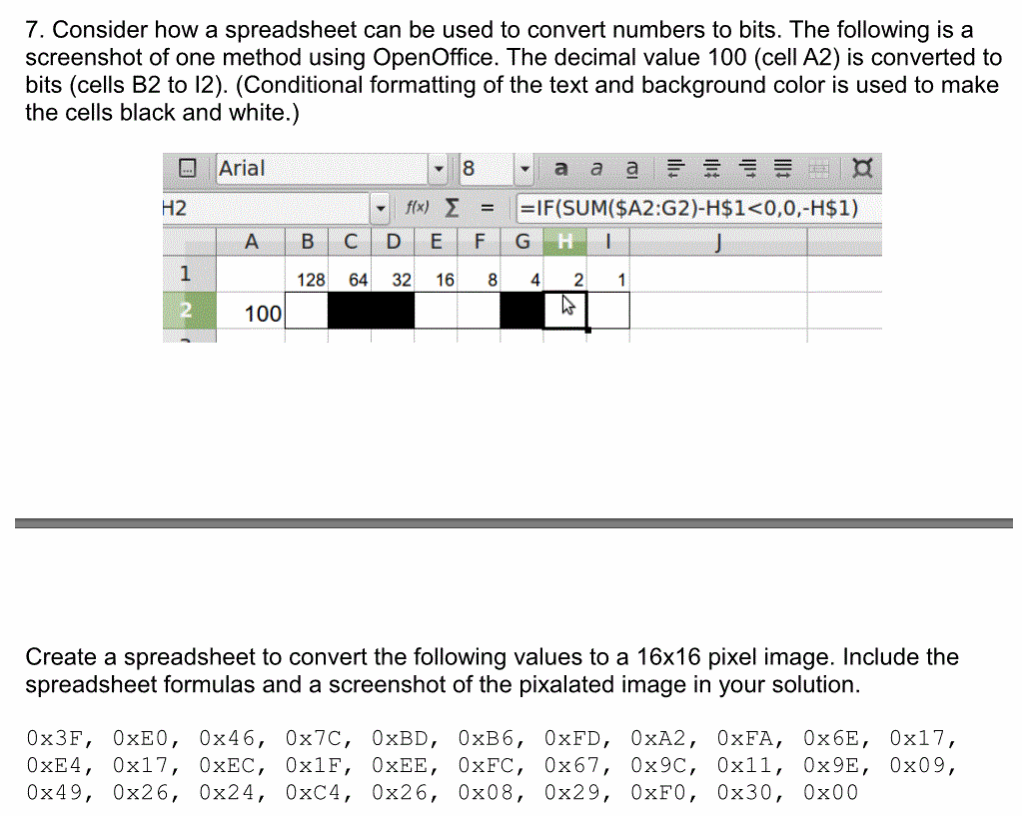
7. Consider how a spreadsheet can be used to convert numbers to bits. The following is a screenshot of one method using OpenOffice. The decimal value 100 (cell A2) is converted to bits (cells B2 to 12). (Conditional formatting of the text and background color is used to make the cells black and white.) Arial 8 a a a E H2 1 28 64 32 16 8 4 21 2 100 Create a spreadsheet to convert the following values to a 16x16 pixel image. Include the spreadsheet formulas and a screenshot of the pixalated image in your solution. 0x3F, 0xEO, 0x46, 0x7C, 0xBD, 0xB6, 0xFD, 0xA2, 0xFA, 0x6E, 0x17, 0xE4, 0x17, 0xEC, 0x1F, 0xEE, 0xFC, 0x67, 0x9C, 0xll, 0x9E, 0x09, 0x49, 0x26, 0x24, 0xC4, 0x26, 0x08, 0x29, 0xFO, 0x30, 0x00
Step by Step Solution
There are 3 Steps involved in it

Get step-by-step solutions from verified subject matter experts
 Study Help