Question: 7. Insert a new sheet and name it Amount Owed. 8. As shown below, start building a table showing per client, the state they live
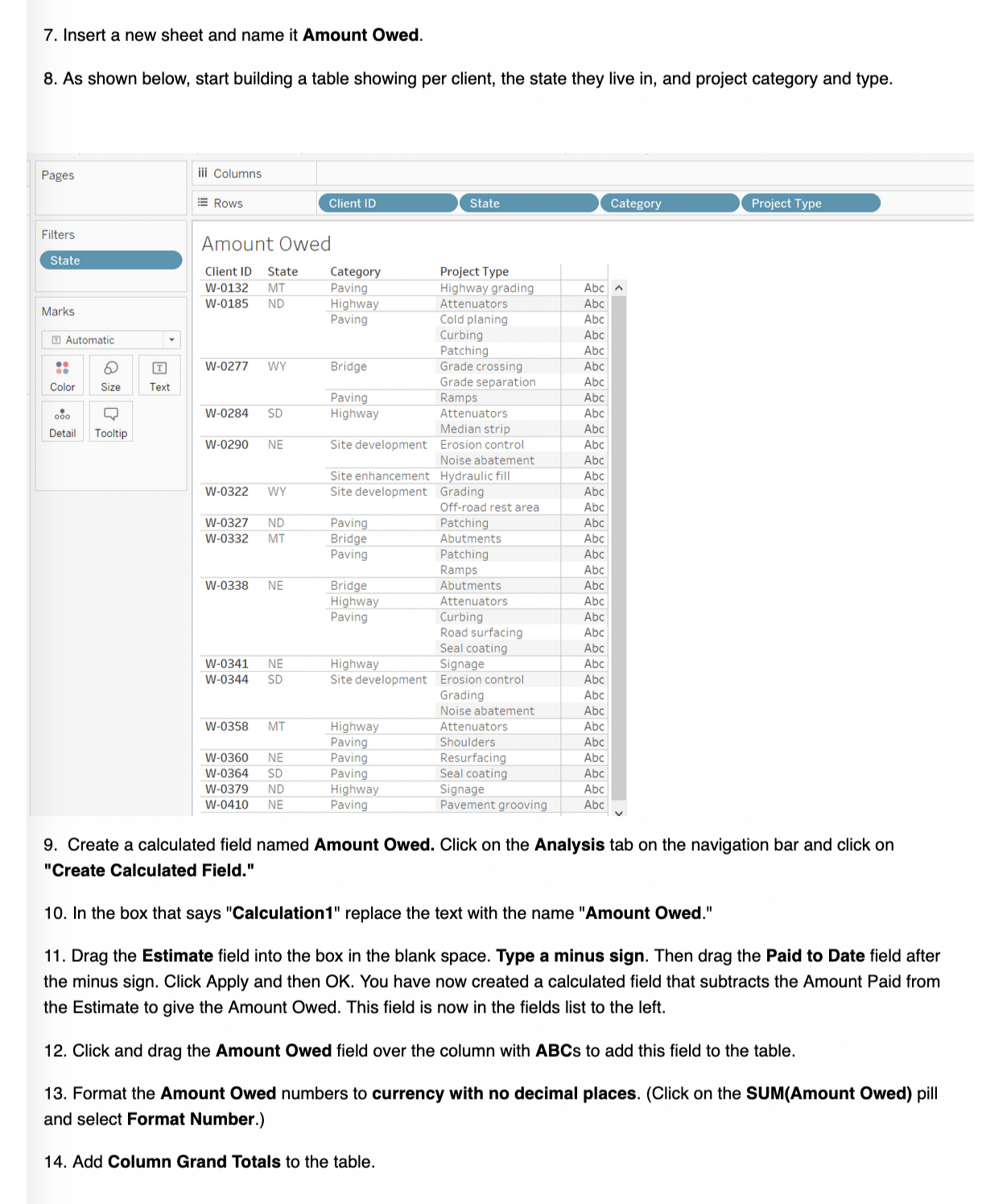
7. Insert a new sheet and name it Amount Owed. 8. As shown below, start building a table showing per client, the state they live in, and project category and type. Pages iii Columns Client ID State Category Project Type E Rows Filters Amount Owed State Client ID State Category Project Type Abc W-0132 MT Paving Highway grading ND Highway Attenuators Abc W-0185 Marks Paving Cold planing Abc Curbing Abc Automatic Patching Abc T W-0277 Bridge Grade crossing Abc Grade separation Abc Color Size Text Paving Ramps Abc W-0284 SD Highway Attenuators Abc Median strip Abc Detail Tooltip Abc W-0290 NE Site development Erosion control Noise abatement Abc Site enhancement Hydraulic fill Abc W-0322 Site development Grading Abc WY Off-road rest area Abc W-0327 Paving Patching Abc ND Abc W-0332 MT Bridge Abutments Paving Patching Abc Ramps Abc Bridge Abutments Abc W-0338 NE Highway Attenuators Abc Paving Curbing Abc Road surfacing Abc Seal coating Abc NE Highway Signage Abc W-0341 Abc W-0344 SD Site development Erosion control Grading Abc Noise abatement Abc Highway Abc W-0358 MT Attenuators Paving Shoulders Abc Abc W-0360 NE Paving Resurfacing Abc W-0364 SD Paving Seal coating W-0379 ND Highway Signage Abc W-0410 NE Paving Pavement grooving Abc 9. Create a calculated field named Amount Owed. Click on the Analysis tab on the navigation bar and click on "Create Calculated Field." 10. In the box that says "Calculation1" replace the text with the name "Amount Owed." 11. Drag the Estimate field into the box in the blank space. Type a minus sign. Then drag the Paid to Date field after the minus sign. Click Apply and then OK. You have now created a calculated field that subtracts the Amount Paid from the Estimate to give the Amount Owed. This field is now in the fields list to the left. 12. Click and drag the Amount Owed field over the column with ABCs to add this field to the table. 13. Format the Amount Owed numbers to currency with no decimal places. (Click on the SUM(Amount Owed) pill and select Format Number.) 14. Add Column Grand Totals to the table.Draft KN Projects Edited Jun 3, 2025, 10:58 AM Publish Kye Nguyen File Data Worksheet Dashboard Analysis Map Format Help Show Me Data Analytics ~Pages iii Columns Category Engineering Projects Rows SUM(Estimate) SUM(Paid to Date) ~Filters Search Estimate vs Paid Tables ~ Marks Category Abc Avg Estimates All $900,000 Abc Category 350K Category 1 Multiple $800,000 Abc Client ID Project Start T 300K Abc Project Type Color Size Label $700,000 Abc Projects (Projects) State Detail Tooltip $600,000 250K Abc Total Estimates Abc Measure Names Measure Names # Estimate $500,000 200K F8 lin, SUM(Estimate) Paid to Date Estimate # Paid to Date Latitude (generated) O SUM(Paid to Date) $400,000 150K Longitude (generated) # Projects (Count) $300,000 # Measure Values 100K $200,000 50K $100,000 $0 OK Bridge Highway Paving Site devel Site enha opment ncement 8 Data Source Projects by State Estimate vs Paid 10 marks 1 row by 5 columns SUM(Estimate): $1,683,195
Step by Step Solution
There are 3 Steps involved in it
1 Expert Approved Answer
Step: 1 Unlock
Question Has Been Solved by an Expert!
Get step-by-step solutions from verified subject matter experts
Step: 2 Unlock
Step: 3 Unlock
Students Have Also Explored These Related Accounting Questions!









 Study Help