







Question: 7. Method Name: dayActivity Parameters: one parameter, day Return value: none Purpose: This function accepts one parameter named day. It will use a switch
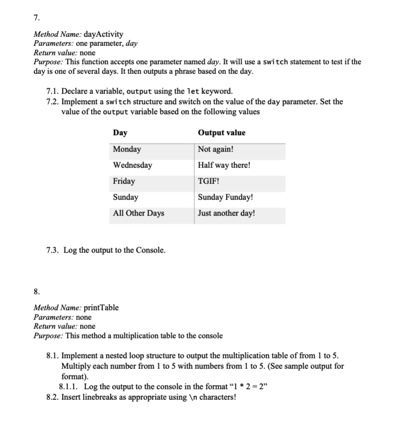
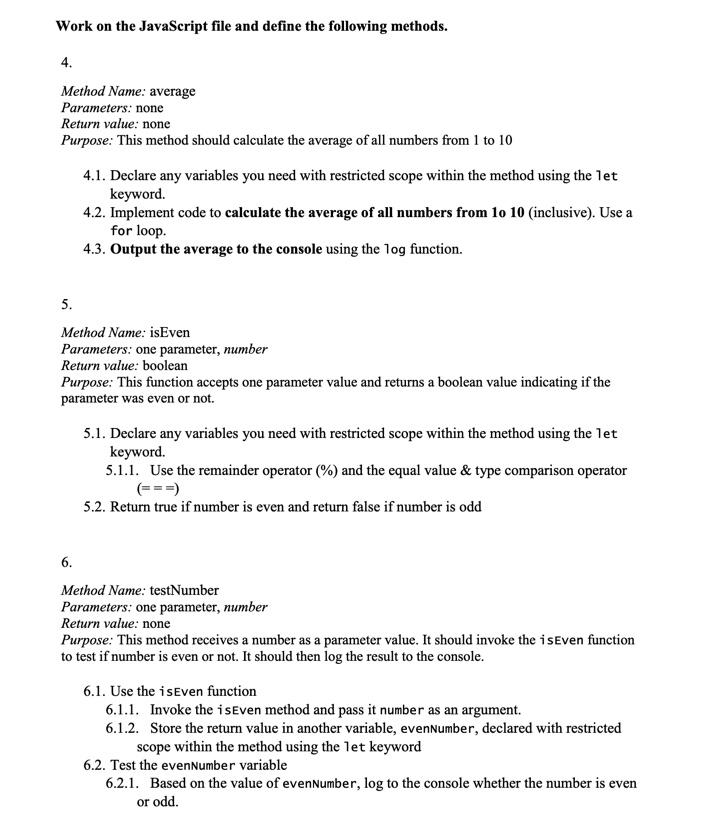
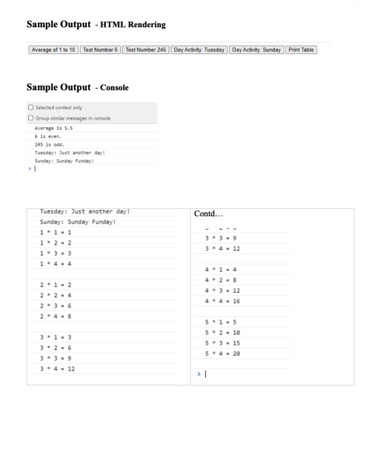
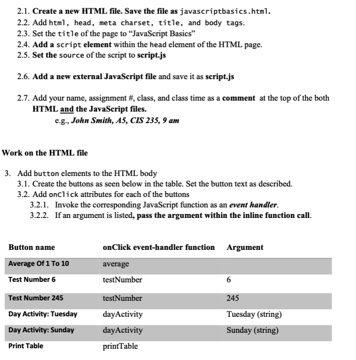
7. Method Name: dayActivity Parameters: one parameter, day Return value: none Purpose: This function accepts one parameter named day. It will use a switch statement to test if the day is one of several days. It then outputs a phrase based on the day. 7.1. Declare a variable, output using the let keyword. 7.2. Implement a switch structure and switch on the value of the day parameter. Set the value of the output variable based on the following values Day Output value Monday Not again! Wednesday Half way there! Friday Sunday TGIF! Sunday Funday! All Other Days Just another day! 7.3. Log the output to the Console. 8. Method Name: print Table Parameters: none Return value: none Purpose: This method a multiplication table to the console 8.1. Implement a nested loop structure to output the multiplication table of from 1 to 5. Multiply each number from 1 to 5 with numbers from 1 to 5. (See sample output for format). 8.1.1. Log the output to the console in the format "1*2-2" 8.2. Insert linebreaks as appropriate using characters! Work on the JavaScript file and define the following methods. 4. Method Name: average Parameters: none Return value: none Purpose: This method should calculate the average of all numbers from 1 to 10 4.1. Declare any variables you need with restricted scope within the method using the let keyword. 4.2. Implement code to calculate the average of all numbers from 10 10 (inclusive). Use a for loop. 4.3. Output the average to the console using the log function. 5. Method Name: isEven Parameters: one parameter, number Return value: boolean Purpose: This function accepts one parameter value and returns a boolean value indicating if the parameter was even or not. 5.1. Declare any variables you need with restricted scope within the method using the let keyword. 5.1.1. Use the remainder operator (%) and the equal value & type comparison operator (===) 5.2. Return true if number is even and return false if number is odd 6. Method Name: testNumber Parameters: one parameter, number Return value: none Purpose: This method receives a number as a parameter value. It should invoke the isEven function to test if number is even or not. It should then log the result to the console. 6.1. Use the isEven function 6.1.1. Invoke the isEven method and pass it number as an argument. 6.1.2. Store the return value in another variable, evenNumber, declared with restricted scope within the method using the let keyword 6.2. Test the evenNumber variable 6.2.1. Based on the value of evenNumber, log to the console whether the number is even or odd. Sample Output - HTML Rendering Average of 1 to 10 Test Number 6 Test Number 245 Day Activity Tuesday Day Activity Sunday Print Table Sample Output - Console Group sunte messages Sunday: Sunday Funday " Tuesday: Just another day! Contd... Sunday: Sunday Funday! 1-1-1 1-2-2 2-1-2 2 2 12 4-3-12 16 2-3-6 2 4 5-2-10 5-3-15 3+2+6 5-4-20 3-3-9 3-4-12 2.1. Create a new HTML file. Save the file as javascriptbasics.html. 2.2. Add html, head, meta charset, title, and body tags. 2.3. Set the title of the page to "JavaScript Basics" 2.4. Add a script element within the head element of the HTML page. 2.5. Set the source of the script to script.js 2.6. Add a new external JavaScript file and save it as script.js 2.7. Add your name, assignment #, class, and class time as a comment at the top of the both HTML and the JavaScript files. e.g, John Smith, AS, CIS 235, 9 am Work on the HTML file 3. Add button elements to the HTML body 3.1. Create the buttons as seen below in the table. Set the button text as described. 3.2. Add onclick attributes for each of the buttons 3.2.1. Invoke the corresponding JavaScript function as an event handler. 3.2.2. If an argument is listed, pass the argument within the inline function call. Button name Average Of 1 To 10 Test Number 6 onClick event-handler function Argument average testNumber testNumber Test Number 245 Day Activity: Tuesday day Activity Day Activity: Sunday Print Table day Activity printTable 245 Tuesday (string) Sunday (string)
Step by Step Solution
3.41 Rating (154 Votes )
There are 3 Steps involved in it
Here is the JavaScript code for the dayActivity function function dayActivityday let out... View full answer

Get step-by-step solutions from verified subject matter experts
 Study Help