







Question: 7 Open the CentralSierra - 0 3 . accob database start file. The file will be renamed automatically to include your name. Change the project
Open the CentralSierraaccob database start file. The file will be renamed automatically to include your name. Change the project file name if directed to do so by your instructor
Enable the contents in the security warning.
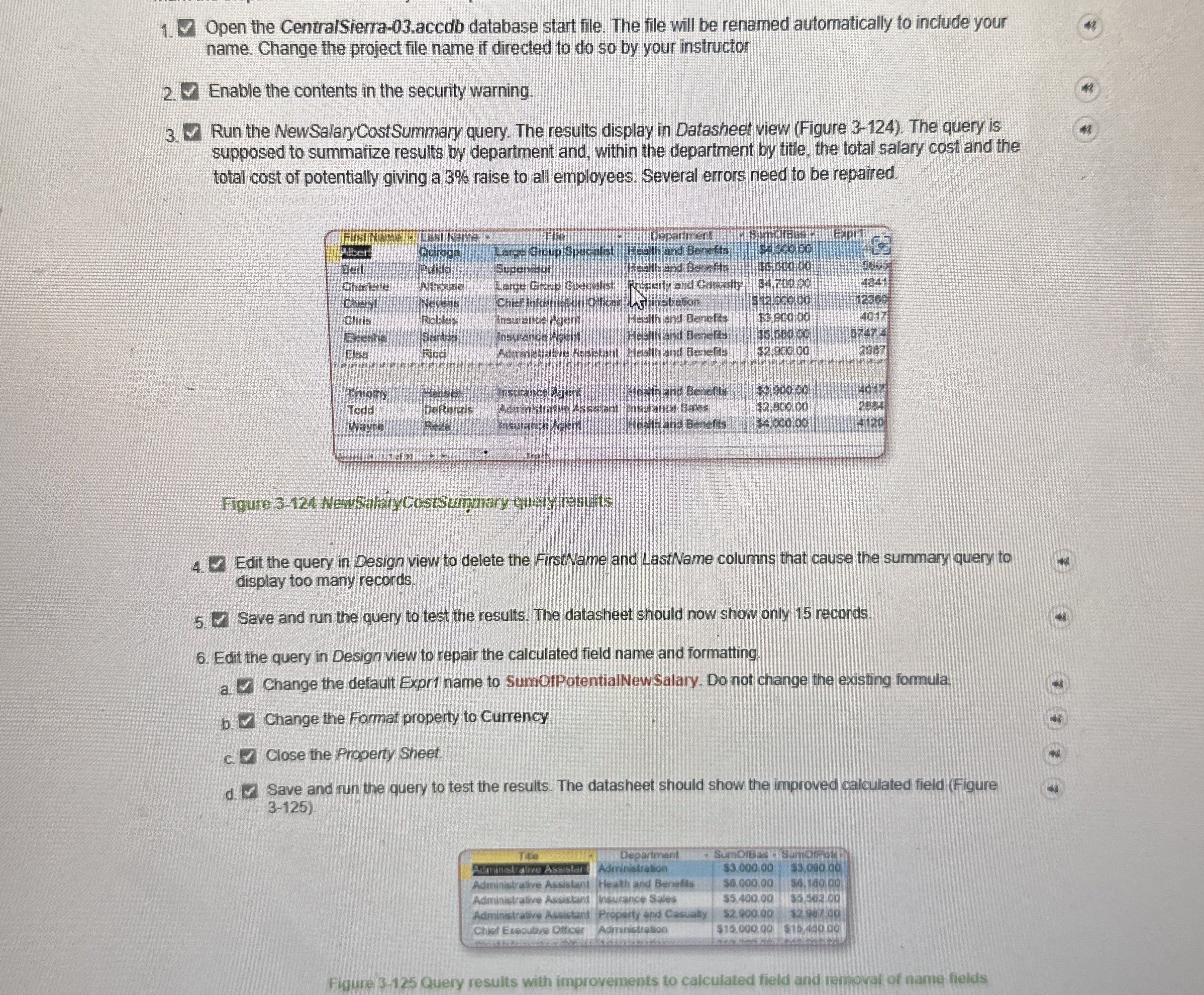
Run the NewSalaryCostSummary query. The results display in Datasheet view Figure The query is supposed to summarize results by department and, within the department by title, the total salary cost and the total cost of potentially giving a raise to all employees. Several errors need to be repaired.
Figure NewSalnCostSummary quely retults
Edit the query in Design view to delete the FirstName and LastName columns that cause the summary query to display too many records.
Save and run the query to test the results. The datasheet should now show only records.
Edit the query in Design view to repair the calculated field name and formatting.
a ~~ Change the default Expr name to SumOfPotentialNewSalary. Do not change the existing formula.
b Change the Format property to Currency
c Close the Property Sheet.
d Save and run the query to test the results. The datasheet should show the improved calculated field Figure
tableTtieDepariment Sumpibas,SumDiferaAdirinistration.,$Administrative Assislant,Heath and Benafis,Adminetralive Assistant,Whatrance Syes,$$Administrative Ascistant,Property end Casualyy,$ coChiet Executve Olticer,Admuistration,$
Figure Query results with improvements to calculated field and removal of name fields
Step by Step Solution
There are 3 Steps involved in it
1 Expert Approved Answer
Step: 1 Unlock

Question Has Been Solved by an Expert!
Get step-by-step solutions from verified subject matter experts
Step: 2 Unlock
Step: 3 Unlock
 Study Help