







Question: 7. Write a program that produces a GUI with the functionality and look of a handheld calculator. Your calculator should allow for addition, subtraction, multiplication,
7. Write a program that produces a GUI with the functionality and look of a handheld calculator. Your calculator should allow for addition, subtraction, multiplication, and division. It should allow you to save and later recall two different values. Use the program in Listing 13.13 as a model. If you have not studied Listing 13.13, use Listing 13.12 as a model.
Instructions
Name your java program Calculator.java.
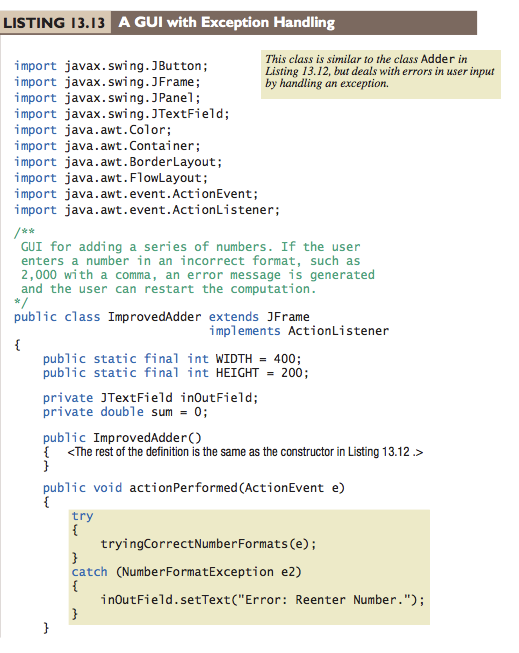
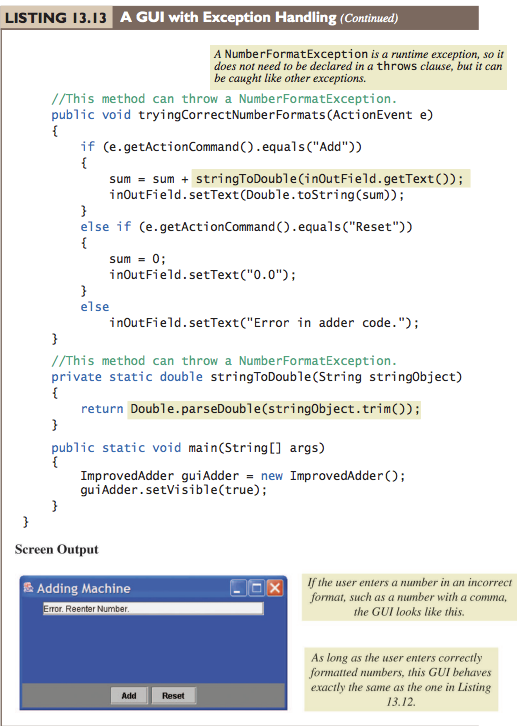
LISTING 13.13 A G A GUI with Exception Handling This class is similar to the class Adder in Listing 13.I2, but deals with errors in user input by handling an exception. import javax. swing. JButton; import javax.swing. JFrame; import javax. swing. JPanel; import javax. swing. JTextField; import java.awt.Color; import java.awt.Container; import java.awt. BorderLayout; import java.awt. FlowLayout; import java.awt.event.ActionEvent; import java.awt.event.ActionListener; GUI for adding a series of numbers. If the user enters a number in an incorrect format, such as 2,000 with a comma, an error message is generated and the user can restart the computation. public class ImprovedAdder extends JFrame implements ActionListener public static final int WIDTH = 400; public static final int HEIGHT 200; private JTextField inOutField; private double sum 0; public ImprovedAdder()
Step by Step Solution
There are 3 Steps involved in it

Get step-by-step solutions from verified subject matter experts
 Study Help