







Question: 7. Write a query to display the vender ID, name and Product SKU for ALL vendors, including those who do NOT provide us with products
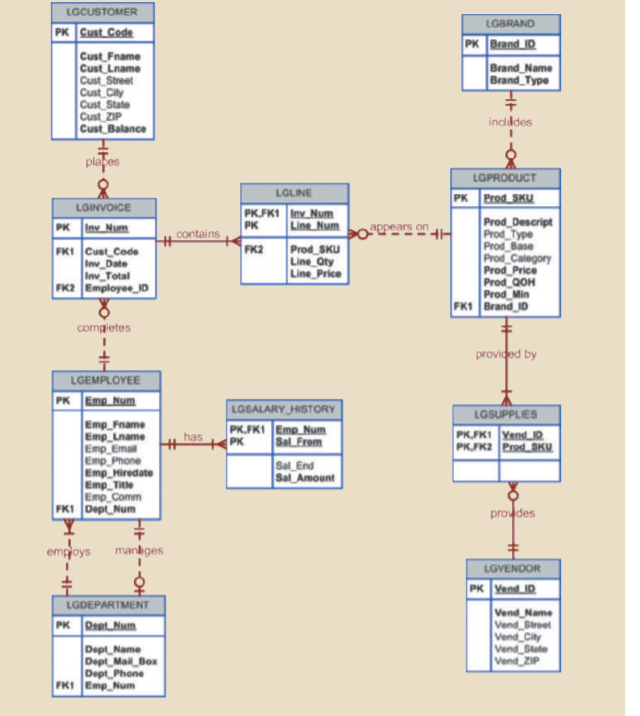
7. Write a query to display the vender ID, name and Product SKU for ALL vendors, including those who do NOT provide us with products currently.
8. Write a query to display the vender ID and vender name for those vendors who do not currently supply us with products.
9. Write a query to display the employee number, last name, title, email and department name of each employee whose job title ends in the word ASSOCIATE (case insensitive). Sorted by department number and employee title.
10. Write a query to display the brand ID, brand name, brand type, and average price of product for the brand that has the largest average product price.
LGCUSTOMER PK Cust Code Cust. Frame Cust Lname Cust Street Cust City Cust State Cust ZIP Cust Balance LGBRAND PK Brand ID Brand Name Brand Type 17 induldes plates LGINVOICE PK Iny Num LGLINE PK.FK1 Iny. Num PK Line Num + contains appears on + FK2 LGPRODUCT PK Prod SKU Prod_Descript Prod Type Prod Base Prod Category Prod Price Prod_QOH Prod Min FK1 Brand_ID FK Cust_code Inv_Date Inv_Total FK2 Employee_10 Prod_SKU Line Qty Line Price completes provided by has LGEMPLOYEE PK Emp Num Emp Frame Emp Lname Emo Ema Emp. Phone Emp_Hiredate Emp Title Emp Comm FK1 Dept_Num LGSALARY HISTORY PK.FK1 Emp Num PK Sall From Sal End Sal Amount LGSUPPLIES PK,FK1 Yend_IR PK.FK2 ProdSK proudes employs manges LGVENDOR PK Yand ID LGDEPARTMENT PK Rent Num Vend Name Vond Street Vend_City Vend State Vend Zip Dept Name Dept. Mail Box Dept_Phone FK1 Emp. Num
Step by Step Solution
There are 3 Steps involved in it

Get step-by-step solutions from verified subject matter experts
 Study Help