







Question: 8 14 The instructors for each class are listed on the Data worksheet in range B12:H14. The instructors for the class in cell A4 need
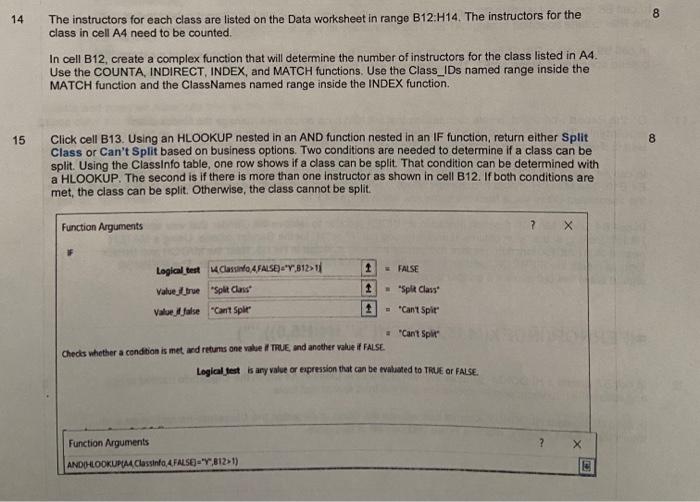
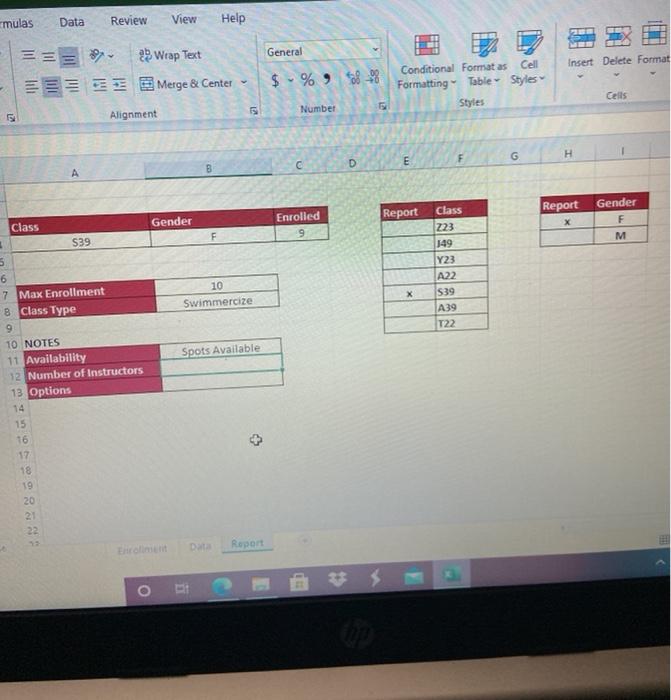
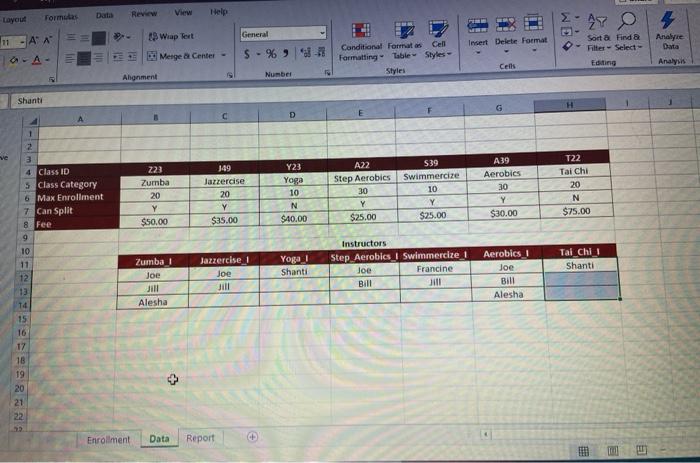
8 14 The instructors for each class are listed on the Data worksheet in range B12:H14. The instructors for the class in cell A4 need to be counted. In cell B12, create a complex function that will determine the number of instructors for the class listed in A4. Use the COUNTA, INDIRECT, INDEX, and MATCH functions. Use the Class_IDs named range inside the MATCH function and the ClassNames named range inside the INDEX function. 15 8 Click cell B13. Using an HLOOKUP nested in an AND function nested in an IF function, return either Split Class or Can't Split based on business options. Two conditions are needed to determine if a class can be split. Using the ClassInfo table, one row shows if a class can be split. That condition can be determined with a HLOOKUP. The second is if there is more than one instructor as shown in cell B12. If both conditions are met, the class can be split. Otherwise, the class cannot be split. Function Arguments X 1 FALSE Logical test Classinfo 4 FALSE)"Y,81371 Value_true Split Class Valoe false "Can't Split 1 - "Split Class + - "Can't Split "Can't Split 1 Checks whether a condition is met med returns one vabe TRUE, and another value of FALSE Logical test is any value or expression that can be evaluated to TRUE OR FALSE. Function Arguments ? X ANDHLOOKUPIM Classinto 4 FALSE)"Y,81251) mulas Data Review View Help General Insert Delete Format Wrap Text Merge & Center $ . % 8-98 Conditional Format as Cell Formatting Table Styles Styles Cells 5 Number Alignment G H D E Report Report Enrolled Gender Class 223 149 Gender F M F 10 Swimmerize X Class 3 $39 5 6 7 Max Enrollment 8 Class Type 9 10 NOTES 11 Availability 12 Number of instructors 13 Options Y23 A22 S39 A39 T22 Spots Available 15 16 17 18 19 20 21 22 Report O Data Formulas Review View Layout 47 11 - AN 18 Wiap Tert Analyze General - % -72 Insert Delete Format Mergea Center - Conditional Formats Cell Formatting Table Styles Styles Sort & Find a Filter Select Editing Cells Analysis Ahonment Number Shanti D ve 1 2 3 4 Class ID 5 Class Category 6 Max Enrollment 7 Can Split 8 Fee 9 223 Zumba 20 Y $50.00 349 Jazercise 20 Y $35.00 Y23 Yoga 10 N $40.00 A22 Step Aerobics 30 Y $25.00 S39 Swimmercize 10 Y $25.00 A39 Aerobics 30 Y $30.00 T22 Chi 20 N $75.00 Jazzercise 1 Joe Zumba Joe Jill Yoga i Shanti Instructors Step Aerobics Swimmercize 1 Joe Francine Bill Hill Tal chi Shanti Aerobics I Joe Bill Alesha Alesha 10 11 12 13 14 15 16 17 18 19 20 21 22 23 Enrollment Data Report 8 14 The instructors for each class are listed on the Data worksheet in range B12:H14. The instructors for the class in cell A4 need to be counted. In cell B12, create a complex function that will determine the number of instructors for the class listed in A4. Use the COUNTA, INDIRECT, INDEX, and MATCH functions. Use the Class_IDs named range inside the MATCH function and the ClassNames named range inside the INDEX function. 15 8 Click cell B13. Using an HLOOKUP nested in an AND function nested in an IF function, return either Split Class or Can't Split based on business options. Two conditions are needed to determine if a class can be split. Using the ClassInfo table, one row shows if a class can be split. That condition can be determined with a HLOOKUP. The second is if there is more than one instructor as shown in cell B12. If both conditions are met, the class can be split. Otherwise, the class cannot be split. Function Arguments X 1 FALSE Logical test Classinfo 4 FALSE)"Y,81371 Value_true Split Class Valoe false "Can't Split 1 - "Split Class + - "Can't Split "Can't Split 1 Checks whether a condition is met med returns one vabe TRUE, and another value of FALSE Logical test is any value or expression that can be evaluated to TRUE OR FALSE. Function Arguments ? X ANDHLOOKUPIM Classinto 4 FALSE)"Y,81251) mulas Data Review View Help General Insert Delete Format Wrap Text Merge & Center $ . % 8-98 Conditional Format as Cell Formatting Table Styles Styles Cells 5 Number Alignment G H D E Report Report Enrolled Gender Class 223 149 Gender F M F 10 Swimmerize X Class 3 $39 5 6 7 Max Enrollment 8 Class Type 9 10 NOTES 11 Availability 12 Number of instructors 13 Options Y23 A22 S39 A39 T22 Spots Available 15 16 17 18 19 20 21 22 Report O Data Formulas Review View Layout 47 11 - AN 18 Wiap Tert Analyze General - % -72 Insert Delete Format Mergea Center - Conditional Formats Cell Formatting Table Styles Styles Sort & Find a Filter Select Editing Cells Analysis Ahonment Number Shanti D ve 1 2 3 4 Class ID 5 Class Category 6 Max Enrollment 7 Can Split 8 Fee 9 223 Zumba 20 Y $50.00 349 Jazercise 20 Y $35.00 Y23 Yoga 10 N $40.00 A22 Step Aerobics 30 Y $25.00 S39 Swimmercize 10 Y $25.00 A39 Aerobics 30 Y $30.00 T22 Chi 20 N $75.00 Jazzercise 1 Joe Zumba Joe Jill Yoga i Shanti Instructors Step Aerobics Swimmercize 1 Joe Francine Bill Hill Tal chi Shanti Aerobics I Joe Bill Alesha Alesha 10 11 12 13 14 15 16 17 18 19 20 21 22 23 Enrollment Data Report
Step by Step Solution
There are 3 Steps involved in it

Get step-by-step solutions from verified subject matter experts
 Study Help